Assassin's Creed Black Flag Crash fix.
First method
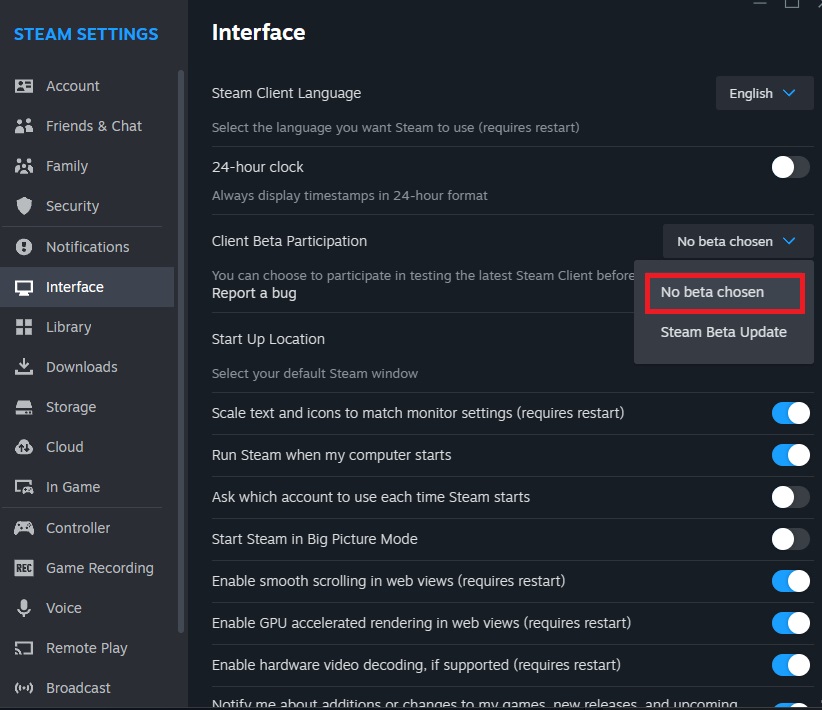 The latest Steam client beta build is preventing some games from starting, if you're using it switch back to the stable build.
Steam > Settings > Interface > Client Beta Participation > No beta chosen
Second method
- Find the file: Locate the "AC4BFSP" file
- Right-click on the file: Select Properties from the context menu.
- Go to the "Compatibility" tab: In the properties window, find the "Compatibility" tab.
- Select compatibility mode: Check the box that says Run this program in compatibility mode for, then choose Windows XP (Service Pack 3) from the list.
- Apply the changes: Click Apply, then OK.
Now, the "AC4BFSP" file should run in compatibility mode with Windows XP (SP3).
Last method
It also helped me to launch the game through the exe file In the main game folder. "AC4BFSP"
More Assassin's Creed IV Black Flag guides
- How to remove stutter and lag from the game + Fix for the Vsync bug★ 5 (277)23k views568 ♥5 minUpdated Jan 31
- The Kenways fleet fix (+activation Freedom Cry)★ 5 (377)22k views559 ♥1 minUpdated Feb 13, 2025
- Бесконечный запуск скрипта установки Microsoft Net Framework17k views43 ♥1 minRussianUpdated Sep 23, 2025
- HOW TO OPEN THE GAME★ 3 (617)15k views67 ♥1 minBulgarian
- CD Key Activation★ 4 (158)14k views29 ♥1 minUpdated Jul 26, 2023
- Multiplayer achievements with Cheat Engine★ 4 (152)13k views369 ♥3 minUpdated May 19, 2023






🔥 Popular guides
- Upgrading to PremiumTeam Fortress 2★ 5 (20k)1441k views11k ♥6 minUpdated May 11, 2022
- No More Room in Hell Official ManualNo More Room in Hell★ 5 (2.8k)569k views2.1k ♥29 minUpdated Apr 22, 2019
- NMRiH Community Hosting GuidesNo More Room in Hell★ 5 (526)351k views653 ♥1 minUpdated Aug 10, 2022
- ULTIMATE GUIDE FOR GAME DEV TYCOONGame Dev Tycoon★ 5 (5.8k)326k views10k ♥4 minUpdated 23 Jan, 2014
- How to 'Git Gud' Soon™MORDHAU★ 5 (2k)318k views3k ♥68 minUpdated Nov 16, 2024
- Лучшие кооперативные игры SteamPAYDAY 2★ 5 (1.5k)315k views2.1k ♥56 minRussianUpdated Apr 27, 2025






This guide was created by its original author on the Steam Community. Are you the author and want it removed? Request removal.