(B42) How to revive the dead (MP + SP no mods or debug mode)
Disclaimer/Info
This method is a 100% guarantee on reviving your EXACT CHARACTER with every last thing they had with the exception of course of any injury or illness that might have caused their untimely demise if done correctly.
This includes every skill, kill count, book/magazine read, vhs watched, and anything else you character might have accumulated over the course of their time in Kentucky.
While you can do this method to the exact character that died what I would recommend you save a copy of the character data (you will learn where this is later in the guide) and make a new character and transfer the data from your saved copy to the new character. This way your dead body remains on the ground and you can gather your stuff back if your inventory didn't transfer but your kills, skills, time played, etc. successfully transferred.(I've had this happen before and I'm not 100% why)
And lastly time for some unfortunate news, if you under a misinformed rage you try and make a new character before seeing this enlightening guide then I'm sorry you are too far gone. This is because Zomboid unfortunately erases and overrides your previous character data when ever you make a new character. Sowwy I can't fix that...
This includes every skill, kill count, book/magazine read, vhs watched, and anything else you character might have accumulated over the course of their time in Kentucky.
While you can do this method to the exact character that died what I would recommend you save a copy of the character data (you will learn where this is later in the guide) and make a new character and transfer the data from your saved copy to the new character. This way your dead body remains on the ground and you can gather your stuff back if your inventory didn't transfer but your kills, skills, time played, etc. successfully transferred.(I've had this happen before and I'm not 100% why)
This method requires NO MODS OR DEBUG MODE
With that being said you do need to use a external program to edit the character file that all your precious data is on. I used DQ Browser (SQLite). AND MAKE BACKUPS. if you mess something up you are going to want to go back to before you started messing with any files so BACKUP ANY FILES YOU TOUCH. As well as if you are playing a multiplayer server you need access to the server files to edit the character data or at least someone that is willing to give you access to them.And lastly time for some unfortunate news, if you under a misinformed rage you try and make a new character before seeing this enlightening guide then I'm sorry you are too far gone. This is because Zomboid unfortunately erases and overrides your previous character data when ever you make a new character. Sowwy I can't fix that...
Finding your dead character data
The first step to reviving your character and preserving all its precious goop is finding where all of its data is stored in the game files. For single player games it is located in C:\Users\<Your-Username>\Zomboid\Saves\ and for Linux servers it is stored somewhere in .cache/Saves/Multiplayer/ProjectZomboidServer. (note that depending on the server provider the name of the save itself might be something different than ProjectZomboidServer) And now that you have found the save file you must look for the players.db file and open it with DB Browser. (if you are using a multiplayer server download the filed and look for it in your downloads) Now if you are new to the program and have no clue what you are looking at have no fear. If you can't figure out how to open the file with DB Browser in the first place simply open the DB Browser program and find the Open Database button near the top.
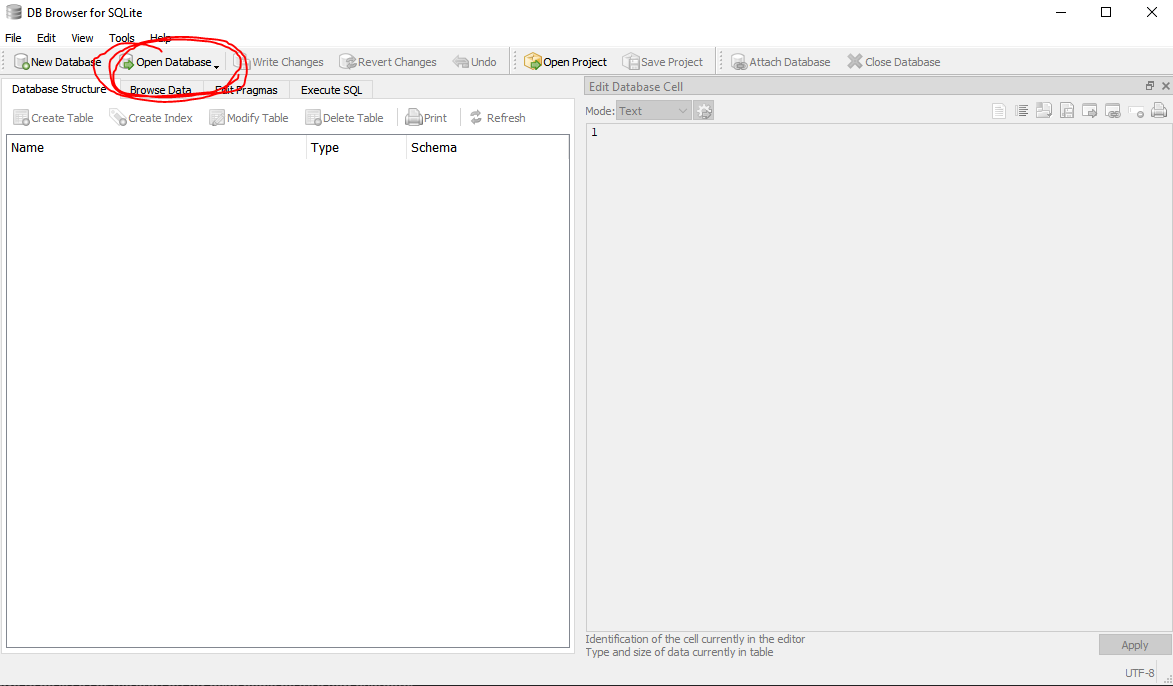
From there follow the same file path to your save and select the players.db file.
Now lastly you must find the character within the database and to do this simply click the Browse Data button right below the Open Database button. For Single player runs you will look under localPlayers to find your character and multiplayer servers will look under networkPlayers to find their characters
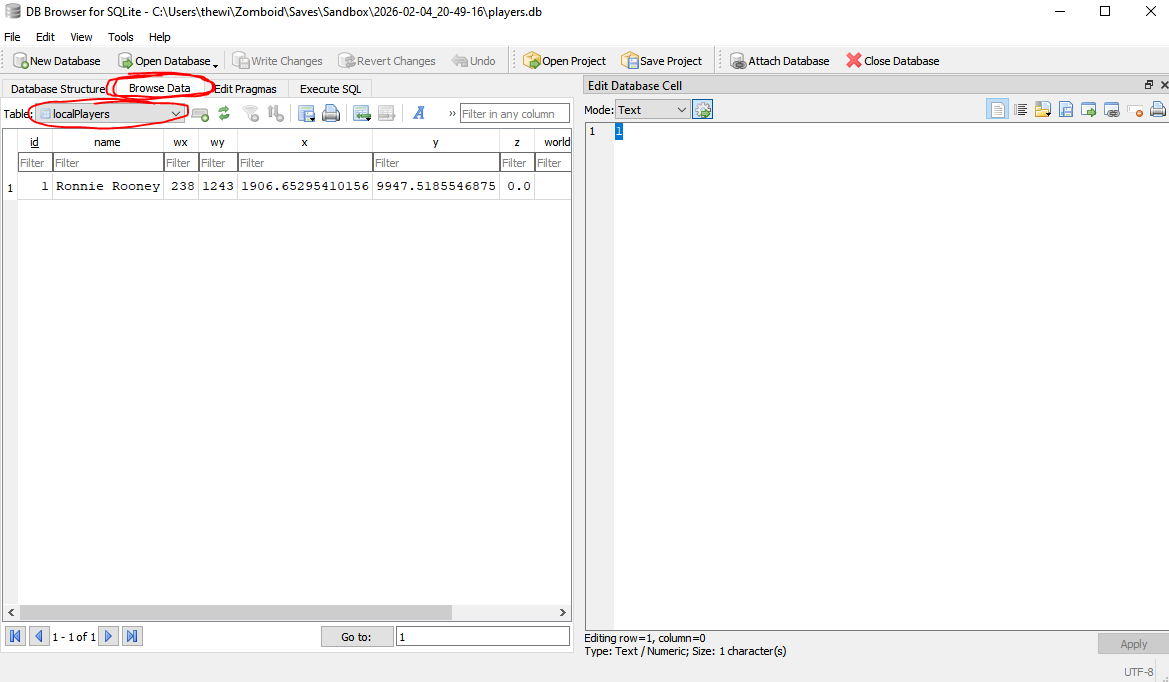
From there follow the same file path to your save and select the players.db file.
Now lastly you must find the character within the database and to do this simply click the Browse Data button right below the Open Database button. For Single player runs you will look under localPlayers to find your character and multiplayer servers will look under networkPlayers to find their characters
Reviving the dead
Now that you have located the goods you are trying to recover its time to dive into the hardest part of cheating death. You will see a couple of different columns of data with some things located within them. The easy part first is simply changing the isDead variable to 0. This ensures that you can actually join the world/server without needing to make a new character.
NOTE: THIS ALONE DOES NOT REVIVE YOU CHARACTER
This simple tells the game to act like you character is alive but the moment you load in nothing about your character will actually change, resulting in a immediate death again.
What you need to look for is a string of numbers that repeats 42 c8 00 00 00 00 00 00 00 00 00 00 00 00 00 00 00 00 00 00 00 00 .... a couple of times.
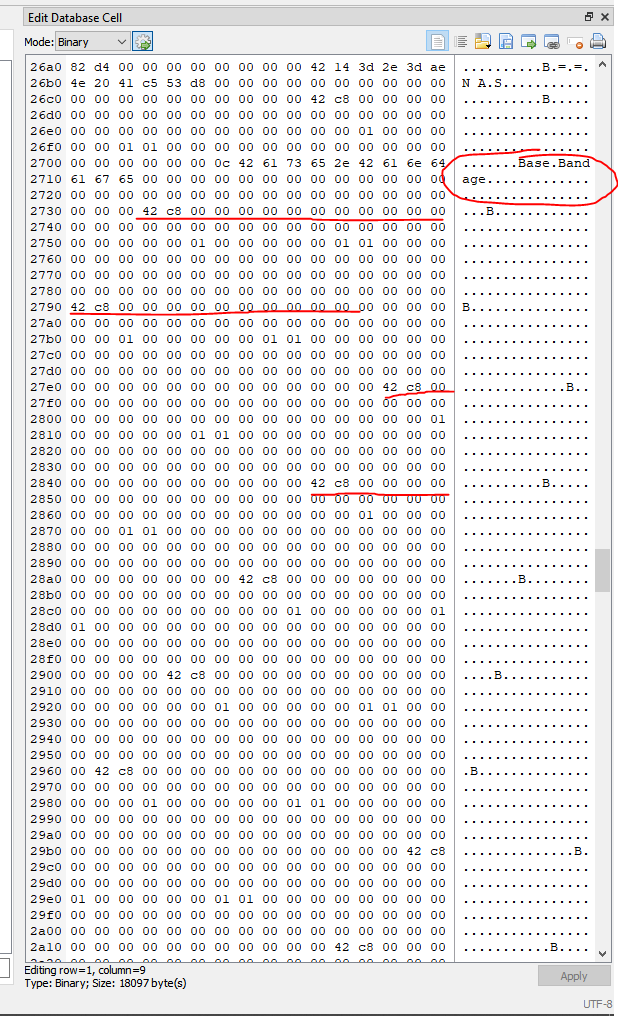 This as far as I know is the portion of the BLOB that contains the condition of all of your limbs and as far as I know every string of 42 c8 00 00 00... is another one of your limbs. Now if any limbs had an injury or damage or bandage you will see something different, for example the Base.Bandage applied to the limb. Now what's important is not only healing all the limbs but ALL of the body including illness, fatigue , etc. Luckily all that is stored right beside the limb info.
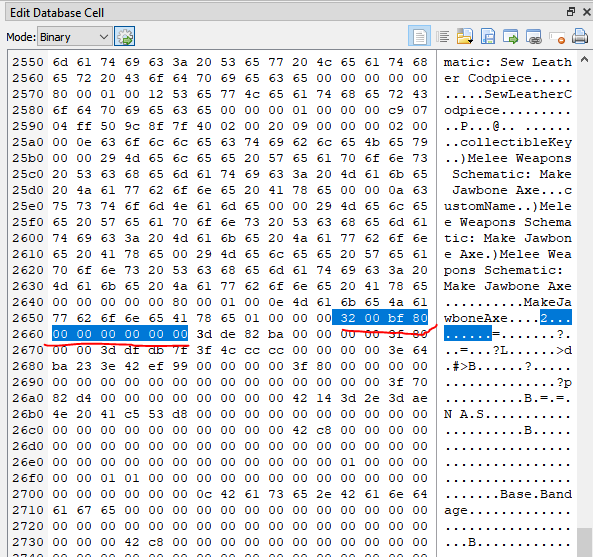 Now you need to find 2 more strings of numbers and letters to know what you need to delete and replace. The first string is the ABOVE the limb data we just found and will be a string of 32 00 bf 80 00... From what I know this is the start of the health data we will be removing and replacing. Every character from what I know has this string located just above the limb data and below a bunch of other data that is in every character.
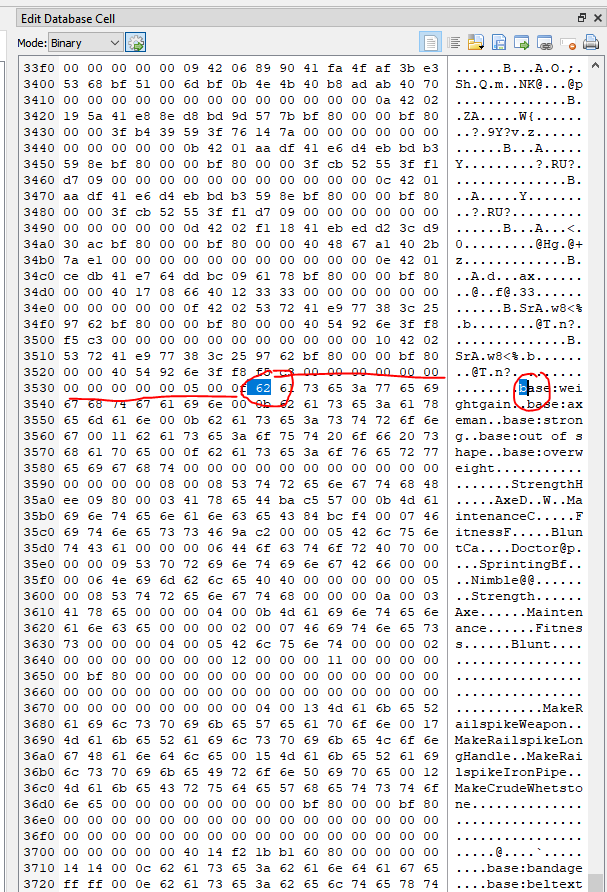 The second string of numbers/letters you are going to look for is BELOW the limb data we found before. You are going to look for your character's TRAIT data and look for the very first trait that shows up, it most likely will start with a b for base so look for the corresponding 62.If for what ever reason the first trait doesn't start with b you can simple highlight the first letter of the trait to find where the traits start.
NOTE: THIS ALONE DOES NOT REVIVE YOU CHARACTER
This simple tells the game to act like you character is alive but the moment you load in nothing about your character will actually change, resulting in a immediate death again.
Now for the tricky part
In order to change your characters circumstances to avoid a immediate death you must remove any injury your character might have had. The method to do this is to edit the data portion of the character file. When you select the BLOB under the data column you will be a bit intimidated on what you are looking at as no one really knows what we are looking at honestly. There is no public documentation on how exactly this portion is written but we know just enough to revive your character. What we will be doing is removing all of the current health data that is killing your character and replacing it with a new/existing characters health data. so in another world/save make a new character to reference and steal the health data from.What you need to look for is a string of numbers that repeats 42 c8 00 00 00 00 00 00 00 00 00 00 00 00 00 00 00 00 00 00 00 00 .... a couple of times.
This as far as I know is the portion of the BLOB that contains the condition of all of your limbs and as far as I know every string of 42 c8 00 00 00... is another one of your limbs. Now if any limbs had an injury or damage or bandage you will see something different, for example the Base.Bandage applied to the limb. Now what's important is not only healing all the limbs but ALL of the body including illness, fatigue , etc. Luckily all that is stored right beside the limb info.
Now you need to find 2 more strings of numbers and letters to know what you need to delete and replace. The first string is the ABOVE the limb data we just found and will be a string of 32 00 bf 80 00... From what I know this is the start of the health data we will be removing and replacing. Every character from what I know has this string located just above the limb data and below a bunch of other data that is in every character.
The second string of numbers/letters you are going to look for is BELOW the limb data we found before. You are going to look for your character's TRAIT data and look for the very first trait that shows up, it most likely will start with a b for base so look for the corresponding 62.If for what ever reason the first trait doesn't start with b you can simple highlight the first letter of the trait to find where the traits start.
Now with those two strings of data you will delete EVERYTHING FROM THE STRING OF 32 00 bf 80 00... ALL THE WAY TO JUST BEFORE THE START OF THE TRAIT DATA and replace it with a fresh characters health data from the EXACT SAME STRINGS OF DATA.
Once you are done editing the data
Now the last thing to do is hit the Apply and Write Changes to finish up you character editing.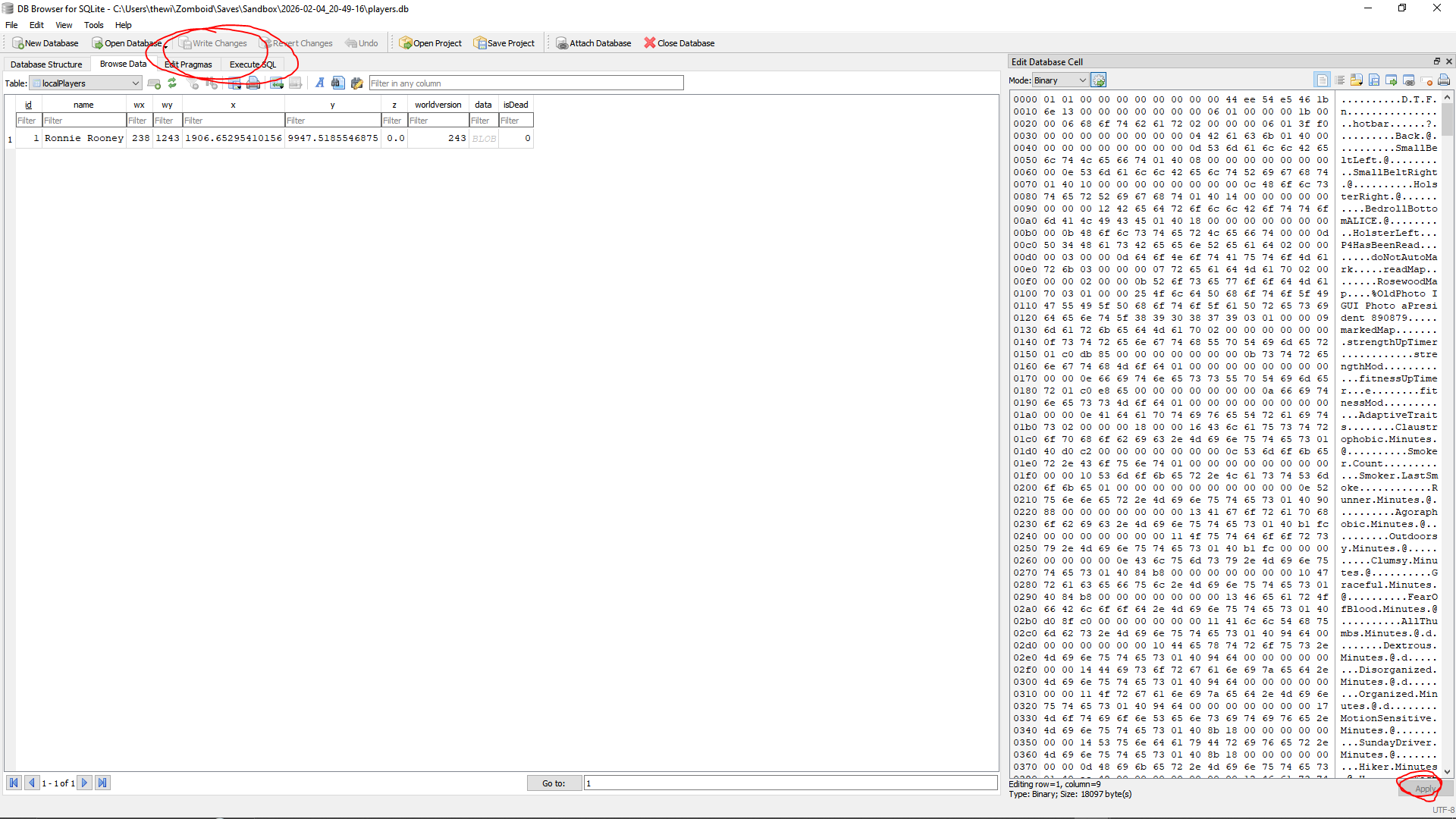
Now replace the old players.db file with your new one and BAM you have know cheated death. If you replaced your old data with a new characters health data you should spawn in brand spanking new with no injuries.
If you end up in a scenario where you can't join because of a player profile data is messed up its bested to take a copy of the original player data and just start again instead of trying to fix the messed up one. It may take a few tries to get used to doing this and if you're really bad at it just make a new character and transfer the old data to the new character. Also even if you left to main menu but you join back and its telling you to make a new character do the same thing, make the new character then just transfer the old data to the new one. (after healing it obv)
Now replace the old players.db file with your new one and BAM you have know cheated death. If you replaced your old data with a new characters health data you should spawn in brand spanking new with no injuries.
If you end up in a scenario where you can't join because of a player profile data is messed up its bested to take a copy of the original player data and just start again instead of trying to fix the messed up one. It may take a few tries to get used to doing this and if you're really bad at it just make a new character and transfer the old data to the new character. Also even if you left to main menu but you join back and its telling you to make a new character do the same thing, make the new character then just transfer the old data to the new one. (after healing it obv)
A request to YOU
First off I want to give a big thanks to someone named https://steamcommunity.com/id/dom2343 for setting me off on this journey on cheating death on this post https://steamcommunity.com/app/108600/discussions/0/3001047413707054835/#c800092239616407228.
He apparently discovered what I have before me and said he was might post a guide on how he did it but I couldn't find on and I'm impatience and brute forced the last remaining steps myself. If he does/did post a more in-depth guide on how he did it (or just a better worded) guide then ill retire this guide and credit everything to him as I would not have been able to do this myself. And if Dom sees this and wants to help/improve the guide then just hit me up and id be happy to help you.
With that being said if YOU find any more info on how the players.db file works in anyway please hit me up in the comments or on discord hahausergobrrrrrr or if something went wrong/had unintended side effects that I haven't found. There is a LOT of ways to die in this game so I haven't been able to test every single way so if you do this and something different happens let me know. And if any of you are coding wizzez lowkey this entire process seems like something you could automate knowing how it works, maybe even with enough tinkering you could figure out how every injury or sickness is saved and customize your injuries within the file, but that seems a bit excessive. Either way I have no clue how to code so good luck for anyone that tries it.
He apparently discovered what I have before me and said he was might post a guide on how he did it but I couldn't find on and I'm impatience and brute forced the last remaining steps myself. If he does/did post a more in-depth guide on how he did it (or just a better worded) guide then ill retire this guide and credit everything to him as I would not have been able to do this myself. And if Dom sees this and wants to help/improve the guide then just hit me up and id be happy to help you.
With that being said if YOU find any more info on how the players.db file works in anyway please hit me up in the comments or on discord hahausergobrrrrrr or if something went wrong/had unintended side effects that I haven't found. There is a LOT of ways to die in this game so I haven't been able to test every single way so if you do this and something different happens let me know. And if any of you are coding wizzez lowkey this entire process seems like something you could automate knowing how it works, maybe even with enough tinkering you could figure out how every injury or sickness is saved and customize your injuries within the file, but that seems a bit excessive. Either way I have no clue how to code so good luck for anyone that tries it.
More Project Zomboid guides
- Modding Policy★ 5 (397)133k views208 ♥9 minUpdated Nov 8, 2022
- 80 tips and tricks for Project Zomboid (If you have over 100 hours in this game some of these will probably be new to you too)★ 5 (1.6k)82k views3.1k ♥28 minUpdated Aug 29, 2021
- Топ 100 лучших модов на "project zomboid"★ 5 (415)68k views1.1k ♥10 minRussianUpdated Jul 28, 2024
- [B41] Лучшие места для базы★ 5 (477)61k views1.3k ♥6 minRussianUpdated Nov 30, 2025
- Первая помощь ❤★ 5 (628)49k views1.4k ♥5 minRussianUpdated Jan 20, 2025
- The Basics of Base Building★ 5 (704)48k views1.5k ♥17 minUpdated Dec 24, 2021





🔥 Popular guides
- Upgrading to PremiumTeam Fortress 2★ 5 (20k)1441k views11k ♥6 minUpdated May 11, 2022
- No More Room in Hell Official ManualNo More Room in Hell★ 5 (2.8k)569k views2.1k ♥29 minUpdated Apr 22, 2019
- NMRiH Community Hosting GuidesNo More Room in Hell★ 5 (526)351k views653 ♥1 minUpdated Aug 10, 2022
- ULTIMATE GUIDE FOR GAME DEV TYCOONGame Dev Tycoon★ 5 (5.8k)326k views10k ♥4 minUpdated 23 Jan, 2014
- How to 'Git Gud' Soon™MORDHAU★ 5 (2k)318k views3k ♥68 minUpdated Nov 16, 2024
- Лучшие кооперативные игры SteamPAYDAY 2★ 5 (1.5k)315k views2.1k ♥56 minRussianUpdated Apr 27, 2025






This guide was created by its original author on the Steam Community. Are you the author and want it removed? Request removal.