Giving fleet subordinates custom default commands (e.g. creating trade fleets without mods)
Giving fleet subordinates custom default commands
Tired of having only defend, attack, intercept, and resupply as your only options for the default orders for fleet subordinates? Well do not worry, as custom default orders are actually not that difficult to assign.
First, assign the desired subordinates as you normally would to your desired fleet commander. Select the desired subordinates, then right click on the desired fleet commander and select "Defend commander” and choose the desired squadron position. Selecting defend, attack, or interception here does not matter, though I usually choose defend because if you forget to give the custom command, at least your trade vessel will not go on a suicide mission.
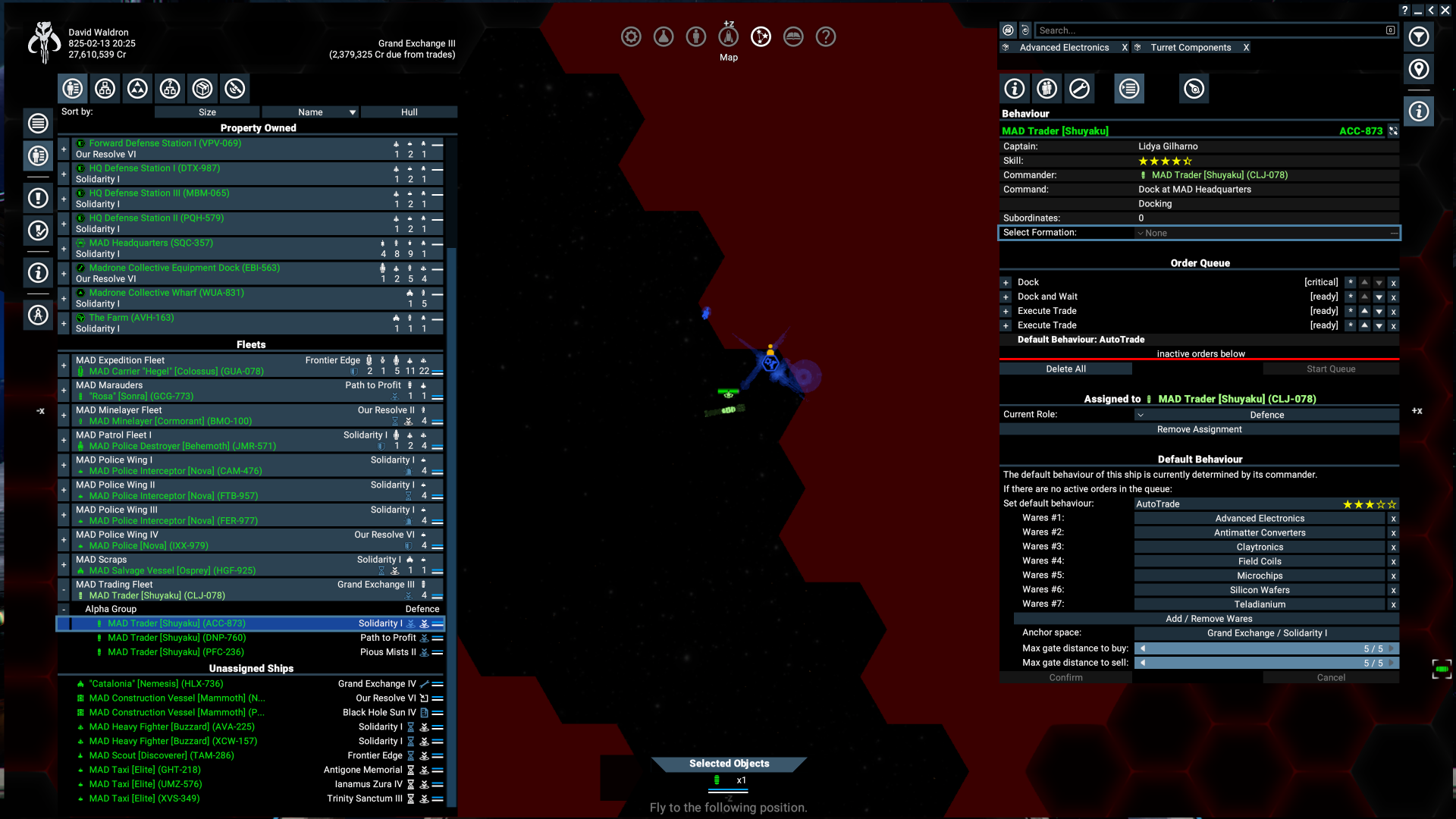
Next, take control of the fleet commander’s vessel. Now, you will be able to assign custom default orders to your subordinates! Simply select the subordinate vessel, go to the behaviors tab, and set their default order to whatever you want. If you want a trade fleet, set all subordinates to auto trade. If you want a taxi to dock at your capital ship, set your subordinate to dock and wait. I don't know if it was fixed, but the last time I tried a civilian fleet mod, it wouldn't let me give my fleets custom names. This vanilla way of creating trade fleets will however let you give your trade fleets custom names.
It's unfortunate such a great feature is so hidden, so hopefully this guide helped you learn something new!
- X4 Full Map [Timelines][7.0]★ 5 (579)46k views1.2k ♥1 minUpdated 22 Jun, 2024
- A Guide to Game Starts★ 5 (209)28k views437 ♥27 minUpdated 7 Jan
- X4 Beginner Guide 5.1★ 5 (393)27k views1.2k ♥22 minUpdated 7 Mar, 2023
- All Ownerless Ships in X4: Foundations (9.00 Base Game + All DLCs)★ 5 (453)27k views1.1k ♥10 minUpdated 10 Jun
- X4 Ultimate Weapons Guide. [NOW ON THE WIKI]★ 5 (343)23k views768 ♥104 minUpdated 8 Jul, 2024
- X4 sector map★ 4 (146)22k views207 ♥1 minUpdated 6 Dec, 2018


- Upgrading to PremiumTeam Fortress 2★ 5 (20k)1441k views11k ♥6 minUpdated May 11, 2022
- No More Room in Hell Official ManualNo More Room in Hell★ 5 (2.8k)569k views2.1k ♥29 minUpdated Apr 22, 2019
- NMRiH Community Hosting GuidesNo More Room in Hell★ 5 (526)351k views653 ♥1 minUpdated Aug 10, 2022
- ULTIMATE GUIDE FOR GAME DEV TYCOONGame Dev Tycoon★ 5 (5.8k)326k views10k ♥4 minUpdated 23 Jan, 2014
- How to 'Git Gud' Soon™MORDHAU★ 5 (2k)318k views3k ♥68 minUpdated Nov 16, 2024
- Лучшие кооперативные игры SteamPAYDAY 2★ 5 (1.5k)315k views2.1k ♥56 minRussianUpdated Apr 27, 2025






This guide was created by its original author on the Steam Community. Are you the author and want it removed? Request removal.