How-to Install Games for Windows Live
tl;dr
If you just installed Resident Evil 5 and your game isn't starting it's most likely because you don't have GFWL installed. You can download it here on PCGamingWiki[community.pcgamingwiki.com].
Once you download the .zip file, you can extract all of the files and it should look like this:
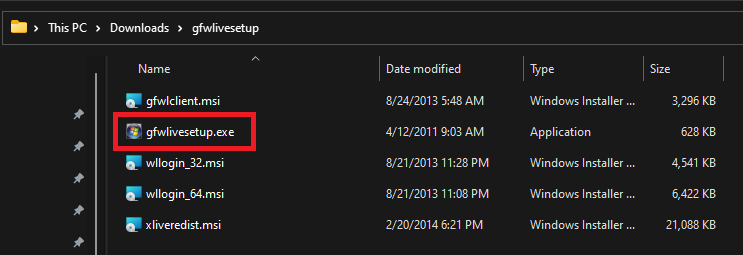
After that's downloaded and extracted, just run gfwlivesetup.exe and you should be good to go.
The Problem
The main problem with getting RE5 to run is that the G4WL installer that's included with the game (redist/gfwlivesetup.exe) will not work.
When you first install the game, or more often than not every time you launch the game, the BH5AE_install.vdf (source[gist.github.com]) | depot[steamdb.info]) file will try and run the default gfwlivesetup.exe installer.
In case you're not familiar with what a .vdf file is, it's a Valve Data File. You will also see these referred to as "Valve's KeyValue format". If you want to read more about the install scripts you can read this Steamworks documentation on "Creating and using InstallScripts".
Here's the relevant part of Resident Evil 5's install script (BH5AE_install.vdf):
This script will (most likely) run every time the game is started, meaning that if you do not already have GFWL installed, the setup will fail. This is because the installer included with Resident Evil 5 is an online version of the installer and you'll get this error message:
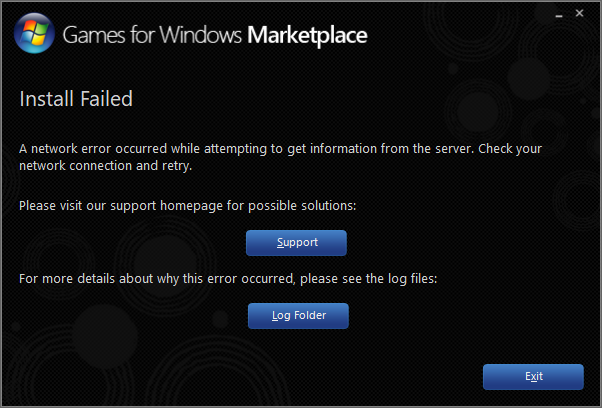
There's two log files that get created, one is setupexe.log and the other is xliveinstall.log. The xliveinstall.log is what actually failed in setupexe.log.
The last line there tells us what happened.
Since the files that gfwlivesetup.exe needs to download are no longer available from Microsoft, the installation fails. This isn't surprising if you've been around for a while as Microsoft frequently removes downloads for products they no longer support (RIP Zune...).
The Solution
The short answer is that you need an offline version of the Games for Windows Live installer. You can download this from PCGamingWiki here:
Microsoft Games for Windows - LIVE 3.5.95.0[community.pcgamingwiki.com]
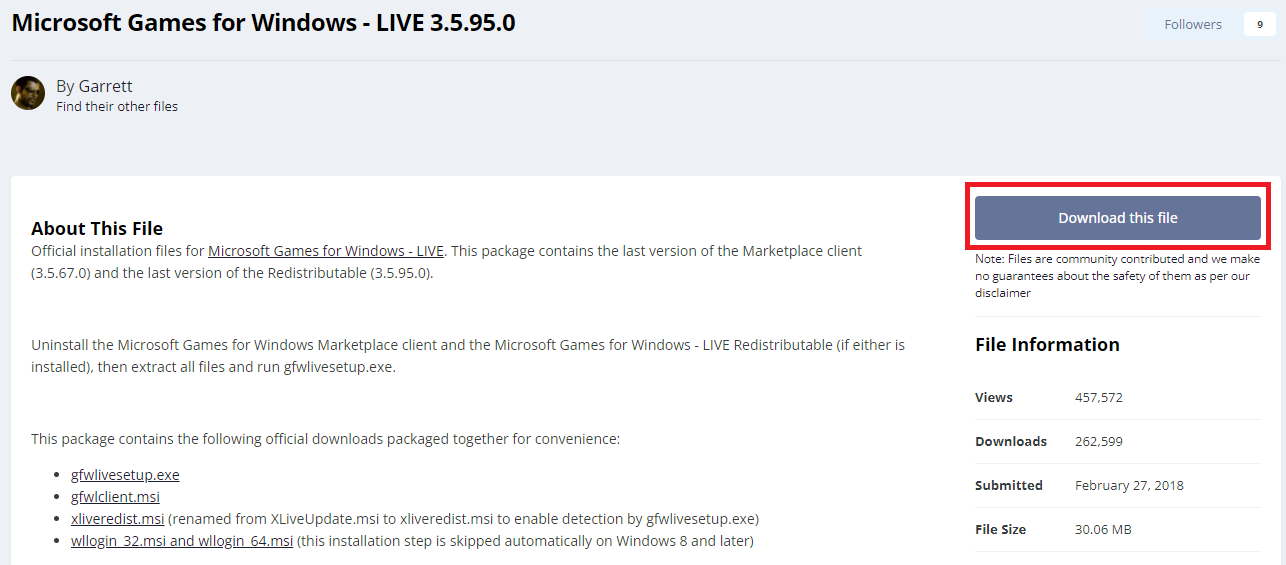
This is a .zip file containing the following files:
- gfwlclient.msi
- gfwlivesetup.exe
- wllogin_32.msi (skipped automatically on Windows 8 and later)
- wllogin_64.msi (skipped automatically on Windows 8 and later)
- xliveredist.msi
Once you have downloaded the .zip file, extract all files (not just gfwlivesetup.exe) and then run gfwlivesetup.exe.
Having everything together in one folder and named appropriately should allow the GFWL installer to run without issue.
Verifying
This is the quicker of the two options.
So, aside from just launching the game, you can go to the Resident Evil 5 install directory and try running the gfwlsetup.exe file manually. If you're not sure where the game is actually installed, you can follow this guide[savelocation.net] that will walk you through it.
Go ahead and run gfwlsetup.exe. Don't be alarmed when you see that it still failed. First, we again need to view the log files and see what happened. This time, we're going to look at setupexe.log (instead of xliveinstall.log). If everything was done correctly, we should see that it was able to find the GFWL redists.
The main thing we care about here is the following:
So, if you see that, then you're good! If you're unable to run the game still then this will at least help you determine whether or not GFWL is the problem.
FAQ
Q: Why did you go through all the trouble documenting all this?
Because some people are hesitant to download files aren't comfortable messing around with things that honestly should just work. Unfortunately, since CAPCOM half-assed this (and everything they do), you have to do some manual steps to get the game working.
I also see people saying to download just one .dll file and put it in the game directory and things like that with no explanation of why or what it does and as a developer I figured I'd walk through identifying the problem, the actual solution, and then verifying it in case anyone chooses to do that. If you follow this guide, you won't need to download random files again if you one day choose to reinstall RE5 since this isn't just a "quick fix" it's the actual solution.
Q: Why can't I download the files from Microsoft?
If you could, then this wouldn't be an issue. Microsoft removes things they don't want to support anymore. Another example of this is Zune. Normally, removing things would force the game's developers that were using it to update their product. CAPCOM however is not a normal developer. If they really cared about their fans they wouldn't just continue to fix and improve RE5 as a new release and they'd go back and apply those fixes for their existing customers too.
Q: So why hasn't CAPCOM fixed it?
CAPCOM has no interest in fixing something if they're not financially forced to do. The money they would lose from people just refunding the purchase is less than the development cost of actually fixing it, especially when there's a community patch that does what they should have done and plenty of guides available, like this one.
Q: My game still doesn't work?
This is just one of the many problems included with Resident Evil 5. If you need help troubleshooting, feel free to shoot me a message here or on Discord (Gundwn#6651).
- Resident Evil 5 - Fixes★ 5 (2k)119k views2.4k ♥9 minUpdated Aug 2, 2025
- Resident Evil 5 Quality of Life Fixes★ 5 (1.5k)78k views2.1k ♥4 minUpdated Mar 9
- Resident Evil 5: Gold Edition 100% Achievement Guide★ 5 (1.3k)42k views2.6k ♥24 min
- getting multiplayer achievements with bots★ 5 (876)33k views1.7k ♥11 minBulgarianUpdated Aug 27, 2023
- Farming Gold (15K), ammo and eggs★ 5 (459)33k views423 ♥1 minBulgarianUpdated Sep 24, 2018
- Полный русификатор (текст+звук) {1C} Gold Edition★ 5 (674)30k views778 ♥1 minRussianUpdated Feb 3, 2024



- Upgrading to PremiumTeam Fortress 2★ 5 (20k)1441k views11k ♥6 minUpdated May 11, 2022
- No More Room in Hell Official ManualNo More Room in Hell★ 5 (2.8k)569k views2.1k ♥29 minUpdated Apr 22, 2019
- NMRiH Community Hosting GuidesNo More Room in Hell★ 5 (526)351k views653 ♥1 minUpdated Aug 10, 2022
- ULTIMATE GUIDE FOR GAME DEV TYCOONGame Dev Tycoon★ 5 (5.8k)326k views10k ♥4 minUpdated 23 Jan, 2014
- How to 'Git Gud' Soon™MORDHAU★ 5 (2k)318k views3k ♥68 minUpdated Nov 16, 2024
- Лучшие кооперативные игры SteamPAYDAY 2★ 5 (1.5k)315k views2.1k ♥56 minRussianUpdated Apr 27, 2025






This guide was created by its original author on the Steam Community. Are you the author and want it removed? Request removal.