Install RE 5 with or without GFWL
Resident Evil 5 on Steam Install
- Install and start Resident Evil 5. An Error occur of gfwl (Games for Windows Live)
- Close the Installer
- Press WindowsKey + R an paste this in the command window and press Enter:
%localappdata%\Microsoft\GFWLive\Downloads
- Doubleclick „gfwlivesetup.exe“ (dont close the Installer even it fails)
The Installer starts and creates 2 more Files in the same Directory. Open „xliveredist.msi“ and install and finish setup. If you close „gfwlivesetup.exe“, then it removes the 2 additional files. - After installing „xliveredist.msi“ close „gfwlivesetup.exe“.
- Start Resident Evil 5 and have Fun.
1.) Install Resident Evil 5
2.) Start Resident Evil 5 for the first time
3.) Windows Live Installer starts and stops
4.) Quit Games for Windows Live Installer
5.) Go on https://de.dll-files.com/xlive.dll.html and scroll down and download the xlive.zip
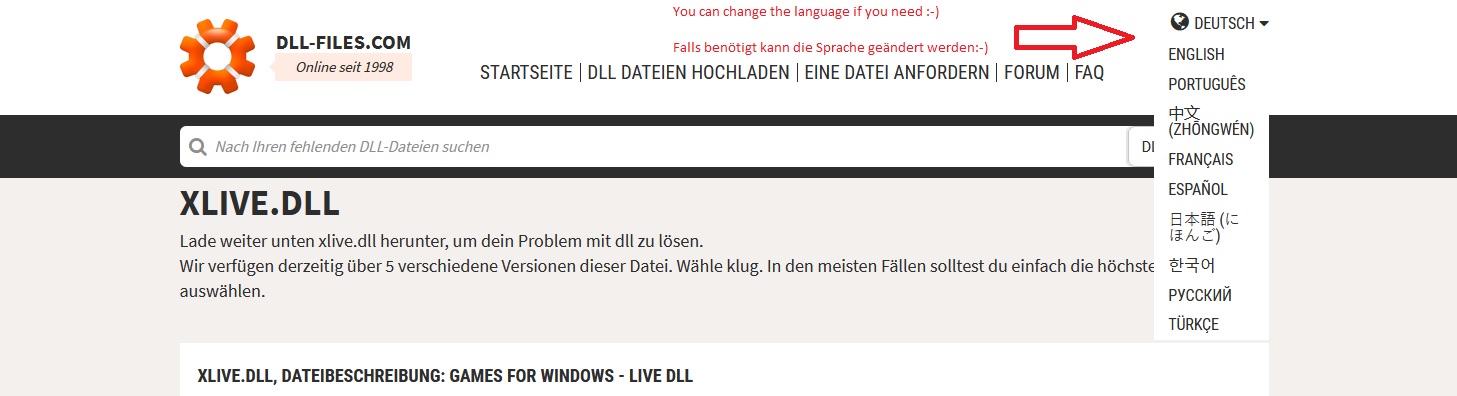
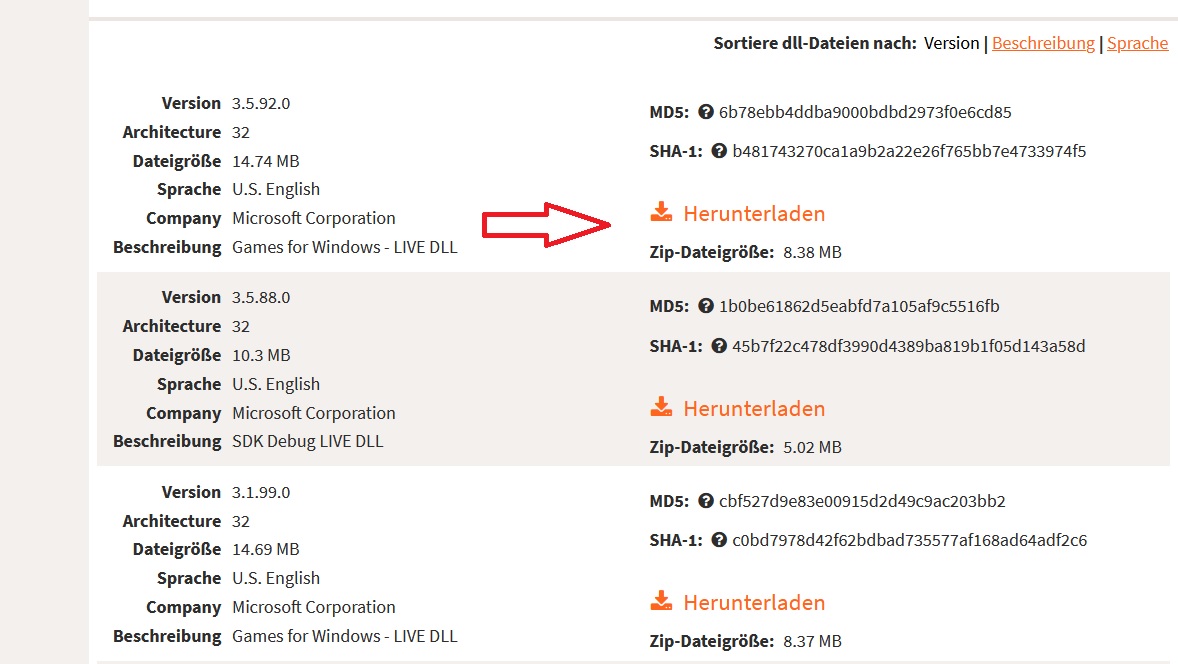
6.) Extract the Xlive.dll from the downloaded Zip file into the Root directory of Resident Evil 5 where you can find the re5dx9.exe (with winrar, 7zip or something else)
7.) Start Resident Evil 5 again and have fun 😊
8.) If Resident Evil 5 doesn`t start, so reboot your computer. This may help in most cases. 😊
(if you install Resident Evil 5 for the first time on your machine, so it maybe doesn`t start the game without a reboot of your Coumputer)
If this Guide did help you, so pls let me know this. You can also write a comment, if you have questions.
1.) Resident Evil 5 bei Steam herunterladen und installieren
2.) Resident Evil 5 einmalig starten
3.) Der Games for Windows Live Installer wird versuchen sich zu installieren und dabei scheitern
4.) Games for Windows Live Installer beenden
5.) Xlive.zip bei https://de.dll-files.com/xlive.dll.html herunterladen (am besten die aktuellste Version)
6.) Xlive.dll aus dem soeben heruntergeladenen Zip Datei in den Root Ordner (Hauptverzeichnis des Spiels) wo die re5dx9.exe vorhanden ist, hineinkopieren bzw. mit einem Entpacker extrahieren (Winrar, 7zip oder ähnliches)
7.) Resident Evil 5 erneut starten und Spaß haben 😊
8.) Sollte Resident Evil 5 immer noch nicht starten, so hilft ein Neustarten des Computers in den meisten Fällen. 😊 (Ist meist bei der Erstinstallation der Fall, dass das Spiel nicht startet)
Wenn dieser Guide geholfen hat, würde ich mich über eine Rückmeldung freuen. Fragen können auch gestellt werden.
- Resident Evil 5 - Fixes★ 5 (2k)119k views2.4k ♥9 minUpdated Aug 2, 2025
- Resident Evil 5 Quality of Life Fixes★ 5 (1.5k)78k views2.1k ♥4 minUpdated Mar 9
- Resident Evil 5: Gold Edition 100% Achievement Guide★ 5 (1.3k)42k views2.6k ♥24 min
- getting multiplayer achievements with bots★ 5 (876)33k views1.7k ♥11 minBulgarianUpdated Aug 27, 2023
- Farming Gold (15K), ammo and eggs★ 5 (459)33k views423 ♥1 minBulgarianUpdated Sep 24, 2018
- Полный русификатор (текст+звук) {1C} Gold Edition★ 5 (674)30k views778 ♥1 minRussianUpdated Feb 3, 2024



- Upgrading to PremiumTeam Fortress 2★ 5 (20k)1441k views11k ♥6 minUpdated May 11, 2022
- No More Room in Hell Official ManualNo More Room in Hell★ 5 (2.8k)569k views2.1k ♥29 minUpdated Apr 22, 2019
- NMRiH Community Hosting GuidesNo More Room in Hell★ 5 (526)351k views653 ♥1 minUpdated Aug 10, 2022
- ULTIMATE GUIDE FOR GAME DEV TYCOONGame Dev Tycoon★ 5 (5.8k)326k views10k ♥4 minUpdated 23 Jan, 2014
- How to 'Git Gud' Soon™MORDHAU★ 5 (2k)318k views3k ♥68 minUpdated Nov 16, 2024
- Лучшие кооперативные игры SteamPAYDAY 2★ 5 (1.5k)315k views2.1k ♥56 minRussianUpdated Apr 27, 2025






This guide was created by its original author on the Steam Community. Are you the author and want it removed? Request removal.