Pilot Academy: Ranks and Relations.
Pilot Academy: Ranks and Relations

- Intuitive UI: Easily manage all Academy operations.
- Pilot Training: Train pilots effectively using trade operations.
- Faction Relations: Improve the Player's standing with other factions through trade.
- Wing Organization: Organize the Player's trainees into Wings for efficient management.
- Goal Selection: Prioritize either pilot training or improving relations.
- Faction Limiting: Restrict training and relation-building activities to specific factions for each Wing.
- Station Managers: Automatically promote qualified pilots to Station Manager positions on Player-owned stations when their management skills exceed those of the current manager.
- Researchable Upgrades:
- Expand to 9 Wings.
- Train pilots up to the 5-star rank.
- Automatically hire Cadets from selected factions.
- Automatically assign Trained Pilots to the Player's ships based on priority.
- Expand to 9 Wings.
Videos
- Overview
- First minute: setting up the Academy.
- Second minute: reaching the destination station and starting the training process.
- The remainder: the training process results shown at 10x speed.
- First minute: setting up the Academy.
Limitations and Caution
- The Academy currently only supports small (S-class) ships.
- Trades used for the training process are non-profitable and uses only one item of selected ware per transaction.
This is a complex mod and may have undiscovered issues. Please report any problems on the Nexus Mods or Steam Workshop pages.
Requirements and Installation
- X4: Foundations: Version 8.00HF3 or newer.
- UI Extensions and HUD: Version v8.0.4.0 or higher by kuertee[next.nexusmods.com].
- Available on Nexus Mods: UI Extensions and HUD[www.nexusmods.com]
- Mod Support APIs: Version 1.95 or higher by SirNukes[next.nexusmods.com].
- Available on Steam: SirNukes Mod Support APIs
- Available on Nexus Mods: Mod Support APIs[www.nexusmods.com]
- Available on Steam: SirNukes Mod Support APIs
- Steam Workshop: Pilot Academy: Ranks and Relations
- Nexus Mods: Pilot Academy: Ranks and Relations[www.nexusmods.com]
Training Procedure
- After the Academy's location is set, the Player can create the first Wing.
- Once a Wing is created, any number of Wingmen can be added to it.
- Immediately after Wing creation, a special order will search for the best trade deal to increase rank and relations.
- After each sale, the ship pilot's current rank will be checked against the target level.
- If the rank is reached, the presence of Cadets at the Academy station will be checked, and the first available candidate will be transferred to the ship.
- If no Cadets are detected, the Auto Hire option will be checked. If enabled, a new Cadet will be hired for the ship, and the appropriate fee will be paid.
- If no Cadets are available and Auto Hire is disabled, the script will repeat these checks in 3 minutes.
- Otherwise, the Trained Pilot on the ship will be swapped with a Cadet and then moved to the Academy station.
- If the Assign option is not set to Manual, and the last assignment turn was finished at least 2 minutes ago, the Auto Assign procedure will be initiated.
- Based on the Assign setting, a ship with a pilot who has a lower rank (and is below the target rank level) will be selected.
- Please take in account: if crew is full, by default you will get a warning notification and the pilot swapping will not be performed. But if the option Auto fire less skilled crew member if crew is full is enabled, the less qualified crew member will be automatically dismissed to free up space for the new pilot transfer.
- If such a ship is found, the Trained Pilot will be assigned as its pilot, and the existing pilot will be transferred to the Academy station as a new Cadet.
- Every 3 minutes, the Auto Assign procedure will repeat to check for available Trained Pilots.
Academy window
The Academy window has three types of tabs:
- Academy Settings
- Cadets and Pilots
- Wings management tabs, including Add New Wing
Academy Settings
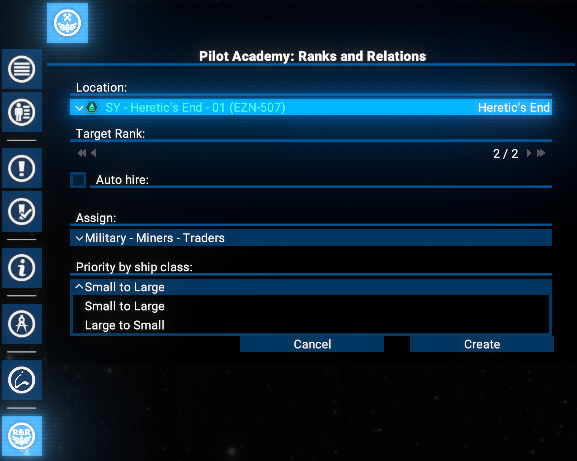
The Academy Settings tab includes controls for location, target skill level, auto-hiring, and auto-assigning Trained Pilots.
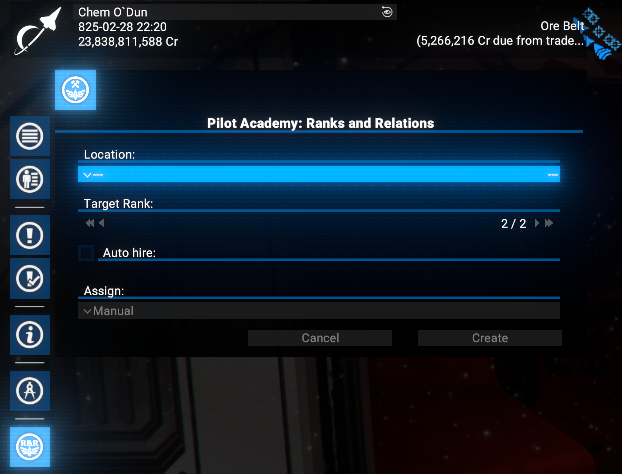
The Academy uses an assigned Player-owned or other faction's station as living quarters for Cadets and Trained Pilots.
In the early game, when the Player may not own any stations, other factions' wharfs, shipyards, or trading stations can be used, depending on the Player's reputation with them.
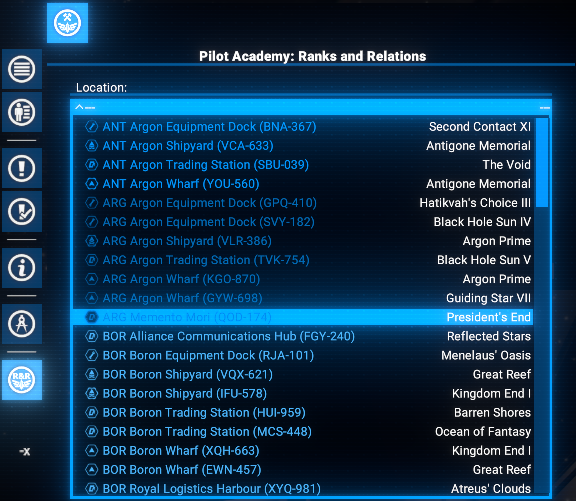
Any available station can be chosen.
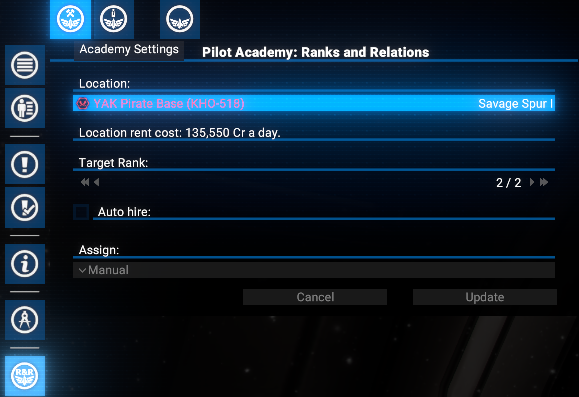
If a non-Player-owned station is selected, the Player will be charged a daily rental fee.
If the Player owns any stations, other factions' stations will not appear in the location list.
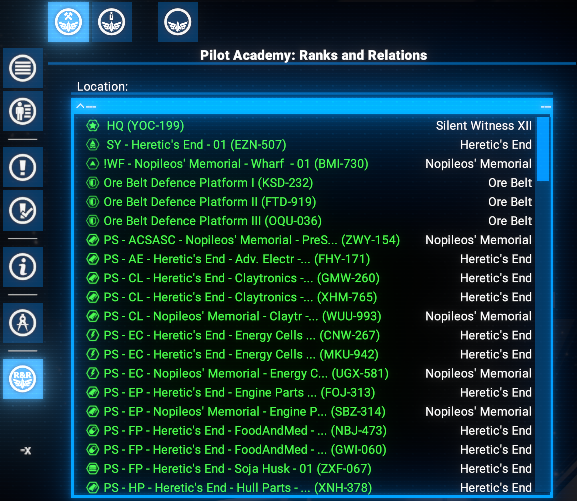
Any Player-owned station can be selected, though using the HQ is not recommended to avoid interference with terraforming projects.
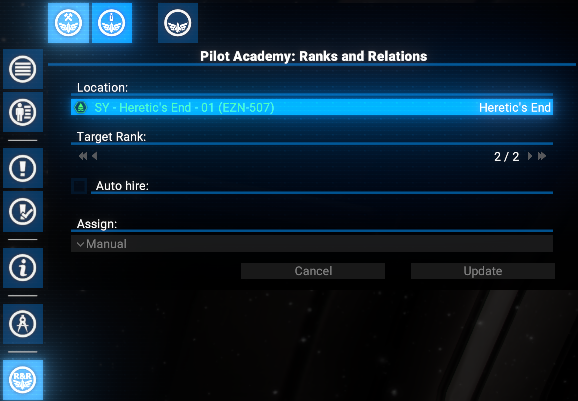
At any time, the Player can reset the Academy location by pressing the button with the current station info. A new station can then be selected from the dropdown.
After pressing the Update button, the location will be changed, and Cadets and Trained Pilots will be moved to the new Academy station.
After completing the appropriate research, the Player can enable the auto-hire feature.
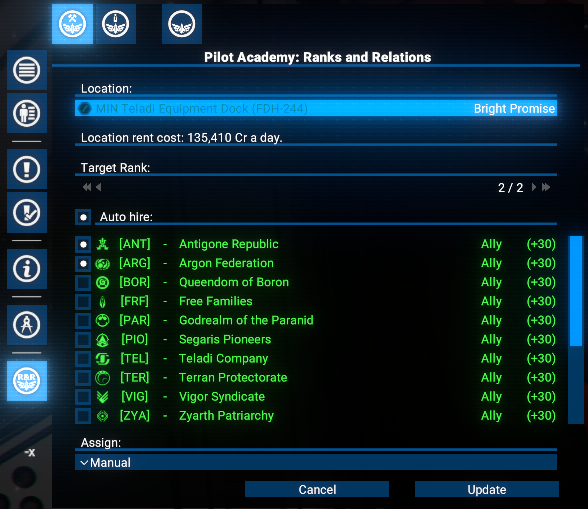
This will automatically hire new Cadets from the selected factions, and the Player will be charged the standard hiring fees.
Once researched, the Player can enable auto-assign in the Academy interface. This allows the Player to set priorities for assigning pilots who have reached the target rank, based on ship role and size.
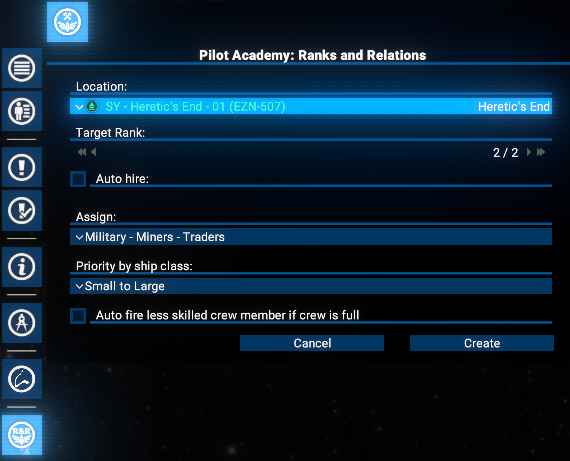
When auto-assign is active, Trained Pilots will replace existing pilots on the Player's ships who have a lower rank than the target. The replaced pilots will be reassigned to the Academy as Cadets.
Pilot will be assigned based on the selected priority:- By ship purpose: The Player can prioritize ships based on their role, such as combat, trading, mining, or by presence in selected fleets.
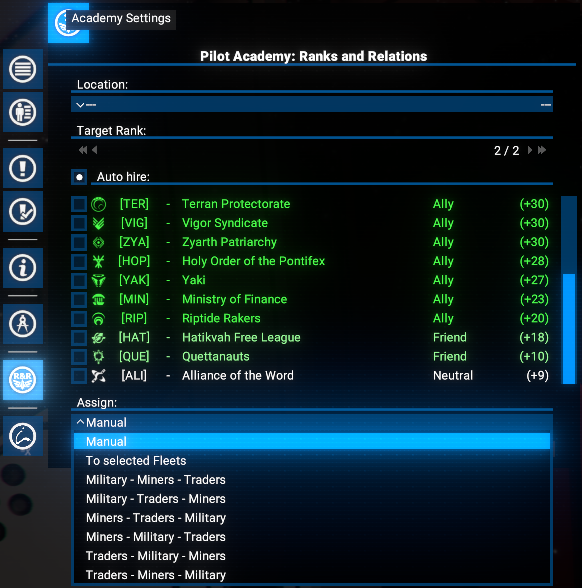
- By ship size: The Player can prioritize ships based on their size, from small to large or vice versa.
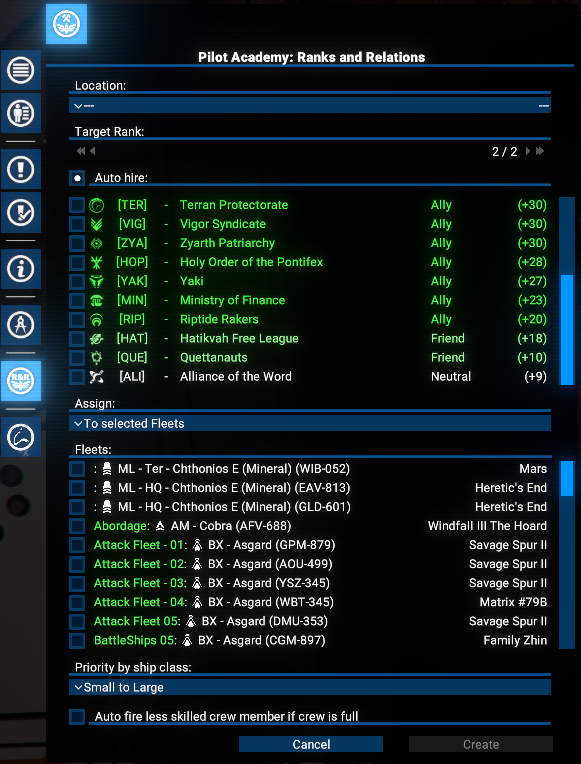
From version 1.05, the Player can also manually transfer any of Skilled pilots to the Academy when the To Selected Fleets option is enabled. The Academy can then act as a Pilot Dispatch center, automatically assigning these experienced pilots to replace less skilled pilots in the Player's selected fleets.
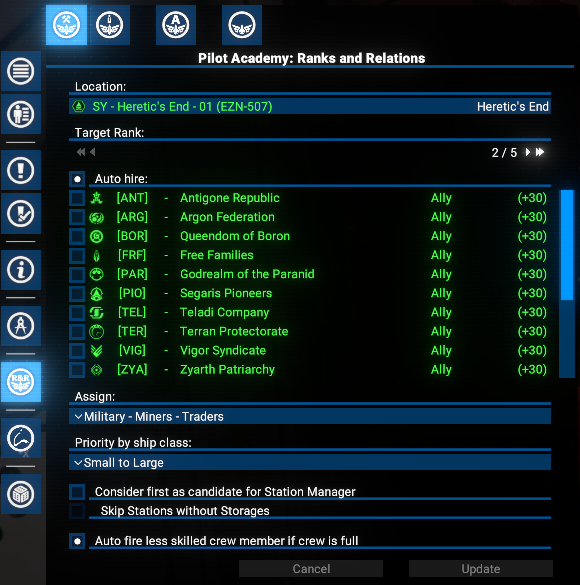
From version 1.09, the Player can also set the option Consider first as candidate for Station Manager - in this case the Skilled pilots will be checked against the Station Managers on Player-owned stations. If this person Manager skills are higher than the current Station Manager, they will be automatically assigned to this position. Otherwise, they will be considered as candidates for pilot swapping based on previously selected priority.
To prevent "losing" skilled pilots on position of Station Manager on Defence Platforms, there is a special option Skip Stations without Storages - if enabled, the pilots with higher Manager skills will not be assigned to stations without storages, which are usually defense platforms.
In addition, please be aware about situation when the target ship's crew is full. By default, in this case, the pilot swapping will not be performed and the Player will get a warning notification.
But if the option Auto fire less skilled crew member if crew is full is enabled, the less qualified crew member will be automatically dismissed to free up space for the new pilot transfer.
Cadets and Pilots
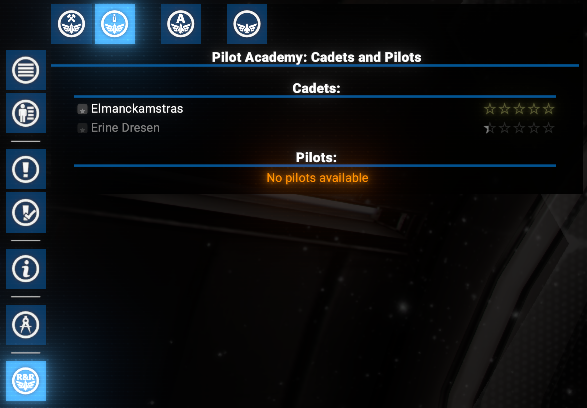
This tab displays a list of the Player's Cadets and Trained Pilots. Initially, both lists will be empty.
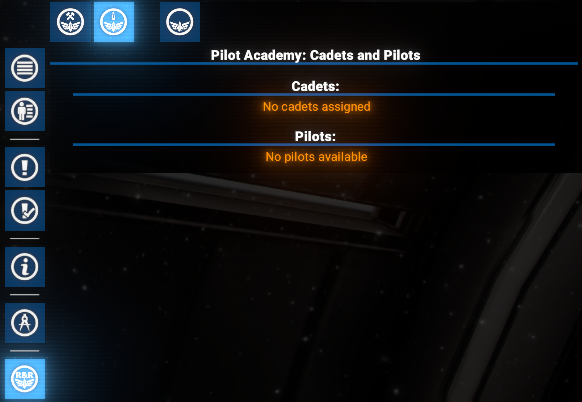
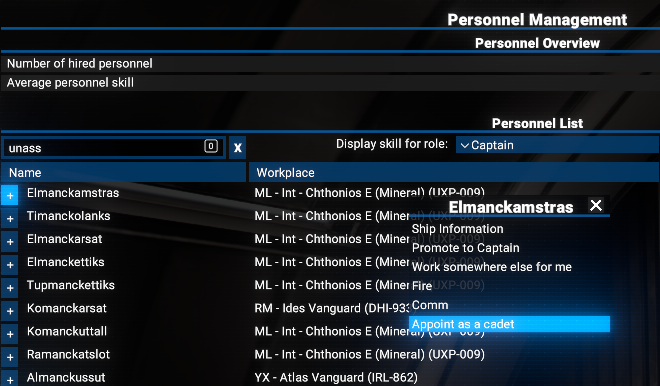
The Player can manually hire Cadets in two ways:
- From the global Personnel Management screen.
- From the crew tab of the Player's existing ships.
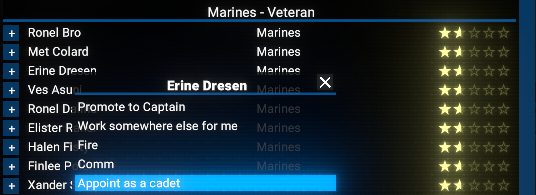
Use the Appoint as cadet option in the context menu.
It will take some time to transfer Cadets from their original location, and they will be grayed out while in transit.
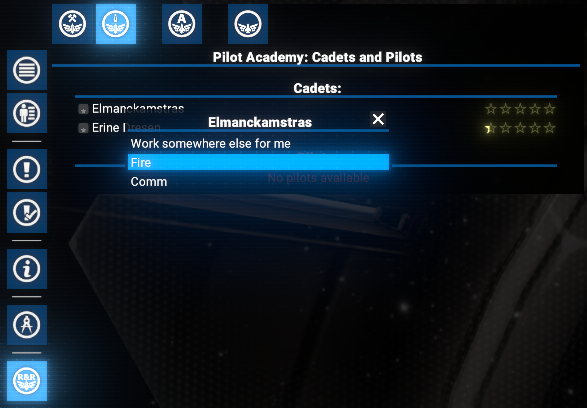
The Player can also use the context menu to manage them like any other employee.
The Player can recall Trained Pilots to the Academy for reassignment.
This option is available in the context menu for any person with a pilot skill level equal to or higher current academy target rank. But only if they are To Selected Fleets assignment option is enabled.
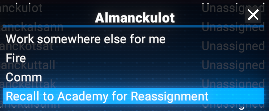
After recalling a Trained Pilot to the Academy, they will be listed as a Pilots and will be automatically considered for assignment to any ship in the Player's selected fleets that has a pilot with a lower rank than the target.
If auto-assign is not used, Trained Pilots will return to the Academy.
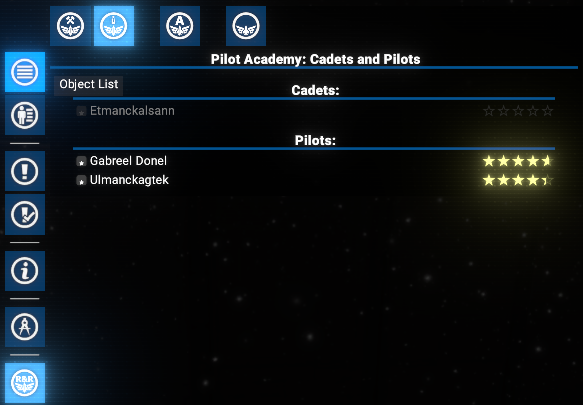
The Player can then manage them in the same way as Cadets.
Wings
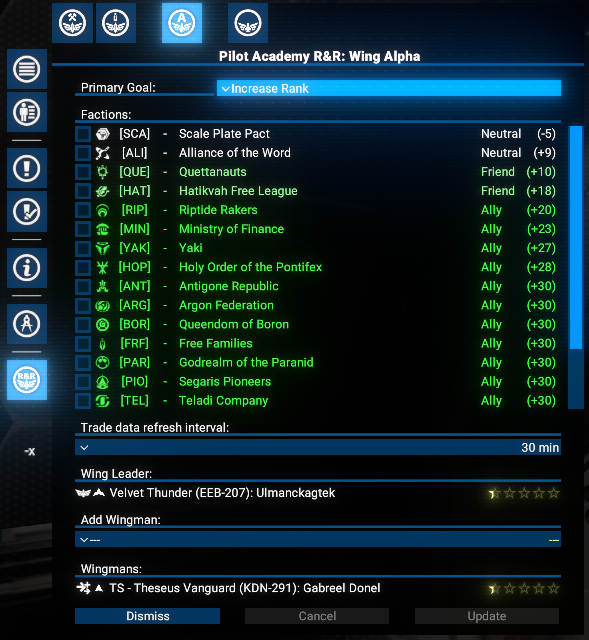
All training functionality of the Academy is based on Wings. Each Wing can contain any number of Wingmen. The Player must select one ship as a Wing Leader and then add any number of direct subordinates with the Mimic directive.
Initially, the Player can manage 3 Wings. To increase the number of available Wings, the Player must complete the appropriate research.
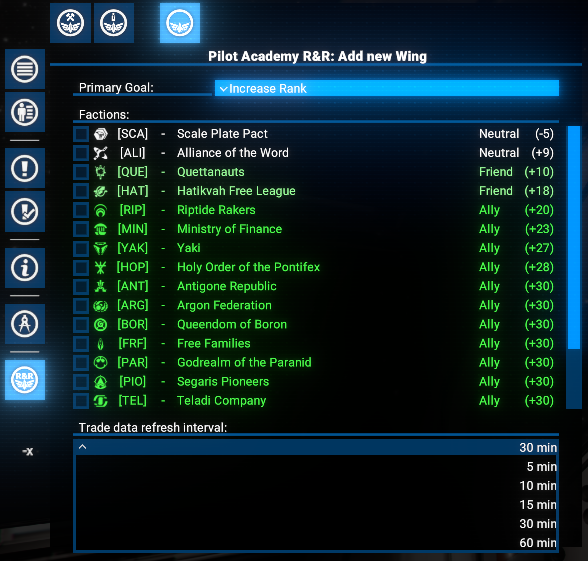
To start, open the Add New Wing tab.
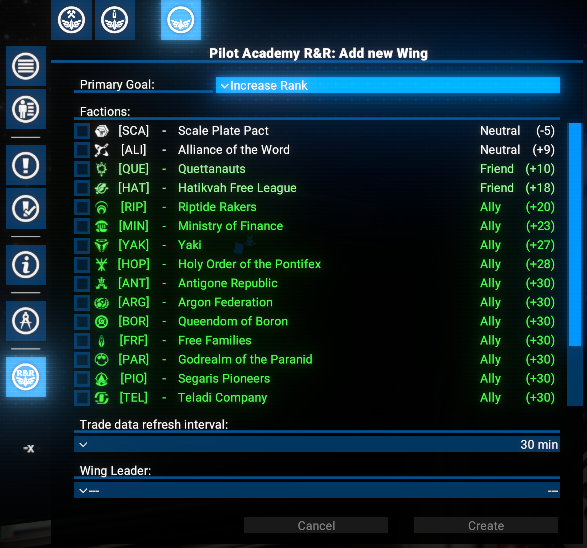
First, the Player must select a Primary Goal for the Wing:
- Increase Rank: Work with any faction to complete as many trade runs as possible in a given time.
- Gain Reputation: Focus on deals with specific factions to increase reputation with them.
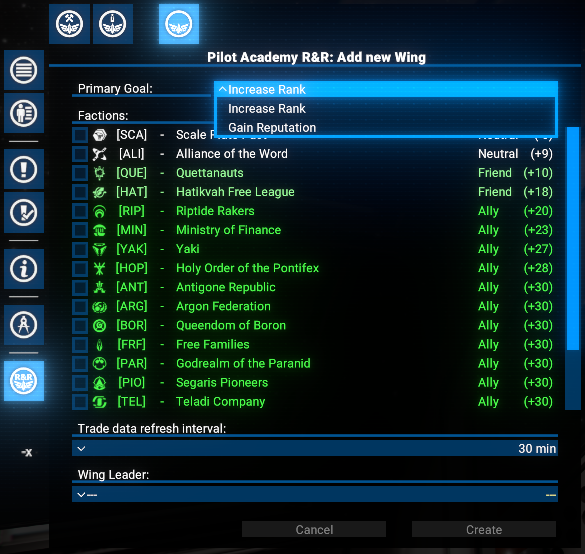
Since the market situation is not static, the Wing Commander must re-check market data to be most effective. The Player can set a value from 5 minutes to one hour.
The main part of Wing creation is selecting the Wing Leader. Use the appropriate dropdown, which will display all unassigned S-class ships, sorted by their pilots' ranks.
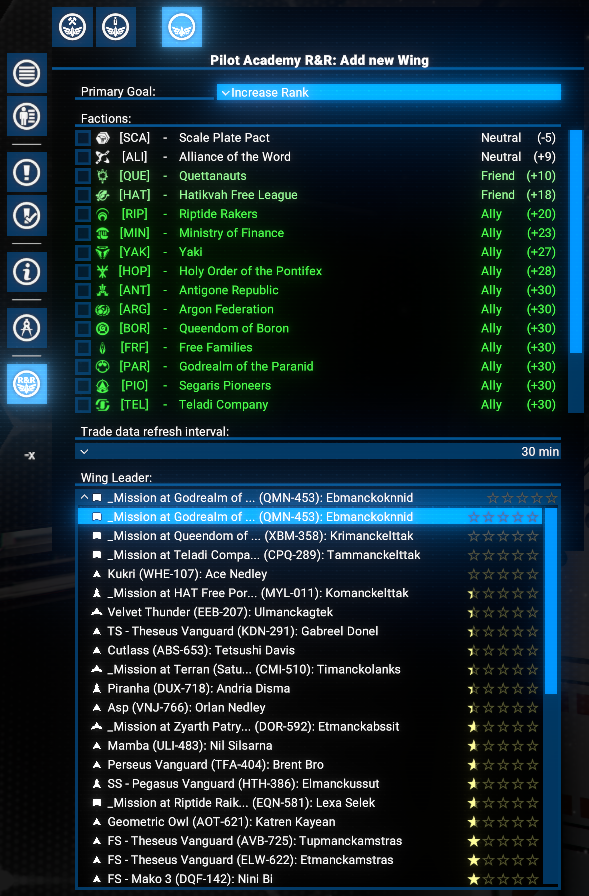
Simply press the Create button to finalize the Wing creation process.
Immediately after Wing creation, the current tab focus will switch to the newly created Wing. The first one will be Alpha.
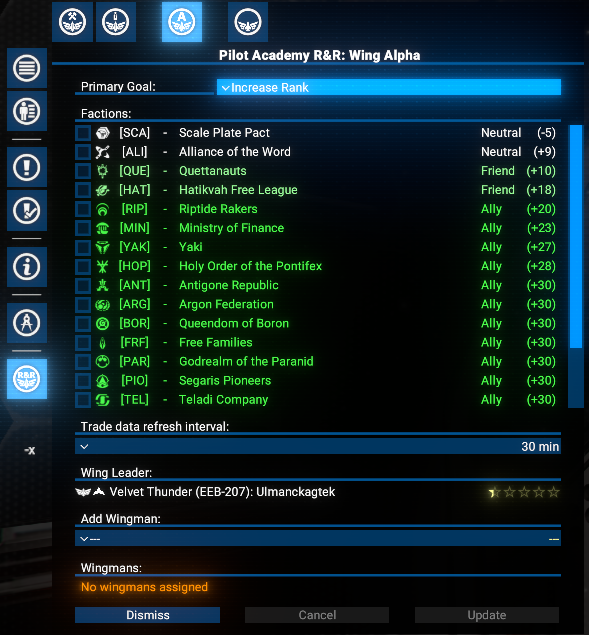
The Player can add any number of Wingmen to an existing Wing at any time on the appropriate Wing... tab using the Add Wingman dropdown.
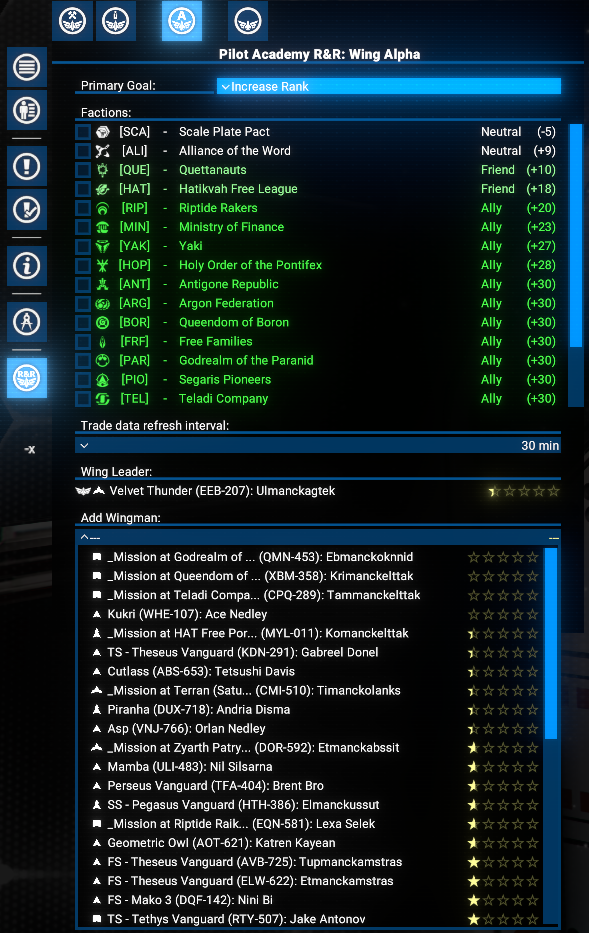
Note: It takes several seconds for an added Wingman to appear in the Wingmen list after selection.
In some cases, a Wingman may have failed the trainings by some unclear reason. In this case, order icon of such Wingman will be displayed with a warning color and a tooltip message indicating the failure reason.
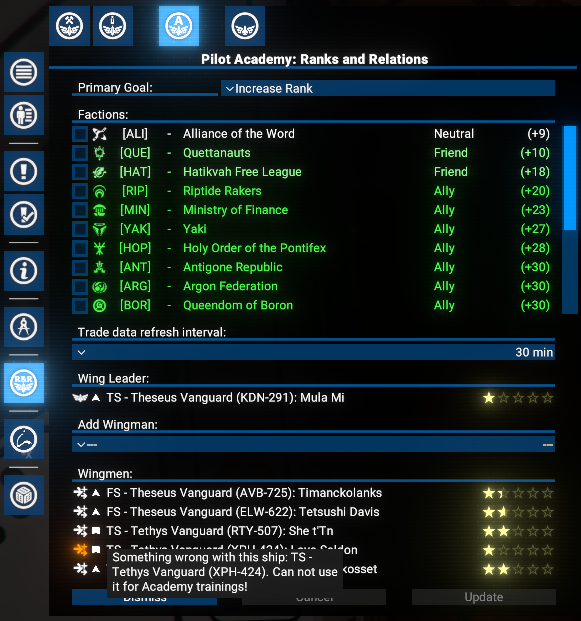
In this case, the best way to resolve the issue is to remove the Wingman from the Wing and use any other compatible ship as a replacement.
Wing Leader and Wingman Context Menus and Hotkey
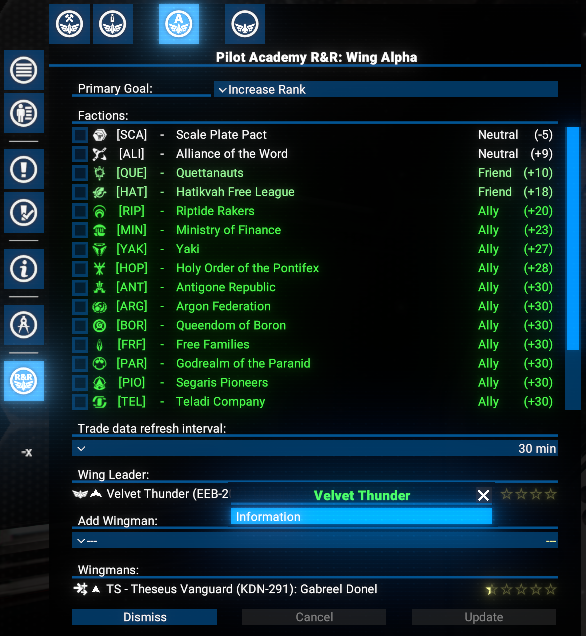
The Player can use the standard I key (or another, depending on key binding settings) to open the Information window if a Fleet, Wing Leader or Wingman item is selected.
The same action is available via the Context Menu.
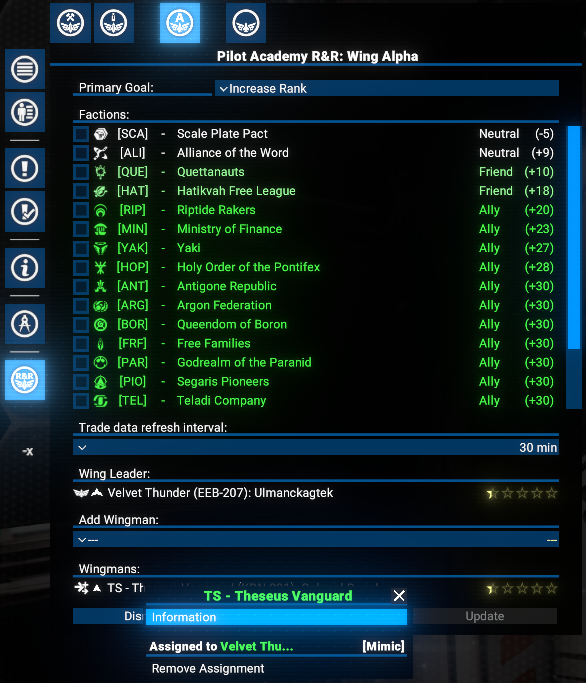
For a Wingman, the Remove Assignment action is also available.
 In addition, please be aware:
- If a Fleet, Wing Leader or Wingman item is selected (by one or two mouse clicks), it will be selected as a map object too.
- Double-clicking on a Fleet, Wing Leader or Wingman item will shift a map focus to the corresponding ship.
Research
- Pilot Academy. Five wings: Extends the Academy capacity to support five wings.
- Pilot Academy. Nine wings: Extends the Academy capacity to support nine wings.
- Pilot Academy. 3-star pilots: Allows training of 3-star pilots in the Academy.
- Pilot Academy. 4-star pilots: Allows training of 4-star pilots in the Academy.
- Pilot Academy. 5-star pilots: Allows training of 5-star pilots in the Academy.
- Pilot Academy. Auto hire: Adds the ability to automate Cadet hiring from desired factions.
- Pilot Academy. Auto assign: Adds the ability to automate pilot assignment to ships outside the Academy.

Options
An options menu is available via the Extension Options menu.
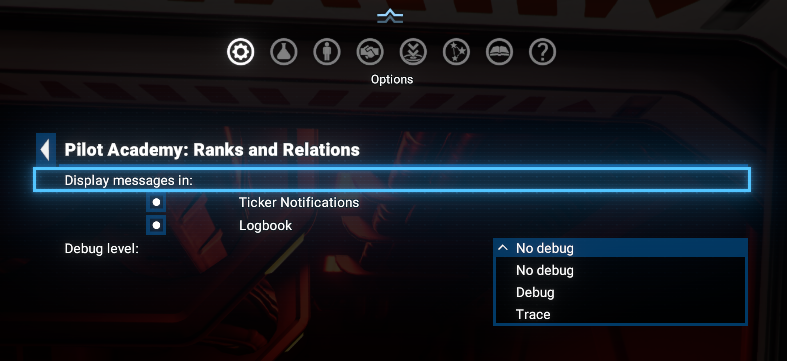
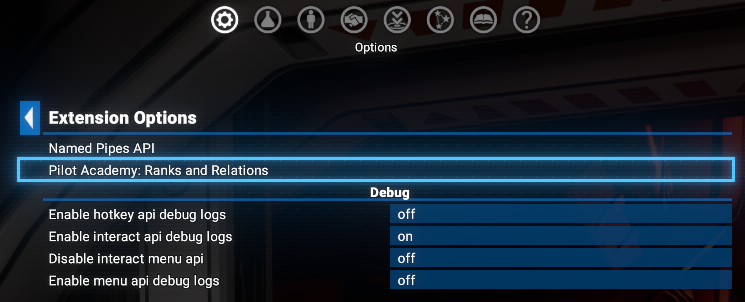 Player can:
- Enable / disable the notifications in the Notification Ticker and Logbook.
- Set the debug level for the mod. By default, it is set to No debug.
Notifications and Logbook messages
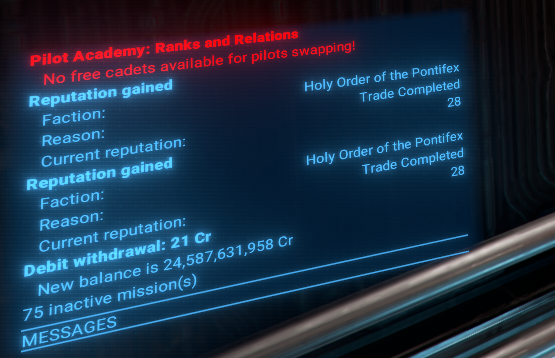
Several notifications are implemented to keep the Player informed about important events related to Academy operations. They will be shown in the standard notifications area (ticker) and in the Logbook, if appropriate settings are enabled.
There are examples of texts and notifications screenshots:
- When a pilot has finished training and reached the target rank: "Pilot %s has reached the target skill level %s."
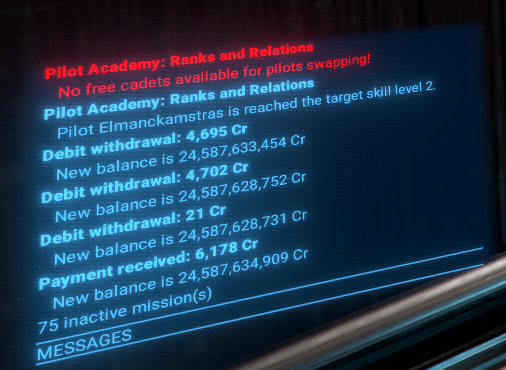
- When no free Cadets are available at the academy to replace a trained pilot: "No free cadets available for pilots swapping!"
- If a new Cadet is hired: "Cadet %s has been hired for %s {1001,101}."
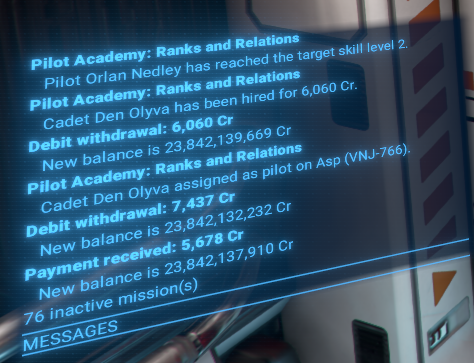
- If there is no free space on a ship to transfer a Cadet: "No free crew capacity on %s to do pilot swapping!"
- When a new Cadet is assigned to a Wing: "Cadet %s assigned as pilot on %s."
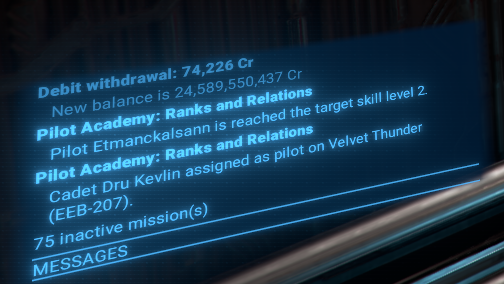
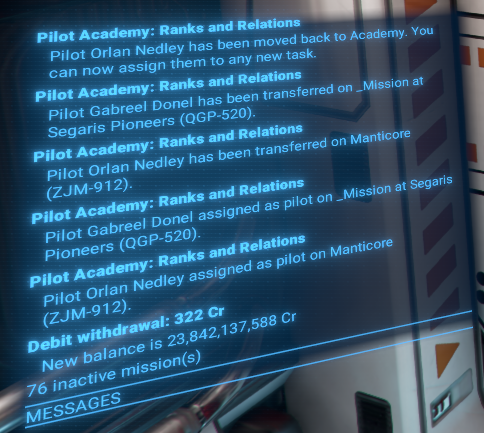
- When a Trained Pilot is moved back to the academy: "Pilot %s has been moved back to Academy. You can now assign them to any new task."
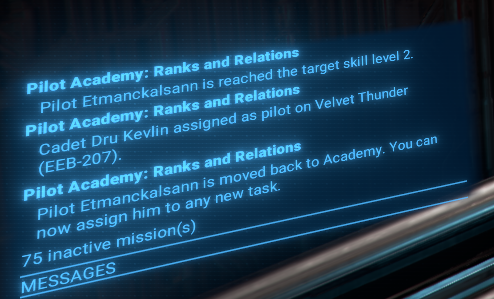
- With Auto Assign, when a Trained Pilot arrives on a new ship: "Pilot %s has been transferred on %s."
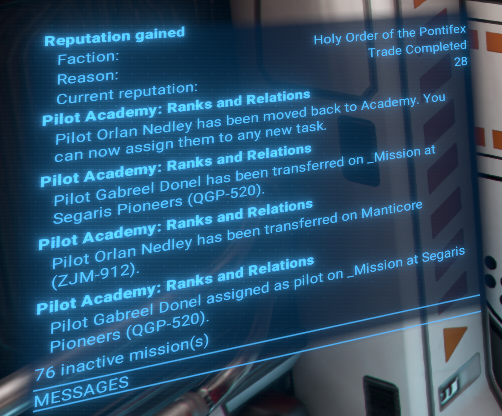
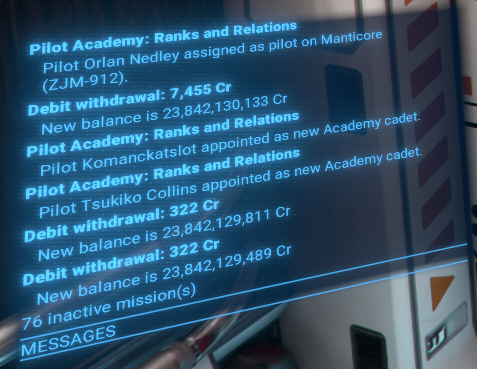
- An then on pilots swapping: "Pilot %s assigned as pilot on %s."
- After moving the "old" one to the Academy, the Player will be notified with: "Pilot %s appointed as new Academy cadet."
- In case of errors in Cadet and Trained Pilot transfers and swaps, several warning messages will be displayed:
- "Can't perform pilot swapping on %s! Please do it manually!"
- "Can't return pilot %s to the Academy! Please do it manually!"
- "No free capacity at Academy to return pilot %s! Please resolve it!"
- "Can't move new pilot %s to %s!"
- "Can't perform pilot swapping on %s! Please do it manually!"
- And hopefully, this warning will not be displayed: "Can't assign Academy training order on wing %s with leader ship %s! Please report the issue!"
Credits and Acknowledgements
- Author: Chem O`Dun, on Nexus Mods[next.nexusmods.com] and Steam Workshop
- "X4: Foundations" is a trademark of Egosoft[www.egosoft.com].
Mod Changelog
- Fixed
- Buttons absence under game version 9.00(beta1)
- Changed
- Academy button location in the left sidebar of the map menu to be next after the Information button.
- Added
- New option Consider first as candidate for Station Manager to automatically assign skilled pilots to Station Manager positions if their Manager skills are higher than the current Station Manager.
- New option Skip Stations without Storages to prevent assigning skilled pilots to stations without storages, which are usually defense platforms.
- Color and tooltip message for Wingman with failed orders in the Wing management tab.
- New option Consider first as candidate for Station Manager to automatically assign skilled pilots to Station Manager positions if their Manager skills are higher than the current Station Manager.
- Improved
- The order responsible for pilot training will now operate without constant docking and undocking cycles, which should significantly reduce training time and prevent possible issues with police interference during the training process.
It will still perform docking and undocking maneuvers when free docking space is limited for other ships, and will also do so at least once every 5 minutes. - Some code optimization and refactoring
- The order responsible for pilot training will now operate without constant docking and undocking cycles, which should significantly reduce training time and prevent possible issues with police interference during the training process.
- Fixed
- After disabling Notification Ticker and Logbook, on next opening of the Academy Options menu, the notifications were enabled again.
- Fixed
- In some cases, the list of candidates for Wing Leader or Wingman selection contained ships that were not accessible for these roles.
- Possible inefficiency of the training process by adding temporary blacklisting of trade offers that are not accessible for the Player.
- Ranks Limitation is some cases not fully worked, allowing pilots to be trained above the target rank level. Now the training process will not be stopped but speed will be significantly reduced for pilots that have reached the target rank level.
[1.06] - 2026-02-24- Improved
- Illegal ware check for trade offers evaluation to prevent possible issues with police interference during training process
[1.05] - 2026-02-20- Added
- The To Selected Fleets assignment option now allows you to manually transfer any of your skilled pilots to the Academy. The Academy can then act as a Pilot Dispatch center, automatically assigning these experienced pilots to fill open roles in your selected fleets.
- Fixed
- Academy tabs titles
- Managing Cadets and Trained Pilots when Academy is situated on non-Player station
- Selection of some UI items
- Increased reachability check accuracy for trade offers evaluation
- Academy tabs titles
[1.04] - 2026-02-15- Added
- New target selection for Trained Pilots assignment: To Selected Fleets. With this option, the Player can select a specific fleets for the pilot assignment.
- Fixed
- Factions and Wingmans scrolling in the Academy window
- Wing Leander an Wingmans selections
- Title for pilot moving notifications
- Other small visual issues in the Academy window
- Factions and Wingmans scrolling in the Academy window
[1.03] - 2026-02-14- Added
- New option Auto fire less skilled crew member if crew is full to automatically dismiss the less qualified crew member if the target ship's crew is full during pilot swapping.
- Improved
- Academy window drawing preparation
[1.02] - 2026-02-12- Fixed
- Some small code mistypings
- Improved
- Some code optimization and refactoring
[1.01] - 2026-02-12- Fixed
- Academy window not displayed properly on resolutions higher than Full HD (1920x1080)
[1.00] - 2026-02-10- Added
- Initial public version
- In some cases, the list of candidates for Wing Leader or Wingman selection contained ships that were not accessible for these roles.
- X4 Full Map [Timelines][7.0]★ 5 (579)46k views1.2k ♥1 minUpdated 22 Jun, 2024
- A Guide to Game Starts★ 5 (209)28k views437 ♥27 minUpdated 7 Jan
- X4 Beginner Guide 5.1★ 5 (393)27k views1.2k ♥22 minUpdated 7 Mar, 2023
- All Ownerless Ships in X4: Foundations (9.00 Base Game + All DLCs)★ 5 (453)27k views1.1k ♥10 minUpdated 10 Jun
- X4 Ultimate Weapons Guide. [NOW ON THE WIKI]★ 5 (343)23k views768 ♥104 minUpdated 8 Jul, 2024
- X4 sector map★ 4 (146)22k views207 ♥1 minUpdated 6 Dec, 2018


- Upgrading to PremiumTeam Fortress 2★ 5 (20k)1441k views11k ♥6 minUpdated May 11, 2022
- No More Room in Hell Official ManualNo More Room in Hell★ 5 (2.8k)569k views2.1k ♥29 minUpdated Apr 22, 2019
- NMRiH Community Hosting GuidesNo More Room in Hell★ 5 (526)351k views653 ♥1 minUpdated Aug 10, 2022
- ULTIMATE GUIDE FOR GAME DEV TYCOONGame Dev Tycoon★ 5 (5.8k)326k views10k ♥4 minUpdated 23 Jan, 2014
- How to 'Git Gud' Soon™MORDHAU★ 5 (2k)318k views3k ♥68 minUpdated Nov 16, 2024
- Лучшие кооперативные игры SteamPAYDAY 2★ 5 (1.5k)315k views2.1k ♥56 minRussianUpdated Apr 27, 2025






This guide was created by its original author on the Steam Community. Are you the author and want it removed? Request removal.