[TOOL] GD Switcher
[TOOL] GD Switcher
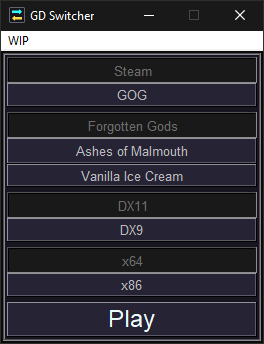 Download
---
- Via https://forums.crateentertainment.com/t/tool-gd-switcher-v1-2/51259/1 - v1.2 - *posted on 12/12/2019*
- Still considering uploading to Nexus and Moddb as alternative download options
What It Does
---
- Lets you easily set and change launch options and fire the game up
- Enable/disable expansions to more easily play with your friends
- More in-depth features are being worked on (saves/stash/mods management and other related tasks)
How To Use
---
- It's a self-contained .exe file, no installation needed
- Download and place it wherever you like (I prefer pinning it to the Windows taskbar personally)
- Fire it up and press some buttons. If you have custom installation paths, set your paths
More Random Info
---
- Right-click on the "Steam" or "GOG" buttons to access the "Set Paths" screen for each of the game clients, the options on each of these pages will be greyed out/disabled if Switcher already detects the default paths or otherwise has already attained this information
- Switcher creates a folder for itself here: C:\Users\YOUR USERNAME HERE\Documents\My Games\gd-switcher
- It uses this folder to create token .txt files here that it uses as its "memory" so that it remembers the various settings you choose from session to session
- This is also where it stores the shortcut files it uses to launch the game
- Delete the above mentioned folder to "uninstall" the program if you need to. Doing this is also an easy way to "reset" Switcher
---
Special thanks to JMD for making Switcher's icons and for testing the "other" version I was working on. Don't worry, I'll get the Python version up to that point :)
To everyone else, be sure to check out JMD's amazing UI modification: Grim UI[forums.crateentertainment.com]
Need to know how to move your saves from the cloud to local saving (or vice versa)? Then check out my visual guide that shows you step-by-step, nice and easy: Visual Guide to Move Your Cloud Saves to Local - and Vice Versa[forums.crateentertainment.com]
More Grim Dawn guides
- Class Selection (EN)★ 5 (510)58k views841 ♥9 minUpdated Jul 6, 2017
- Beginner's Guide to Skills★ 5 (1.1k)53k views2.3k ♥167 minUpdated Nov 4, 2021
- Devotion Shrines★ 5 (2.1k)43k views3.7k ♥5 minUpdated Nov 22, 2023
- How to start new games at level 15+★ 4 (161)30k views341 ♥6 minUpdated Jul 6, 2019
- Секретные Локации★ 5 (1.1k)27k views1.9k ♥8 minRussianUpdated Apr 20, 2017
- Lokarr - Secret Quest (AoM)★ 5 (549)26k views1k ♥10 minUpdated Oct 5, 2018




🔥 Popular guides
- Upgrading to PremiumTeam Fortress 2★ 5 (20k)1441k views11k ♥6 minUpdated May 11, 2022
- No More Room in Hell Official ManualNo More Room in Hell★ 5 (2.8k)569k views2.1k ♥29 minUpdated Apr 22, 2019
- NMRiH Community Hosting GuidesNo More Room in Hell★ 5 (526)351k views653 ♥1 minUpdated Aug 10, 2022
- Лучшие кооперативные игры SteamPAYDAY 2★ 5 (1.5k)315k views2.1k ♥56 minRussianUpdated Apr 27, 2025
- Desert Eagle Heat Treated | Blue GemCounter-Strike 2★ 5 (1.6k)292k views1.5k ♥2 minUpdated Jan 16
- Treasure Hunt Puzzle SolutionsTotal War: WARHAMMER II★ 5 (6.9k)281k views15k ♥3 minUpdated Aug 19, 2021






This guide was created by its original author on the Steam Community. Are you the author and want it removed? Request removal.