Transparenz deaktivieren / disable transparency
Anleitung / Instructions
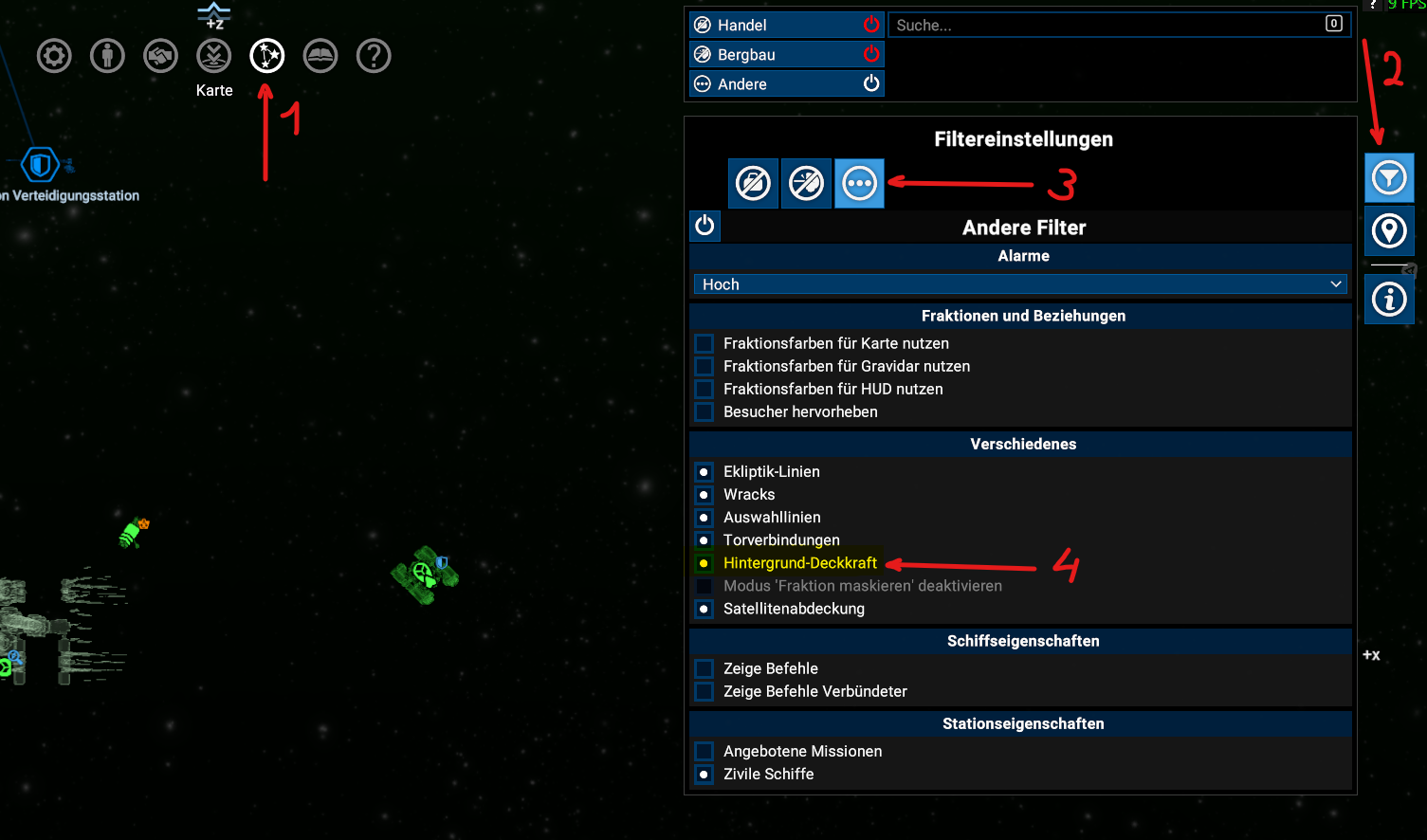
Starte X4, lade deinen Spielstand und öffne das Kartenmenü (standardmäßig Taste M)
Open X4, load your savegame and open the map view (default key M)
Klicke auf Filter, Andere Filter, Verschiedenes, Hintergrund Deckkraft (Aktivieren)
Click on filter, other filters, misc, background opacity (activate)
Der Kartenhintergrund sollte nun undurchsichtig sein.
The map view background should now be opaque.
Danke / Thank you
Danke fürs Vorbeischauen in dem Guide. Bitte weist die Entwickler darauf hin, dass wichtige Optionen immer gut sichtbar sein sollten.
Thank you for visiting this guide. Please consider giving the devs a hint for making important options more visible.
Thank you for visiting this guide. Please consider giving the devs a hint for making important options more visible.
More X4: Foundations guides
- X4 Full Map [Timelines][7.0]★ 5 (579)46k views1.2k ♥1 minUpdated 22 Jun, 2024
- A Guide to Game Starts★ 5 (209)28k views437 ♥27 minUpdated 7 Jan
- X4 Beginner Guide 5.1★ 5 (393)27k views1.2k ♥22 minUpdated 7 Mar, 2023
- All Ownerless Ships in X4: Foundations (9.00 Base Game + All DLCs)★ 5 (453)27k views1.1k ♥10 minUpdated 10 Jun
- X4 Ultimate Weapons Guide. [NOW ON THE WIKI]★ 5 (343)23k views768 ♥104 minUpdated 8 Jul, 2024
- X4 sector map★ 4 (146)22k views207 ♥1 minUpdated 6 Dec, 2018


🔥 Popular guides
- Upgrading to PremiumTeam Fortress 2★ 5 (20k)1441k views11k ♥6 minUpdated May 11, 2022
- No More Room in Hell Official ManualNo More Room in Hell★ 5 (2.8k)569k views2.1k ♥29 minUpdated Apr 22, 2019
- NMRiH Community Hosting GuidesNo More Room in Hell★ 5 (526)351k views653 ♥1 minUpdated Aug 10, 2022
- ULTIMATE GUIDE FOR GAME DEV TYCOONGame Dev Tycoon★ 5 (5.8k)326k views10k ♥4 minUpdated 23 Jan, 2014
- How to 'Git Gud' Soon™MORDHAU★ 5 (2k)318k views3k ♥68 minUpdated Nov 16, 2024
- Лучшие кооперативные игры SteamPAYDAY 2★ 5 (1.5k)315k views2.1k ♥56 minRussianUpdated Apr 27, 2025






This guide was created by its original author on the Steam Community. Are you the author and want it removed? Request removal.