How to download Half-Life 2 mods that don´t appear in the workshop?
Requirements
First, you need the main game for sure. Some mods require the episodes too, so just install them in case. You can find Half-Life 2 with both episodes here:
https://store.steampowered.com/app/220/
Before you start, make sure that you have "Source SDK Base 2013 Singleplayer" installed, you can find it in your steam-library by typing in "source" .
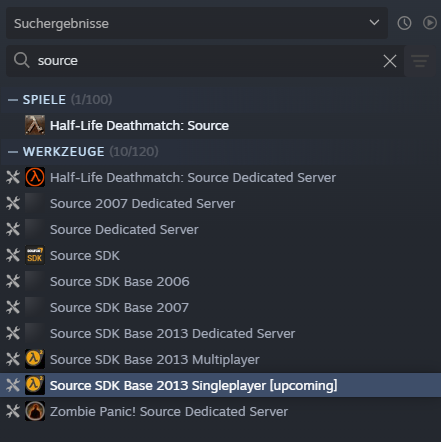 After its succesfully installed, right-click it, go to properties>beta and select "upcoming".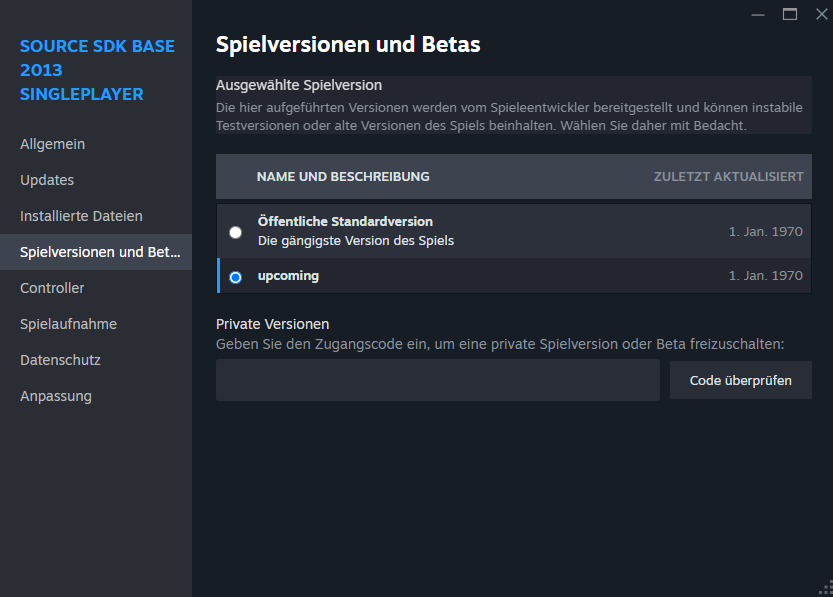
If you want to run older mods, install "Source SDK Base 2006" and "Source SDK Base 2007" too.
You will also need a program like win-rar[www.win-rar.com]or 7-zip[www.7-zip.org] to un-zip the mod-folders later.
Where can i get those mods?
Simply download them on a website of your choice, i would recommend trying Moddb or Gamebanana[gamebanana.com]but its up to you.
After you have downloaded a mod, you should have a file of it like this. Example:
Now just extract it by righclicking>extract all and you´re ready for the next step!
How can i install them properly?
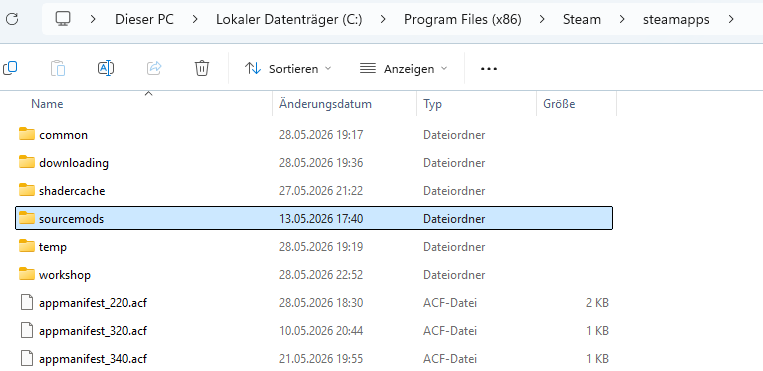 Take the main file from the mod of your choice, where the data is stored (not the "read me"-file or sth like that) and drag it into the "sourcemods" folder.
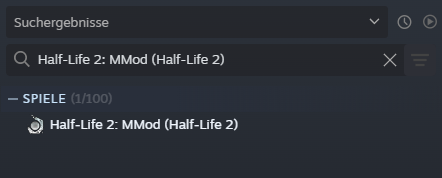
After restarting Steam, the mod should either appear in your steam library or is already in the game. For example:
If you can´t find the "sourcemods"-folder, then open the explorer, scroll down and click on "this pc>Volume where HL2 is installed on> programs (x86)>Steam>Steamapps> Sourcemods
If done correctly, the mods should work (remember to restart steam!)
- Half life 2 Cheats & commands (works for other source games too)★ 5 (1.5k)152k views2.9k ♥13 minUpdated Dec 4, 2024
- Lambda Locator★ 5 (8k)117k views9.3k ♥14 minUpdated Feb 25, 2016
- Half-Life 2 — Чит коды и консольные команды★ 5 (831)62k views1.5k ♥58 minRussianUpdated Dec 29, 2024
- Half-Life 2 100% Achievement Guide★ 5 (1.1k)40k views1.6k ♥5 minUpdated Nov 16, 2024
- 100% Achievement Guide: Half Life 2★ 5 (1.3k)24k views2.6k ♥103 minUpdated May 13
- 🏆 Lambda Locator - All Locations Detailed★ 5 (1.9k)24k views2.9k ♥17 minUpdated Aug 19, 2021





- Upgrading to PremiumTeam Fortress 2★ 5 (20k)1441k views11k ♥6 minUpdated May 11, 2022
- No More Room in Hell Official ManualNo More Room in Hell★ 5 (2.8k)569k views2.1k ♥29 minUpdated Apr 22, 2019
- NMRiH Community Hosting GuidesNo More Room in Hell★ 5 (526)351k views653 ♥1 minUpdated Aug 10, 2022
- ULTIMATE GUIDE FOR GAME DEV TYCOONGame Dev Tycoon★ 5 (5.8k)326k views10k ♥4 minUpdated 23 Jan, 2014
- How to 'Git Gud' Soon™MORDHAU★ 5 (2k)318k views3k ♥68 minUpdated Nov 16, 2024
- Лучшие кооперативные игры SteamPAYDAY 2★ 5 (1.5k)315k views2.1k ♥56 minRussianUpdated Apr 27, 2025






This guide was created by its original author on the Steam Community. Are you the author and want it removed? Request removal.