How to install OWN music on STEAM DECK in ATS
Preparation
1. To begin with, you need to have the music itself on the deck, and I will additionally emphasize that it DOESN'T matter where exactly, you can even throw it on a memory card
2. Next, turn on the "show hidden files" option, this is necessary in order to get to the music folder from which the game pulls the same music
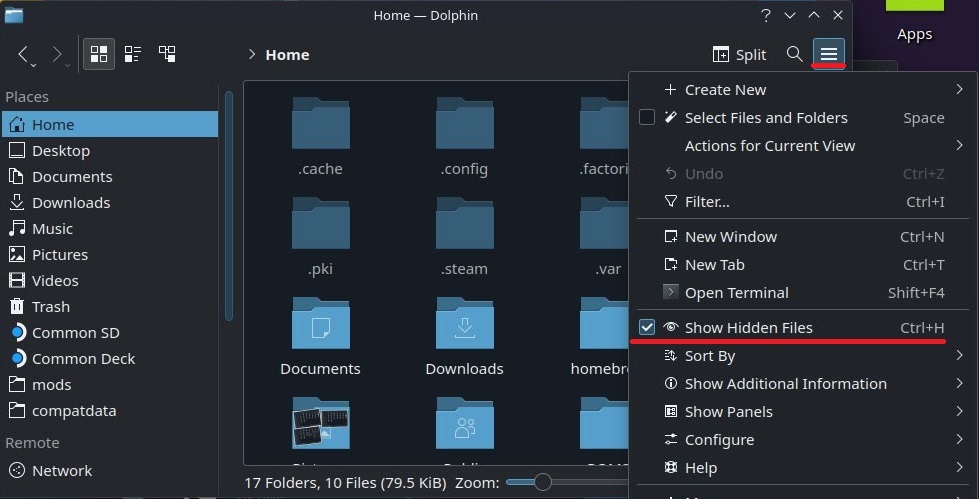
2. Next, turn on the "show hidden files" option, this is necessary in order to get to the music folder from which the game pulls the same music
Let's throw music into the game
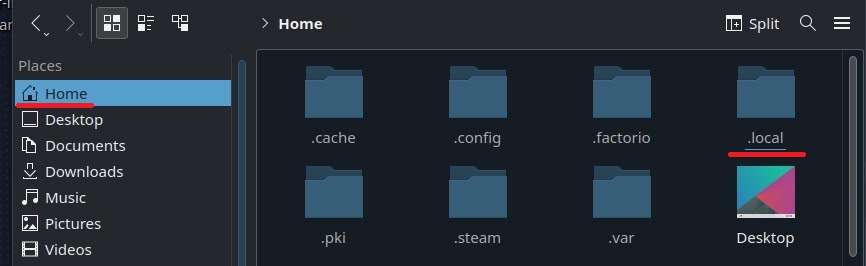
1. First, go to Home and find the .local folder
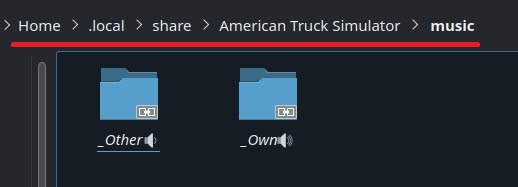
And we go directly to the music folder for the game (home/.local/share/American Truck Simulator/music)
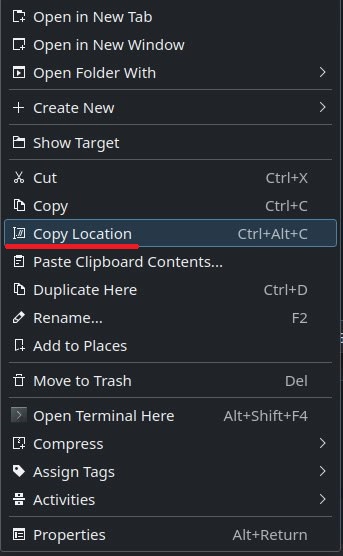
Great, you're halfway there 2. Now go to the folder with our music and call the context menu with the right mouse button (or RT) and select "Copy Location"
 3. Return to the music folder we entered earlier, call up the context menu on an empty space and select "Create New -> Link to File or Directory...
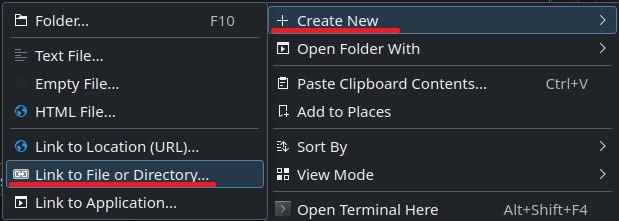
The Create Symlink window will appear, in the LOWER column we insert the path to the folder with our music that we copied earlier, there is no need to touch the first column - the name will fit there by itself as soon as we insert the path
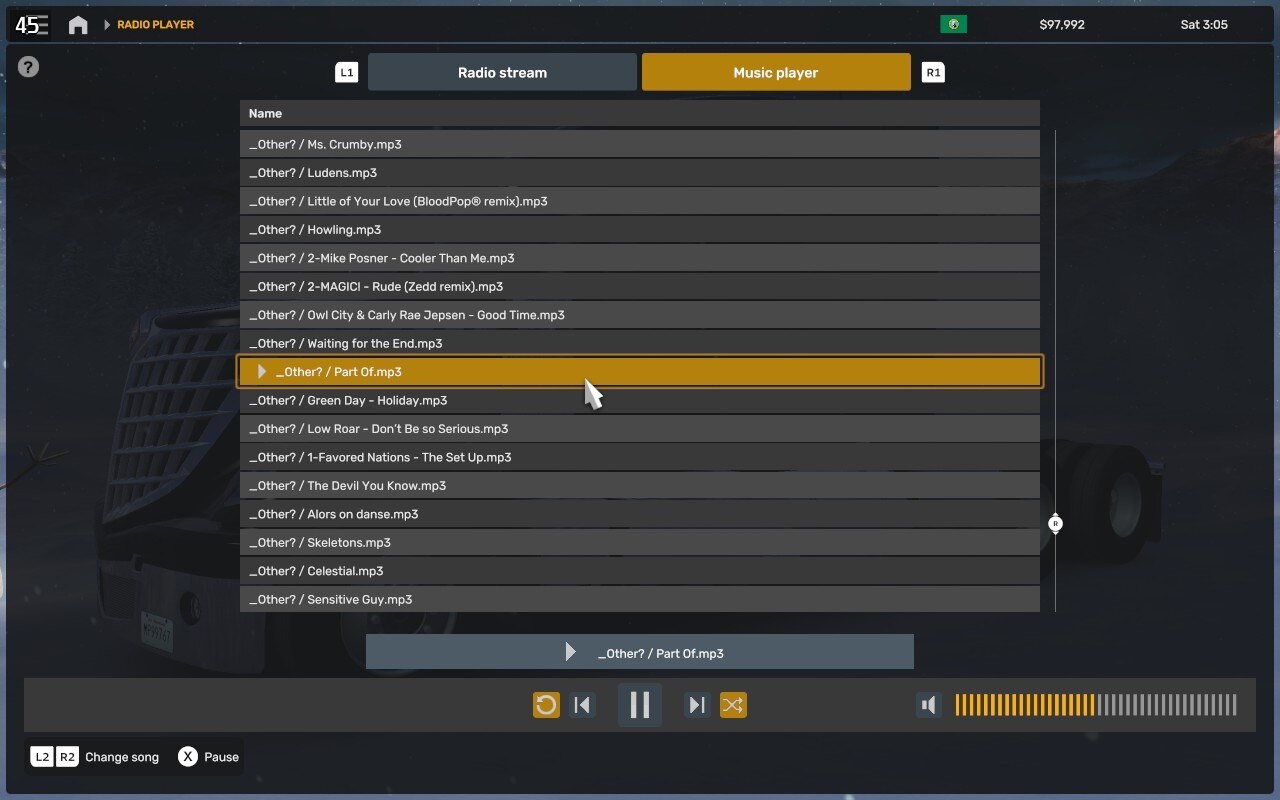
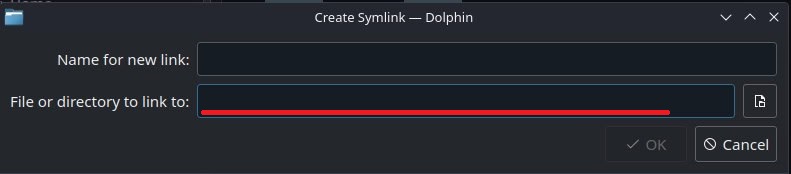 That's it, a shortcut should have been created, close everything and enter the game, if you did everything correctly, all our music should have appeared in the player
And we go directly to the music folder for the game (home/.local/share/American Truck Simulator/music)
Great, you're halfway there 2. Now go to the folder with our music and call the context menu with the right mouse button (or RT) and select "Copy Location"
3. Return to the music folder we entered earlier, call up the context menu on an empty space and select "Create New -> Link to File or Directory...The Create Symlink window will appear, in the LOWER column we insert the path to the folder with our music that we copied earlier, there is no need to touch the first column - the name will fit there by itself as soon as we insert the path
That's it, a shortcut should have been created, close everything and enter the game, if you did everything correctly, all our music should have appeared in the player
My English is poor, there may be many errors in the instructions, if anyone is ready to put things in order in the text, a vacancy for a contributor is open.
More American Truck Simulator guides
- Hidden and unmarked roads - USA - WEST - updated 2026/02/20★ 5 (1.3k)38k views1.9k ♥73 minUpdated Feb 19
- The American Truckers Guide to everything!★ 5 (960)34k views1.5k ♥53 minUpdated Aug 16, 2020
- American Truck Simulator 100% Achievement-Guide [ENG]★ 5 (704)15k views1.3k ♥8 minUpdated May 16
- Все достижения American Truck Simulator + все DLC [100% Achievement-Guide] [upd: 15.05.26]★ 5 (1.2k)14k views1.7k ♥42 minRussianUpdated Jul 12
- ATS | Cheat-codes | ENG★ 4 (106)13k views183 ♥3 minUpdated 2 Jan, 2025
- Texas 100% Achievement-Guide [ENG]★ 5 (443)12k views595 ♥7 minUpdated May 16


🔥 Popular guides
- Upgrading to PremiumTeam Fortress 2★ 5 (20k)1441k views11k ♥6 minUpdated May 11, 2022
- No More Room in Hell Official ManualNo More Room in Hell★ 5 (2.8k)569k views2.1k ♥29 minUpdated Apr 22, 2019
- NMRiH Community Hosting GuidesNo More Room in Hell★ 5 (526)351k views653 ♥1 minUpdated Aug 10, 2022
- ULTIMATE GUIDE FOR GAME DEV TYCOONGame Dev Tycoon★ 5 (5.8k)326k views10k ♥4 minUpdated 23 Jan, 2014
- How to 'Git Gud' Soon™MORDHAU★ 5 (2k)318k views3k ♥68 minUpdated Nov 16, 2024
- Лучшие кооперативные игры SteamPAYDAY 2★ 5 (1.5k)315k views2.1k ♥56 minRussianUpdated Apr 27, 2025






This guide was created by its original author on the Steam Community. Are you the author and want it removed? Request removal.