How to play twitch mode without twitch
Vermintwitch
Twitch mode is one of my favourite ways to enjoy the game, it's one way to add excitement and challenge to your matches even when you have invested tons of hours into the game. But very few people playing twitch mode actually stream, they don't have an audience trying to put them in predicaments, so we leave it up to a coin toss.
This is fine, but sometimes some options are just more fun. Sometimes you want to fight monsters back-to-back, and you get a curse or loot rats. Sometimes you're clutching it out and the game decides to put the movement curse on you, dooming the run with no counterplay. I'm sure you have thought before "oh I hope it's that one".
So I wrote a very simple program that lets you choose. Official or modded. Here's a small demo:
https://www.youtube.com/watch?v=CJJ15B4suDI
The exe or a zip containing the exe can be downloaded from the github repositories releases page here[github.com].
Always download the latest possible version to ensure you get bugfixes.
Windows binaries like to be signed by a certificate from a trusted certificate authority which will run developers between $500-$1000 a year. This is more than I would like to spend so I opted for the trust me bro method. The github repo is controlled solely by me and if you want to compile from source yourself to be sure you are more than welcome to.
You can get started with cargo here[doc.rust-lang.org] to build it yourself. And are free to make any changes.
Vermintide's interaction with twitch is actually very simple. It uses the twitch api to find a channel and acquire a chat. It then connects to a chat via IRC and checks the text for #A/#B/#C/#D/#E to apply votes.
So all this program does is start a fake twitch server that runs on your local machine. It then listens for hotkeys that you registered via the GUI and places text into the fake IRC chat.
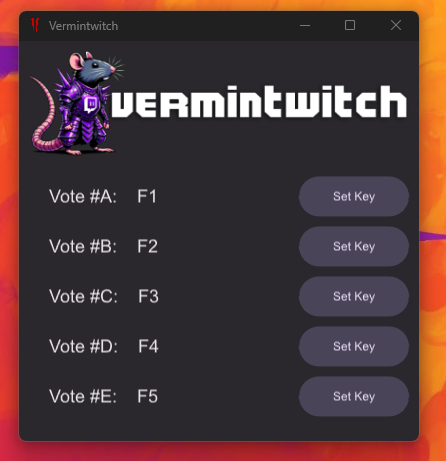
We then insert an entry into your system's hosts file, which causes the computer to look up it's own IP address when attempting to resolve the addresses of api.twitch.tv and irc.twitch.tv.
Note that trying to use other applications that utilise the twitch API while the program is running will probably break. The program will remove the host entries upon closing.
The program is entirely external from the game and does not interact with game processes or mess with game files at all. It redirects connections intended for twitch at a network level and completely ignores any data it receives outside of TLS handshake.
As for how fatshark feels, I asked a few devs and got this response from Aqshy, the community manager:

The executable is standalone but generates/modifies several files to run.
- Your system hosts file for DNS entries
- A generated self-signed root certificate
- App data to remember your keybinds
Instructions for manually removing all this from your system can be found in the README file.[github.com]
I have been using this simple tool to have more fun with the game and I hope someone else might enjoy it too.
- 【Updated to Patch 6.10】【All Careers】Legend Builds Collection★ 5 (2.6k)99k views7.6k ♥87 minUpdated Mar 10
- 【Updated to Patch 6.10】【Cataclysm Builds】Kruber all careers★ 5 (1.8k)60k views5.7k ♥33 minUpdated Mar 10
- 【Updated to Patch 6.11】Optimal Melee Weapon Combo★ 5 (1.9k)58k views5.2k ♥26 minUpdated Jun 11
- 【Updated to Patch 6.10】【Cataclysm Builds】Saltzpyre all careers★ 5 (1.7k)57k views5.6k ♥36 minUpdated Mar 10
- 【Updated to Patch 6.10】【Cataclysm Builds】Bardin all careers★ 5 (1.8k)57k views5.6k ♥33 minUpdated May 12
- 【Updated to Patch 6.10】【Cataclysm Builds】Sienna all careers★ 5 (1.7k)57k views5.4k ♥37 minUpdated Mar 10





- Upgrading to PremiumTeam Fortress 2★ 5 (20k)1441k views11k ♥6 minUpdated May 11, 2022
- No More Room in Hell Official ManualNo More Room in Hell★ 5 (2.8k)569k views2.1k ♥29 minUpdated Apr 22, 2019
- NMRiH Community Hosting GuidesNo More Room in Hell★ 5 (526)351k views653 ♥1 minUpdated Aug 10, 2022
- ULTIMATE GUIDE FOR GAME DEV TYCOONGame Dev Tycoon★ 5 (5.8k)326k views10k ♥4 minUpdated 23 Jan, 2014
- How to 'Git Gud' Soon™MORDHAU★ 5 (2k)318k views3k ♥68 minUpdated Nov 16, 2024
- Лучшие кооперативные игры SteamPAYDAY 2★ 5 (1.5k)315k views2.1k ♥56 minRussianUpdated Apr 27, 2025






This guide was created by its original author on the Steam Community. Are you the author and want it removed? Request removal.