Mods on Linux
Beta branches
It's not enough to subscribe to a mod in the Workshop, you also have to enable it in the launcher. Despite what some people say, the launcher works on Linux just fine. The issue is the Easy Anti Cheat (EAC) that misbehaves when you start the game with the launcher's Play button.
 You can start the launcher on the release branch, but you don't want to play it this way.
 To play the game, you should switch to the temporary_launcher_workaround branch (right-click game ⇾ Properties ⇾ Betas).
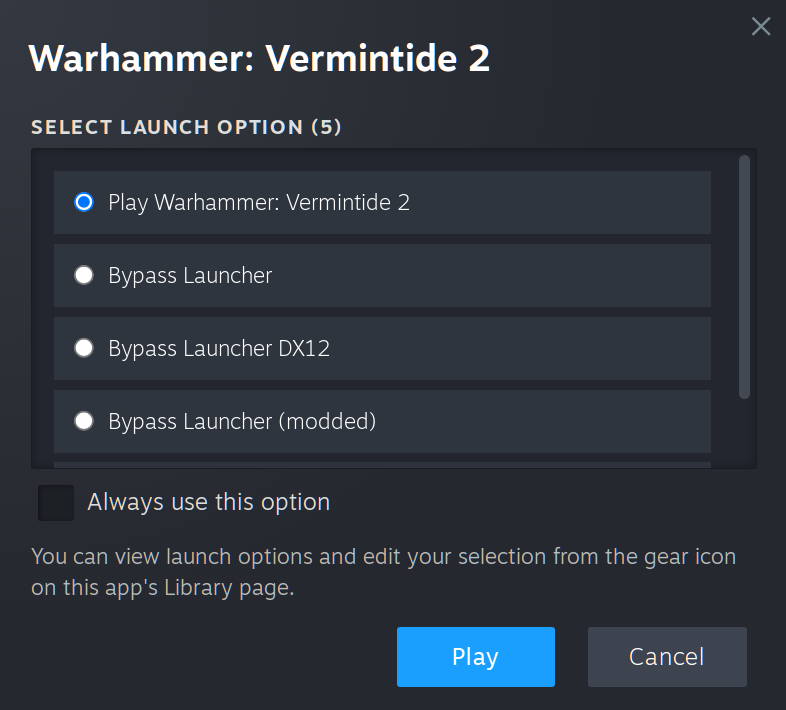
If you've switched already, no worries, you don't have to switch back just to start the launcher. Simply select Play Warhammer: Vermintide 2 when starting the game.
If that menu doesn't appear for you, you must've checked Always use this option at some point in the past. Again, no worries, we will temporarily revert that.
When launch menu doesn't appear
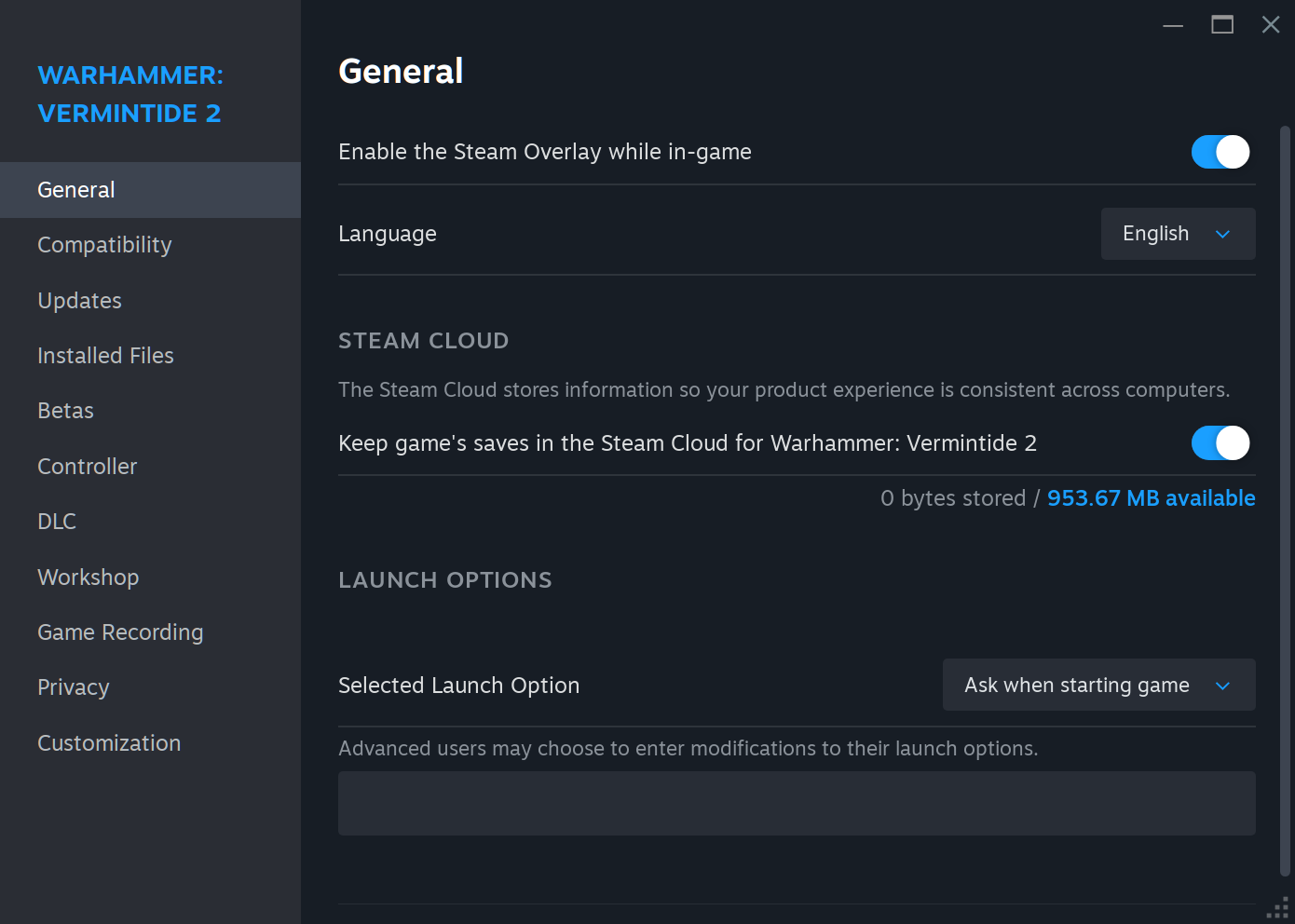
- right-click the game title ⇾ Properties
- swith General ⇾ Selected Launch Option
to Ask when starting game - close properties
- click PLAY in Steam to start the game
- instead of bypassing the launcher select
Play Warhammer: Vermintide 2
“Frozen splash screen” issue
 If it looks like the game “froze” on a splash screen, it's the launcher background rendering on top of the buttons… You have to hide it, e.g. by sending to another workspace – it'll reveal buttons underneath.
You have to use the keyboard shortcut, though – closing the background will close the launcher, dragging it will move the buttons as well, and there are no window decorations so you can't use the context menu.
Enable mods as usual
- check Modded Realm
- click Mods, select which mods to run, and set the order (dependencies must load first)
- [optionally] check Auto-disable Unsanctioned Mods in Official Realm
- save changes with ACCEPT
- close the launcher or force stop the game
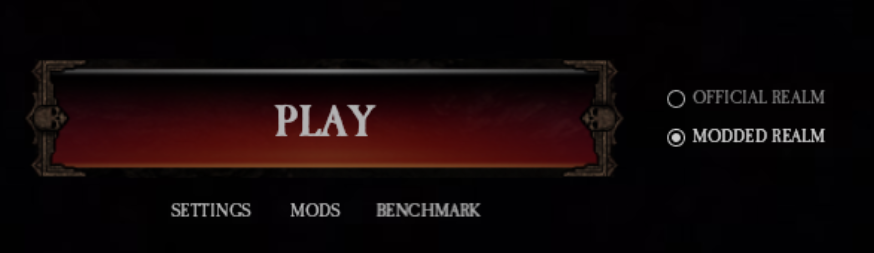
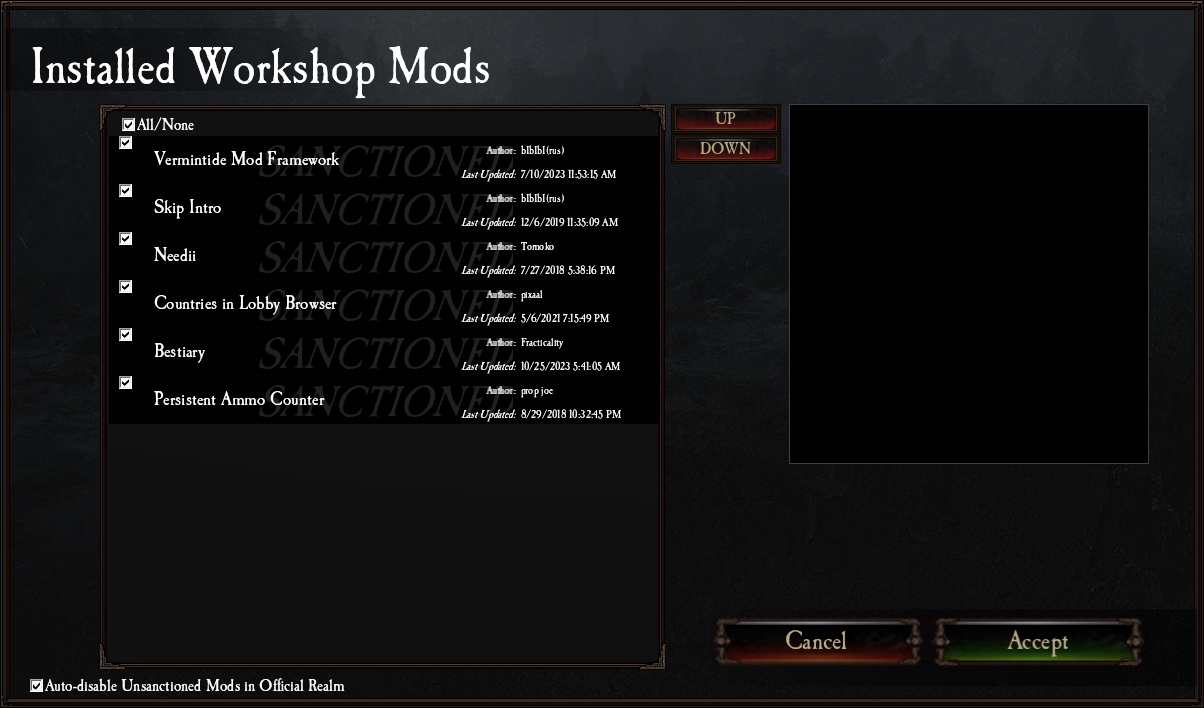

At this point, the mods are enabled. Remember to avoid Play button in the launcher – click STOP button in the Steam client instead, then start the game as usual.
Start the game as usual
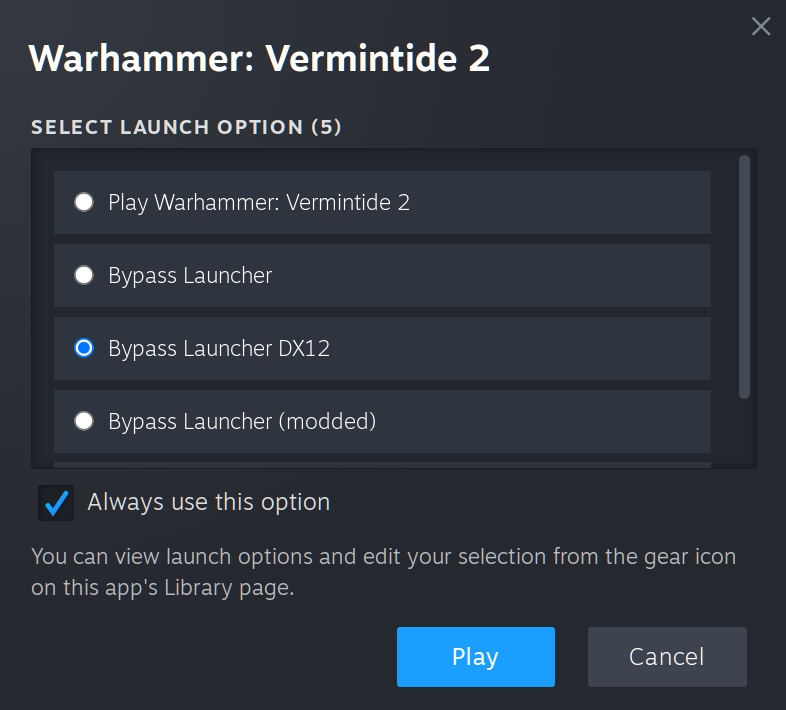
- click PLAY in Steam
- select Bypass Launcher DX12 (not the “modded” option! – mods will still load, no worries)
- [optionally] you can check Always use this option
⚠️ Warning
If you click Play in the launcher, or start the game with Bypass Launcher DX12 (modded) option, the game will start, and you'll be able to play… But after you finish the map, EAC will respond with gibberish, and you'll lose your progress (both, chests and XP)! Tested multiple times, so you wouldn't have to.
 (AI-generated thumbnail; if you know the artist whose style was stolen, please comment below)
- 【Updated to Patch 6.10】【All Careers】Legend Builds Collection★ 5 (2.6k)99k views7.6k ♥87 minUpdated Mar 10
- 【Updated to Patch 6.10】【Cataclysm Builds】Kruber all careers★ 5 (1.8k)60k views5.7k ♥33 minUpdated Mar 10
- 【Updated to Patch 6.11】Optimal Melee Weapon Combo★ 5 (1.9k)58k views5.2k ♥26 minUpdated Jun 11
- 【Updated to Patch 6.10】【Cataclysm Builds】Saltzpyre all careers★ 5 (1.7k)57k views5.6k ♥36 minUpdated Mar 10
- 【Updated to Patch 6.10】【Cataclysm Builds】Bardin all careers★ 5 (1.8k)57k views5.6k ♥33 minUpdated May 12
- 【Updated to Patch 6.10】【Cataclysm Builds】Sienna all careers★ 5 (1.7k)57k views5.4k ♥37 minUpdated Mar 10



- Upgrading to PremiumTeam Fortress 2★ 5 (20k)1441k views11k ♥6 minUpdated May 11, 2022
- No More Room in Hell Official ManualNo More Room in Hell★ 5 (2.8k)569k views2.1k ♥29 minUpdated Apr 22, 2019
- NMRiH Community Hosting GuidesNo More Room in Hell★ 5 (526)351k views653 ♥1 minUpdated Aug 10, 2022
- ULTIMATE GUIDE FOR GAME DEV TYCOONGame Dev Tycoon★ 5 (5.8k)326k views10k ♥4 minUpdated 23 Jan, 2014
- How to 'Git Gud' Soon™MORDHAU★ 5 (2k)318k views3k ♥68 minUpdated Nov 16, 2024
- Лучшие кооперативные игры SteamPAYDAY 2★ 5 (1.5k)315k views2.1k ♥56 minRussianUpdated Apr 27, 2025






This guide was created by its original author on the Steam Community. Are you the author and want it removed? Request removal.