Project Lightly Modded Skyrim (AE Ready)
Hello!
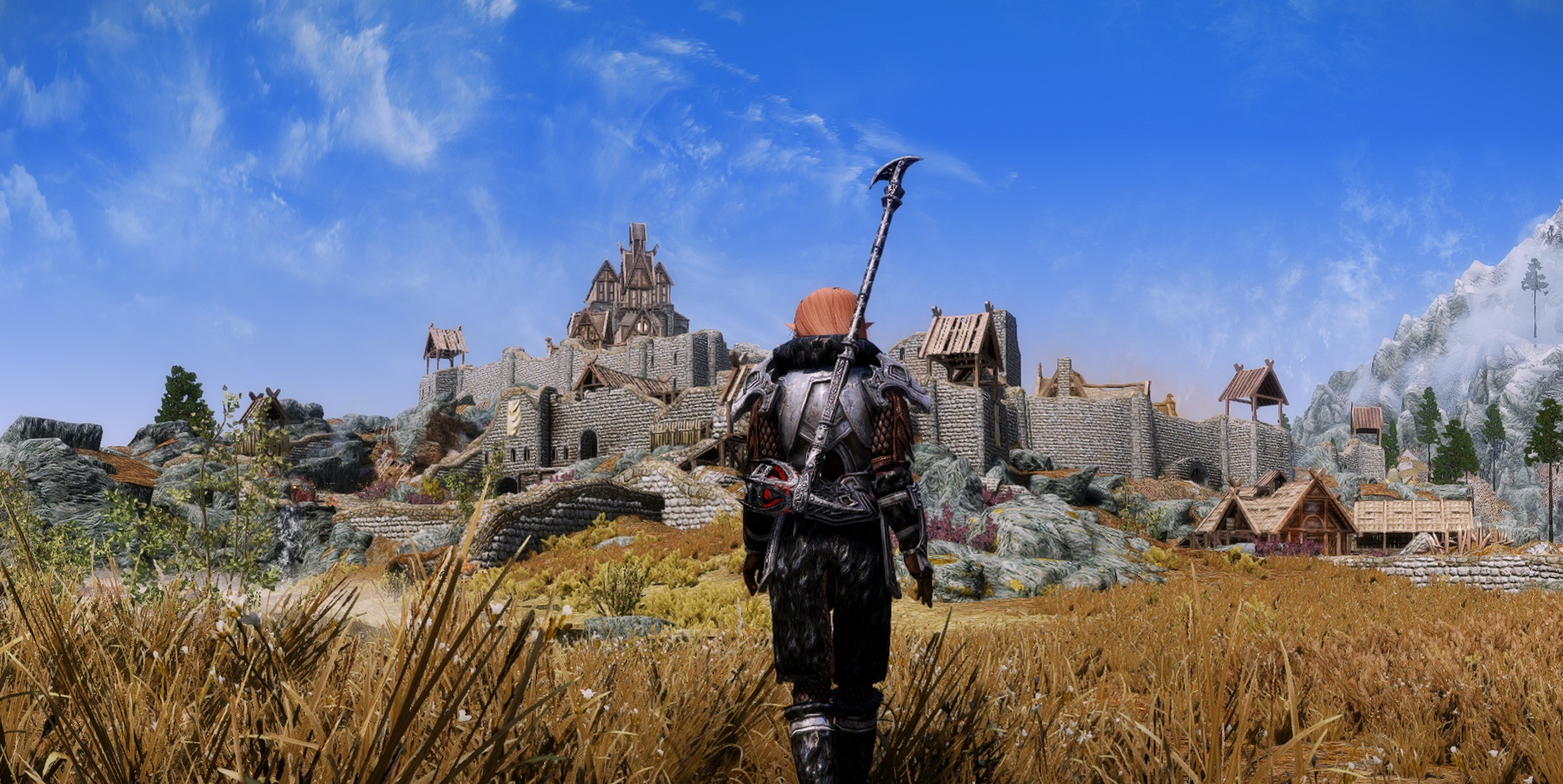
THIS GUIDE IS NOW READY FOR THE AE UPDATE
I will show you how to get most out of your game using as less mods as possible! Following this guide will give you a stable, beautiful looking and highly customizable game.
For people who never modded before or are new: Feel free to use the "Nexus Mod Manager". If you already know how to use Mod Organizer 2, use that one instead! Vortex works as well!
For the NMM users: Always overwrite any existing mod, when NMM asks to. ("Yes to all"). If a mod comes with an installation, alway install everything and or to your liking!
Have fun!
If you have questions feel free to write a comment below! Because I am just a normal human being some mistakes might happen. If you have tips or additions, or see any problems in my modlist, feel also free to let me know and I will fix them!

Modding - Textures

All we need to start is a fresh installation of Skyrim. If you still have Skyrim installed and modded it before, delete it! Also delete the folder under "My Documents/My Games/Skyrim Special Edition" (Back up your savefiles before).
- Install "Skyrim Script Extender (SKSE)" first please! Just place everything into your Skyrim folder (The "skse64_loader.exe" should be in the same Location as your Skyrim.exe). Always start the game with the "skse64_loader.exe" (Make a shortcut to your Desktop)
Now please install the following mods in this exact order!
- 2. Address Library for SKSE Plugins - All in one (1.6.X) (Version 11)
- 3. Unofficial Skyrim Special Edition Patch (Version 4.3.4a)
- 4. Skyrim SE - Project Optimization - ESL VERSION (Version 1.5)
- 5. PapyrusUtil AE SE - Scripting Utility Functions (Version 4.6)
- 6. SkyUI_5_2_SE (Version 5.2SE)
- 7. Forgotten Retex Project - Full Resolution (Version 8.4)
Install Everything! - 8. Static Mesh Improvement Mod - SMIM (VErsion 2.08)
Choose "Skyrim 2016 Special Edtion: Everything" but dont check "Statues" on the second page! - 9. Relighting Skyrim SE (Version 3.0)
- 10. High Poly Project (Version 5.3)
- 11. Noble Skyrim - Full Pack (Version 5.5.0) + NSM - SMIM Patch (Version 5.5.0)
- 12. Skyrim 202X Downscale
Choose whichever resolution you want. (I suggest 2k if you only are going to play in 1080p)
- 13. Better Dynamic Ash SE (Version 2.1.1)
- 14. Simplicity of Snow (Version 0.25)
- 15. RUSTIC CLOTHING - Special Edition - 4K-2K (Version 3.0)
- 16. Simply Realistic Armor and Weapons
Simply Realistic Armor (NordwarUA Edition) (Version 1.2)
Simply Realistic Armor (NordwarUA Edition) - All-In-One Weapons Replacer (Version 1.0)
Simply Realistic Armor (NordwarUA Edition) - 1.3 Patch (Version 1.3)
SRA - All-In-One Weapons Replacer Update v1.1 Patch (Version 1.1) - 17. Wigfrid's Skyrim Tree Replacer (Version 1.1)
- 18. Skyland - A Landsacpe Texture Overhaul 2k (Version 5.2)
Install everything!
- 19. Northern Grass (Version 1.00)
- 20. Cathedral - Weathers (Version 2.23b) + Cathedral Weathers Unofficial Update (Version 2.36)
- 21. Landscapes - Cathedral Concept (Version 3.0.3)
Also install: "LODGEN Textures for v3" from the "Miscellaneous files" - 22. Cathedral Landscape - Fixed Bridge Meshes - REALly Blended Roads for SMIM (Version 1.0)
- 23. Cathedral - 3D Pine Grass (Version 0.457)
- 24. Northern Cathedral Regional Grass (Version 1.0)
- 25. Pre generated lod for Wigfrids Tree Replacer (Version 1.1)
- 26. Cathedral - Water (Version 3.7)
- 27. ETHEREAL CLOUDS SE - 2K (Version 3.0)
- 28. Smooth Sky Mesh (Version 1.0.262)
- 29. Cathedral - Luminosity (Version 4.2)
- 30. Project Clarity - Creature Textures Redone (Version 1.8)

Modding - NPC Overhauls

You might have noticed my character I play with in Skyrim. If you also want to have a good looking character, here are some suggestions. Just, as always, install them in this order!
As for the bodies: I prefer both body types (CBBE and UNP), but for this one I choose UNP.
- RaceMenu Anniversary Edition (Version 0.4.19.16)
- RaceCompatibilty All-In-One (Version 2.15) + Untranslated Plugins
Moonlight Tales: Do not install
Optional Compatibility Patches: USSEP
Optional Vampire Lord Transformation: Do not install
Optional Vampire Overhaul: No Vampire Overhaul - KS Hairdos SSE
- CBPC - Fomod installer - MAIN FILE (Version 1.6.4)
- HDT-SMP for SSE 1.5.97 v2.11 (Version 2.11)
- FNIS Behaviours (Version 7.6)
- XP32 Maximum Skeleton Special Extended (Version 5.06)
Just click “Next”. The only thing you should uncheck is the
“SoS” option (on page 7). Select “NONE - UNP Female Body Renewal (Version 4.6)
- Cathedral Player and NPC Overhaul II (Version 4.52)
- Expressive Facegen Morphs SE (Version 1.0)”
- Bijin Warmaidens SE (Version 3.1.3)
- Pandorable's NPCs - Dawnguard SE (Version 1.2)
- Pandorable's NPCs - Dragonborn SE (Version 1.1)
- Pandorable's Heroines (Version 1.1)
You have to run FNIS! Otherwise the animations won’t work. You can find the tool here:
*STEAMFOLDER*\steamapps\common\Skyrim Special Edition\Data\Tools\GenerateFNIS_for_Users\GenerateFNISforUsers.exe
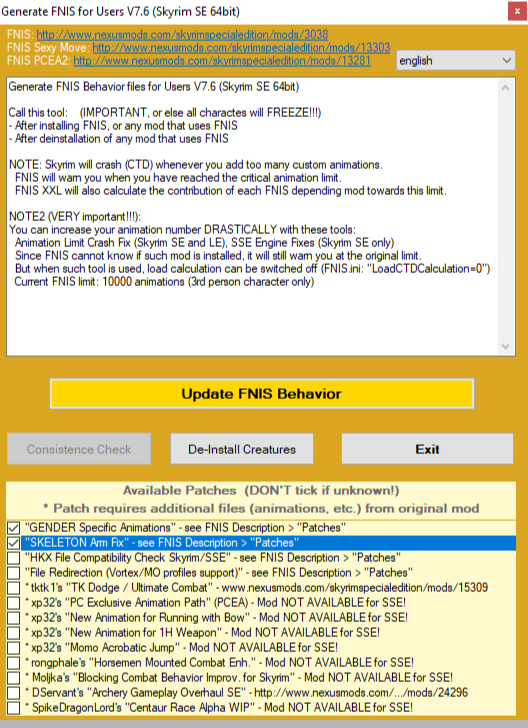 Check the first two patches! (“GENDER Specific Animations” and “SKELETON Arm Fix”)
Afterwards press the big yellow button “Update FNIS Behaviour”. If this is done (It could take some time) press the “Consistence Check” button! Now you can press “Exit”. The program just asks you if you want to have a shortcut on your desktop. Choose either “No” or “Yes”, because this is not really important.

ENB

The ENB I am using is "PI-CHO ENB - Konan Edition". The installation is fairly simple! Most of the following files will be installed manually (without a modmanager)!
Download the latest ENB binary (From the ENBDev Homepage!) and manually copy the "d3d11.dll" and "decompiler_46e.dll" (inside the wrapper folder) to the Skyrim SE installation folder (where the .exe is).
Download "ENB Helper SE" (Version 2.2.0) and install it like any other mod!
Download Pi-CHO ENB and manually copy/paste the content of the folder into your Skyrim SE folder!
Check the following value in the Skyrimprefs.ini file.
(Documents -> My Games -> Skyrim Special Edition)
bEnableImprovedSnow=0
bToggleSparkles=0
bSAO_CS_Enable=0
bSAOEnable=0
bUseTAA = 1
bVolumetricLightingEnable = 1
iVolumetricLightingQuality = 0

LODs Generation (Not necessary!)
This can be tricky for some users, but if you really want to have a good LOD this is a must have (Especially with the Enhanced Vanilla Tree settings you made!)
Lets go!
First you need to Google for "xLODGen". There should be a link for the "STEP Modifications" website and download the latest BETA (beta 95).
Afterwards you extract it wherever you want and rename the "xLODGEN.exe" to "SSELODGEN.exe" (64bit version!).
Start it up in "Admin-Mode" and wait until another window pops-up!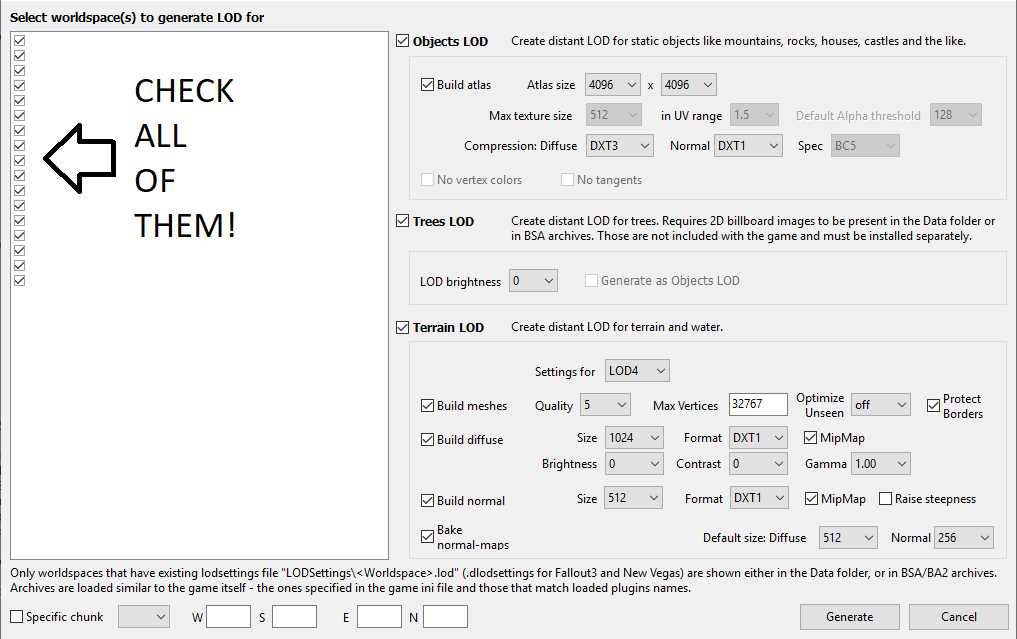
Check:
Objects LOD
Trees LOD
Terrain LOD
For the LOD brightness in the tree section I suggest you to set it to "-3"!
Now click "Generate" and wait.... Shouldtake between 10 and 30 minutes to be finished, but can even take a bit longer!
If it says "LOD Generation Finished" you can close the windows!
Thats all!
Last but not least!
Now you can finally start your game (With the SKSE.exe!)!
GG WP GL HF

Useful Console Commands for Screenarchery

For this we don't need any mods! We are just using the ingame console!
You can access the console using the "^" key (its above your TAB key - at least on a European keyboard)
Set Gamehour To "x" - You don't like the time you have right now ingame? You want to have a better sunlight for a better scene lighting? Don't waste your time using the "waiting" feature. Use this command to immediately change it. The "x" stands for the time you can enter (0 - 23)
TGM - "Toggle God Mode" is a good way not to die during action shots! You have infinite HP, Mana and Stamina
- How to get lvl 50 Archery in 30 minutes after starting a new game★ 5 (842)90k views1.5k ♥5 minBulgarianUpdated Aug 13, 2020
- How to get an GF while playin The Elder Scrolls V: Skyrim★ 5 (1.4k)69k views538 ♥1 minBulgarian
- Кооперативный мод на Skyrim★ 5 (435)52k views1.1k ♥6 minRussianUpdated Jul 8, 2025
- The Basics: Modding Skyrim SE Properly in 2025 (All versions)★ 5 (1.5k)46k views2.2k ♥83 minUpdated Mar 19, 2025
- Skyrim SE 2024 Essential Modding Guide★ 5 (431)42k views1.2k ♥40 minUpdated Jul 31, 2024
- The Elder Scrolls V: Skyrim - Complete Achievement Guide (Inc. DLC)★ 5 (1.5k)40k views3.9k ♥29 minUpdated May 19






- Upgrading to PremiumTeam Fortress 2★ 5 (20k)1441k views11k ♥6 minUpdated May 11, 2022
- No More Room in Hell Official ManualNo More Room in Hell★ 5 (2.8k)569k views2.1k ♥29 minUpdated Apr 22, 2019
- NMRiH Community Hosting GuidesNo More Room in Hell★ 5 (526)351k views653 ♥1 minUpdated Aug 10, 2022
- Лучшие кооперативные игры SteamPAYDAY 2★ 5 (1.5k)315k views2.1k ♥56 minRussianUpdated Apr 27, 2025
- Desert Eagle Heat Treated | Blue GemCounter-Strike 2★ 5 (1.6k)292k views1.5k ♥2 minUpdated Jan 16
- Treasure Hunt Puzzle SolutionsTotal War: WARHAMMER II★ 5 (6.9k)281k views15k ♥3 minUpdated Aug 19, 2021






This guide was created by its original author on the Steam Community. Are you the author and want it removed? Request removal.