Adaptive camera zoom lock for controller
Controller configuration steps
1. Open Steam settings -> controller , and enable "Steam input" for your controller. In case you have a Xbox controller, also download the Xbox Extended Feature Support Driver. Then close the window.
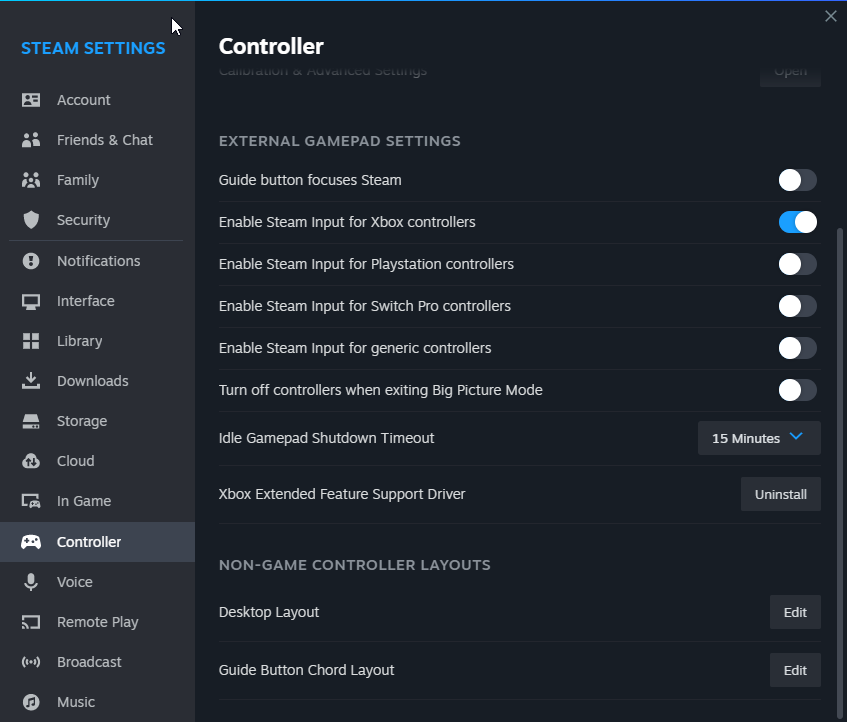
2. Switch your controller on, and go to your library and right click on Grim Dawn (Griminternals added as a non steam game works too). Select manage -> controller layout. Then press "Edit layout".
![]()
3. In the edit layout window configure all your buttons, the Dpad and the triggers of your controller how you want it. Leave the joystick option on default for now, but don't close the window yet.
![]()
4. When you are done with configuring all your buttons, click the "Action Sets" link in the bottom left of the edit layout window. In the "Action Sets" window create 2 new action sets, use the default controller settings as a template to copy from. Name one "Playing" and the other "Inventory".
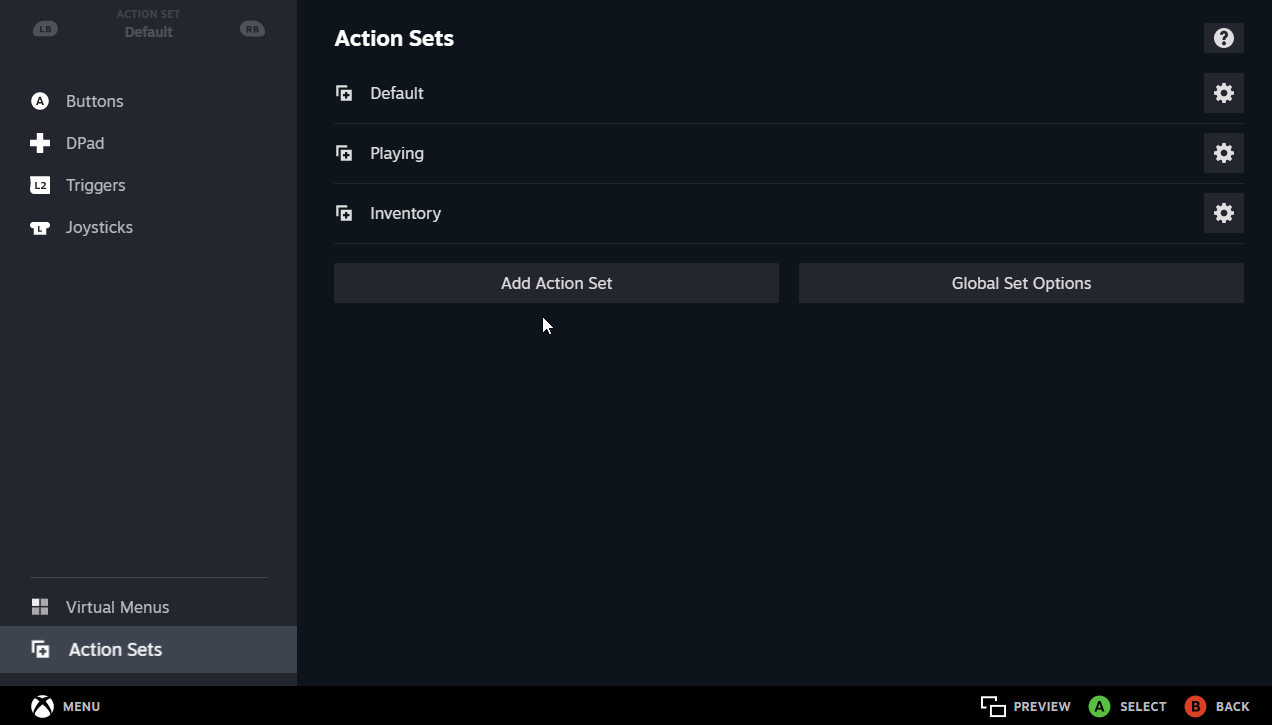
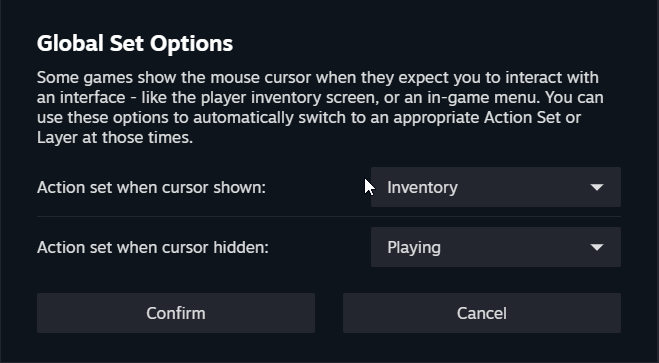
5. Now Click on the "Global Set Options" button and configure it like in the image below. Close the "Global Set Options" window when that is done.
6. Now click the Joysticks option on the left, you will see that in the top left corner there is a menu "Action Sets". Select the "Playing" action set by using controller buttons or your mouse, then click the options wheel next to the "Right Joystick Behavior" option.
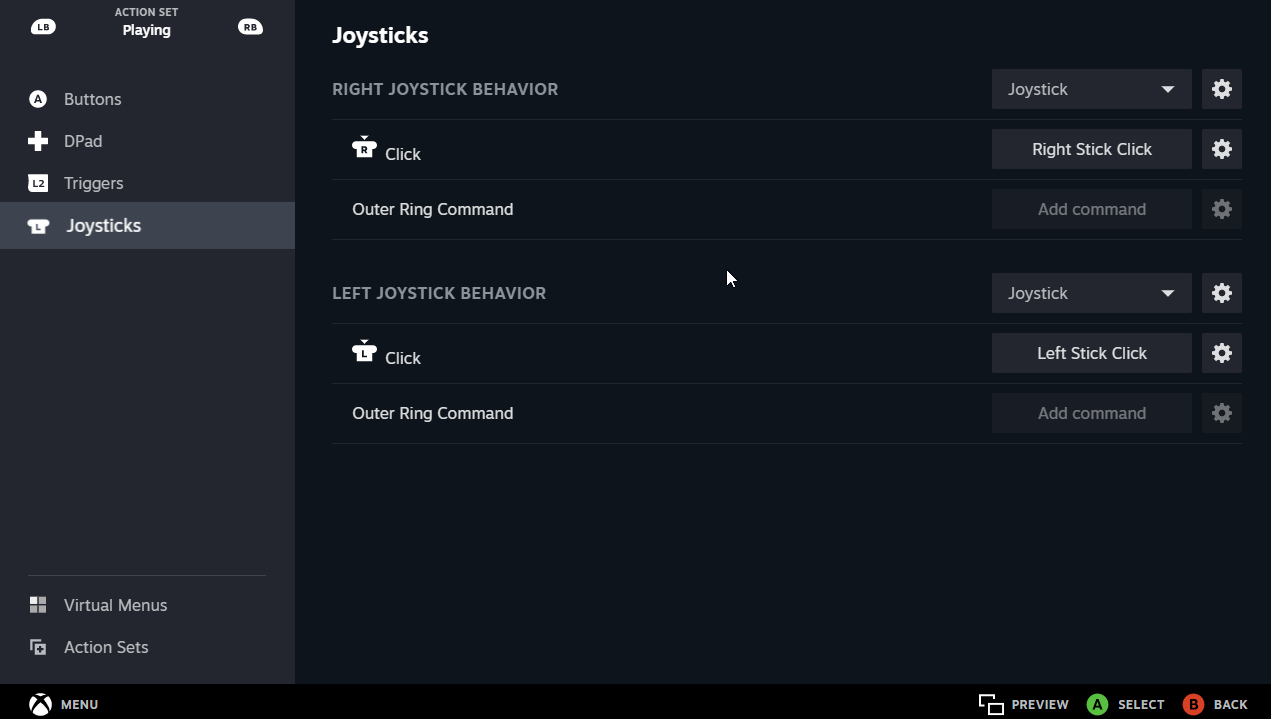
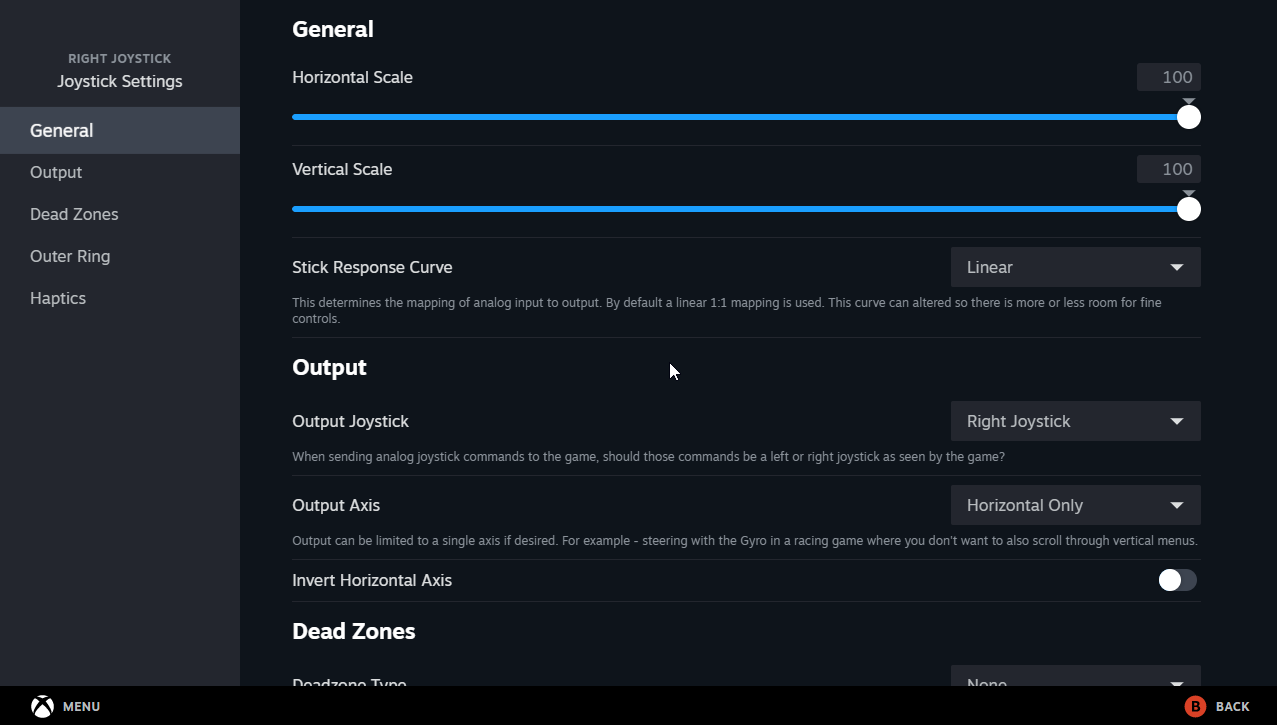
7. In the "Right Joystick Settings" window, look for the option "Output Axis". Use the drop down box to change it from "Both Horizontal & Vertical" to "Horizontal Only".
2. Switch your controller on, and go to your library and right click on Grim Dawn (Griminternals added as a non steam game works too). Select manage -> controller layout. Then press "Edit layout".
3. In the edit layout window configure all your buttons, the Dpad and the triggers of your controller how you want it. Leave the joystick option on default for now, but don't close the window yet.
4. When you are done with configuring all your buttons, click the "Action Sets" link in the bottom left of the edit layout window. In the "Action Sets" window create 2 new action sets, use the default controller settings as a template to copy from. Name one "Playing" and the other "Inventory".
5. Now Click on the "Global Set Options" button and configure it like in the image below. Close the "Global Set Options" window when that is done.
6. Now click the Joysticks option on the left, you will see that in the top left corner there is a menu "Action Sets". Select the "Playing" action set by using controller buttons or your mouse, then click the options wheel next to the "Right Joystick Behavior" option.
7. In the "Right Joystick Settings" window, look for the option "Output Axis". Use the drop down box to change it from "Both Horizontal & Vertical" to "Horizontal Only".
- Run Grim Dawn or the Griminternals mod added as a non steam game and enjoy hacking and slashing without accidently zooming in or out, but when you're checking the map, inventory, quest log, etc. the right stick has full functionality.
If anyone needs help, please do not add me to friends. Use the comment section of the guide.
Thanks!
More Grim Dawn guides
- Class Selection (EN)★ 5 (510)58k views841 ♥9 minUpdated Jul 6, 2017
- Beginner's Guide to Skills★ 5 (1.1k)53k views2.3k ♥167 minUpdated Nov 4, 2021
- Devotion Shrines★ 5 (2.1k)43k views3.7k ♥5 minUpdated Nov 22, 2023
- How to start new games at level 15+★ 4 (161)30k views341 ♥6 minUpdated Jul 6, 2019
- Секретные Локации★ 5 (1.1k)27k views1.9k ♥8 minRussianUpdated Apr 20, 2017
- Lokarr - Secret Quest (AoM)★ 5 (549)26k views1k ♥10 minUpdated Oct 5, 2018




🔥 Popular guides
- Upgrading to PremiumTeam Fortress 2★ 5 (20k)1441k views11k ♥6 minUpdated May 11, 2022
- No More Room in Hell Official ManualNo More Room in Hell★ 5 (2.8k)569k views2.1k ♥29 minUpdated Apr 22, 2019
- NMRiH Community Hosting GuidesNo More Room in Hell★ 5 (526)351k views653 ♥1 minUpdated Aug 10, 2022
- Лучшие кооперативные игры SteamPAYDAY 2★ 5 (1.5k)315k views2.1k ♥56 minRussianUpdated Apr 27, 2025
- Desert Eagle Heat Treated | Blue GemCounter-Strike 2★ 5 (1.6k)292k views1.5k ♥2 minUpdated Jan 16
- Treasure Hunt Puzzle SolutionsTotal War: WARHAMMER II★ 5 (6.9k)281k views15k ♥3 minUpdated Aug 19, 2021






This guide was created by its original author on the Steam Community. Are you the author and want it removed? Request removal.