Converting a 42.15 save to 42.16
Conversion
REMEMBER TO MAKE A COPY BEFORE TOUCHING A SAVE'S FILES
The only thing we are changing is removing echo creek as a spawn location so your character should be fine in theory
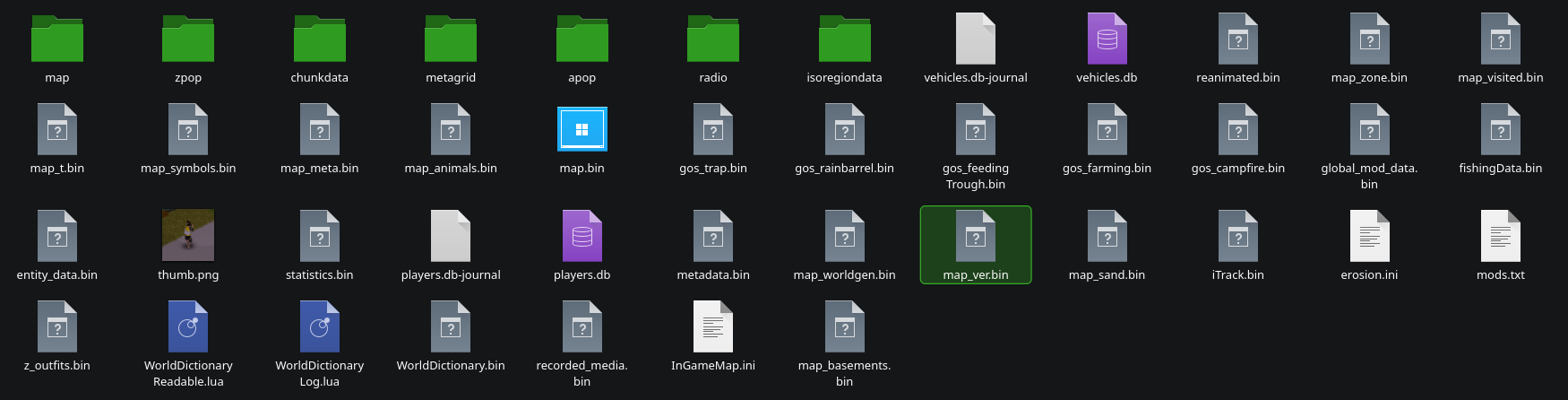
It is as simple as making a new save and copying that new save's "map_ver.bin" file.
You then just paste the new "map_ver.bin" file into your old save to bring it back
Linux saves are located in /home/(user)/Zomboid/Saves/
Windows saves are located in C:\Users\(your user name)\Zomboid
Small Warning
You do miss out on the new occupation rebalance and difficulty tweaks. So if its an old save that has minor progress, id just restart.
If you have a mod thats outdated and breaking a save, you gotta wait for that mod to get updated, remove the mod, or just restart without the mod.
The devs would probably prefer if you just restarted but its your game to do as you wish with.
Visual Guide
- Modding Policy★ 5 (397)133k views208 ♥9 minUpdated Nov 8, 2022
- 80 tips and tricks for Project Zomboid (If you have over 100 hours in this game some of these will probably be new to you too)★ 5 (1.6k)82k views3.1k ♥28 minUpdated Aug 29, 2021
- Топ 100 лучших модов на "project zomboid"★ 5 (415)68k views1.1k ♥10 minRussianUpdated Jul 28, 2024
- [B41] Лучшие места для базы★ 5 (477)61k views1.3k ♥6 minRussianUpdated Nov 30, 2025
- Первая помощь ❤★ 5 (628)49k views1.4k ♥5 minRussianUpdated Jan 20, 2025
- The Basics of Base Building★ 5 (704)48k views1.5k ♥17 minUpdated Dec 24, 2021





- Upgrading to PremiumTeam Fortress 2★ 5 (20k)1441k views11k ♥6 minUpdated May 11, 2022
- No More Room in Hell Official ManualNo More Room in Hell★ 5 (2.8k)569k views2.1k ♥29 minUpdated Apr 22, 2019
- NMRiH Community Hosting GuidesNo More Room in Hell★ 5 (526)351k views653 ♥1 minUpdated Aug 10, 2022
- ULTIMATE GUIDE FOR GAME DEV TYCOONGame Dev Tycoon★ 5 (5.8k)326k views10k ♥4 minUpdated 23 Jan, 2014
- How to 'Git Gud' Soon™MORDHAU★ 5 (2k)318k views3k ♥68 minUpdated Nov 16, 2024
- Лучшие кооперативные игры SteamPAYDAY 2★ 5 (1.5k)315k views2.1k ♥56 minRussianUpdated Apr 27, 2025






This guide was created by its original author on the Steam Community. Are you the author and want it removed? Request removal.