EasyAnticCeat is not installed - EN / RU
Вступление / Introduction
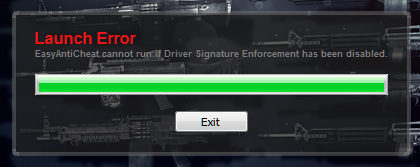 RU: (Немножко не тот скрин, в интеренте именно эту ошибку не нашел :( )
Вот почти такую ошибку мы можем видеть :D Но как же её решить? Начнем!
EN: (A little wrong screen, in the Internet, this error is not found :( )
Here is almost such an error, we can see: D But how to solve it? Let's start!
Решение проблемы / Solution
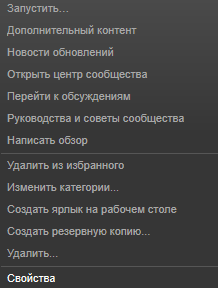
1. RU: Заходим в библиотеку Steam и жмём ПКМ и выбираем свойства.
EN: We go to the Steam library and click on PKM and select the properties.
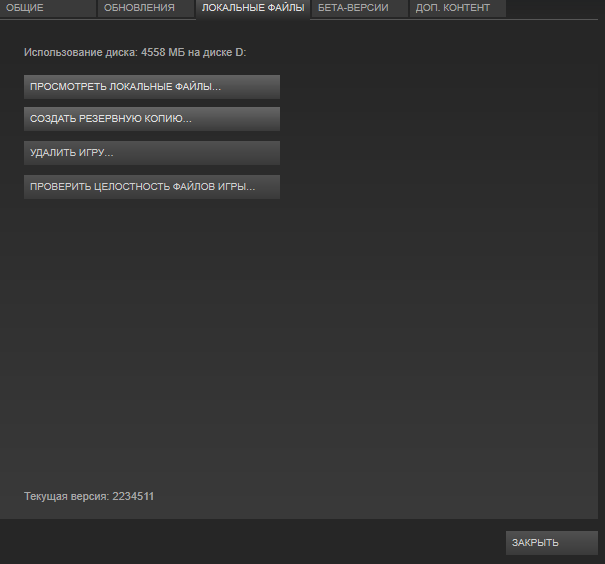
 2. RU:Далее выбраем локальные файлы и посмотреть их.
EN: Then select the local files and see them.
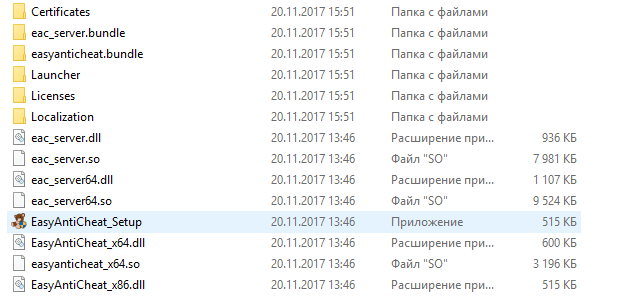
 3. RU: Ищем папку EasyAntiCheat, заходим в неё. Нажимаем на установочный файл EasyAntiCheat.
EN:We are looking for a folder and we'll go into it. Click on the anti-cheat installation file.
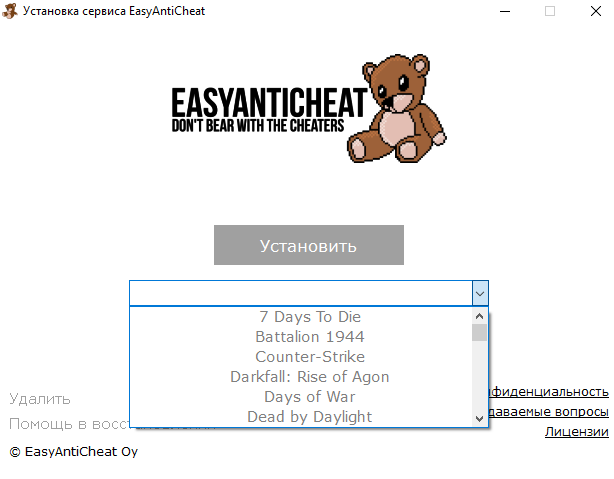
4.RU: В полоске выбераем игру в которой произошла ошибка.
Установить —> Финиш
EN: In the strip, select the game with which the problem occurred.
Set -> finish
EN: We go to the Steam library and click on PKM and select the properties.
2. RU:Далее выбраем локальные файлы и посмотреть их.EN: Then select the local files and see them.
3. RU: Ищем папку EasyAntiCheat, заходим в неё. Нажимаем на установочный файл EasyAntiCheat. EN:We are looking for a folder and we'll go into it. Click on the anti-cheat installation file.
4.RU: В полоске выбераем игру в которой произошла ошибка.
Установить —> Финиш
EN: In the strip, select the game with which the problem occurred.
Set -> finish
Заключение / Conclusion
RU:
- По вопросам / жалобам / предложениям, обращаться ко мне или в комментариях !
- Я не хочу, чтобы сообщество засорялось бессмысленными комментариями, вроде "взаимные + rep", "получи бесплатные скины, пройдя по ссылке" и т.п. Все Ваши сообщения, содержащие вышеуказанные высказывания, будут немедленно удаляться.
- For questions / complaints / suggestions, contact me or in the comments!
- I do not want the community to get littered with meaningless comments, like "reciprocal + rep," "get ♥♥♥♥♥♥♥♥♥♥ by following the link", etc. All your messages containing the above statements will be immediately deleted.
More Friday the 13th: The Game guides
- Как выжить, если Джейсон уже спалил.★ 5 (334)22k views218 ♥8 minBulgarianUpdated 14 Oct, 2017
- How to play online in 2026 [FIX]★ 5 (238)22k views403 ♥1 minUpdated 11 Jan
- Jason's Cabin Locations (Pinehurst updated)★ 5 (568)20k views793 ♥3 minUpdated 13 May, 2022
- [FIX] How to play on Friday the 13th in 2025 | Как играть в пятницу 13 в 2025★ 4 (74)13k views177 ♥1 minRussianUpdated 14 Mar, 2025
- Complete Level Unlocks List★ 5 (234)12k views285 ♥4 minUpdated 14 Jun, 2018
- How To Play As Chad★ 5 (305)12k views140 ♥1 minUpdated 9 Jan, 2018




🔥 Popular guides
- Upgrading to PremiumTeam Fortress 2★ 5 (20k)1441k views11k ♥6 minUpdated May 11, 2022
- No More Room in Hell Official ManualNo More Room in Hell★ 5 (2.8k)569k views2.1k ♥29 minUpdated Apr 22, 2019
- NMRiH Community Hosting GuidesNo More Room in Hell★ 5 (526)351k views653 ♥1 minUpdated Aug 10, 2022
- ULTIMATE GUIDE FOR GAME DEV TYCOONGame Dev Tycoon★ 5 (5.8k)326k views10k ♥4 minUpdated 23 Jan, 2014
- How to 'Git Gud' Soon™MORDHAU★ 5 (2k)318k views3k ♥68 minUpdated Nov 16, 2024
- Лучшие кооперативные игры SteamPAYDAY 2★ 5 (1.5k)315k views2.1k ♥56 minRussianUpdated Apr 27, 2025






This guide was created by its original author on the Steam Community. Are you the author and want it removed? Request removal.