How to mod Friday the 13th
Before we begin...
Before we can actually mod our game, we need to unpack our game files. Don't worry, it's not too complicated.
----------------------------------------------------------------------------
To unpack your game files you need some applications :
- WinRar[www.win-rar.com] or 7-ZIP[7-zip.org] to extract the mods and stuff
- The Tools to unpack Friday the 13th (F13tools)[drive.google.com] / These tools are necessary to unpack Friday the 13th
----------------------------------------------------------------------------
IMPORTANT!!
In your Friday the 13th Game Files, you need to change the extension of the file "SummerCamp-WindowsNoEditor.pak" to org instead of pak otherwise the mods will not function properly. The file is located in :
F13Game / SummerCamp / Content / Paks
How to unpack Friday the 13th

----------------------------------------------------------------------------
If you open the .exe, two windows should've popped up like this
quickbms
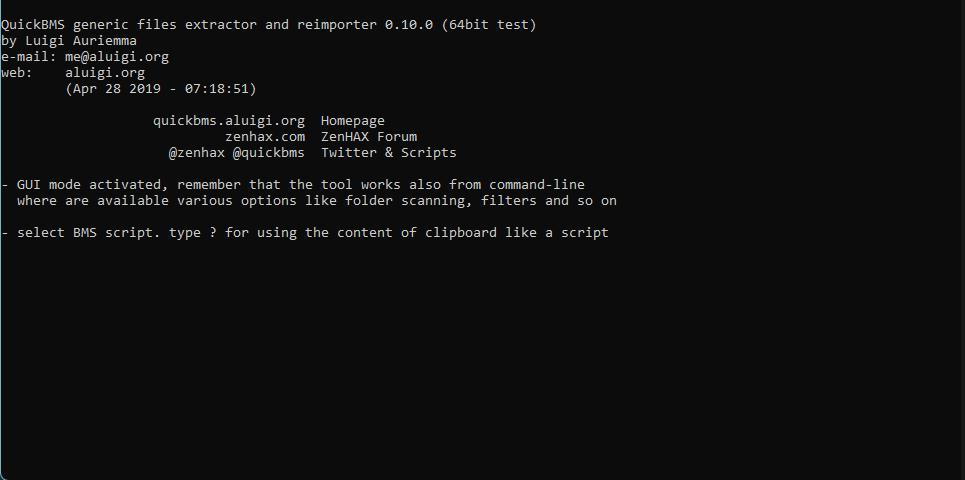 quickbms - File Explorer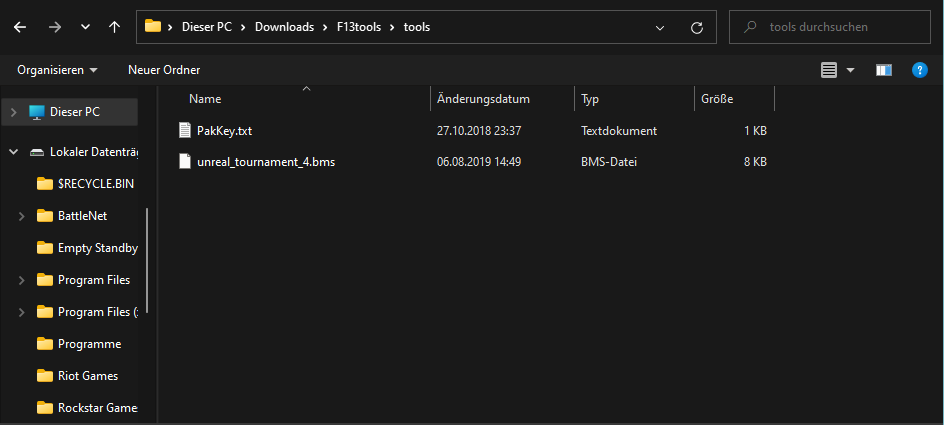
----------------------------------------------------------------------------
For now we need to focus on the File Explorer. In the File Explorer, you double-click "unreal_tournament_4.bms"

After that, the quickbms - File Explorer window should've disappeared for a second but re-appear again.
----------------------------------------------------------------------------
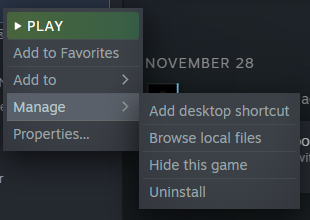
Now, you need to go into your Friday the 13th Game Files with your quickbms - File Explorer.
They are most likely located in :
Steam / steamapps / common / F13Game
----------------------------------------------------------------------------
In your Game Files, you go to this path :
F13Game / SummerCamp / Content / Paks
In the Paks Folder, select the file called "SummerCamp-WindowsNoEditor. org" in the quickbms - File Explorer

Afterwards the quickbms - File Explorer window should disappear but re-appear again.
----------------------------------------------------------------------------
Now this is very important. You need to go back to the Root Folder (that means F13Game) with your quickbms - File Explorer and save it. Just hit Enter. This is where all the files are being unpacked.
----------------------------------------------------------------------------
When you're done with all that, we can focus on that other quickbms window.
It should look like this now :
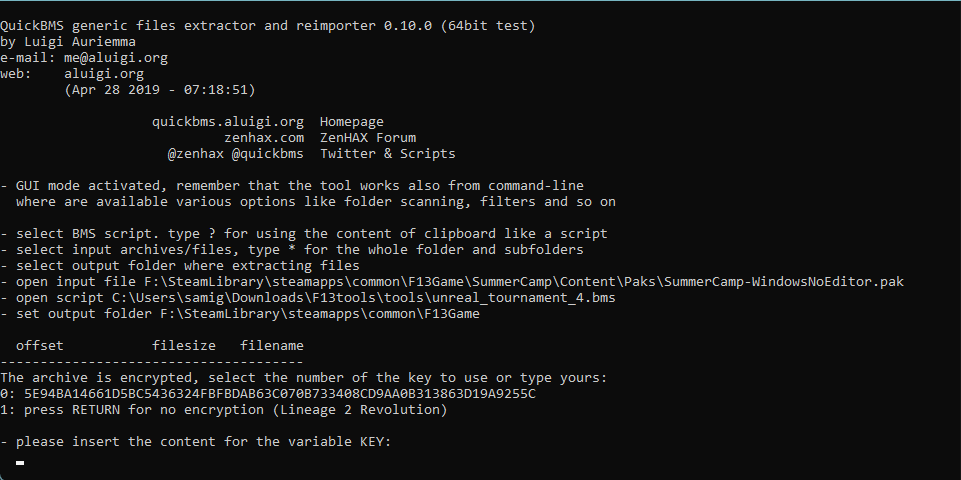 You can see that it asks for a "variable KEY".
----------------------------------------------------------------------------
Well, in the "F13tools" Folder, you need to open the file "PakKey.txt"

It should contain a bunch of letters and numbers. Press "Ctrl + A", then "Ctrl + C" to copy everything. Now you just need to paste the KEY in the quickbms window and you're done.
You're finished!
Now you just need to wait. The window should look like you're hacking the matrix or whatosever, don't worry though, it's just the files that are being unpacked. You can see their names too.
The process can take about 30 - 60 minutes, depending on your computer.
You can now install all the mods you want. You can check out Moddb or Nexusmods for some mods. You'll find higher-quality mods in some discord servers though.
- New Emotes[gofile.io]
How to install :
- Make a Backup of the "Emotes" Folder from :
F13Game / SummerCamp / Content / Blueprints / Emotes
- Extract the "Emotes.zip" Folder
- Copy and Paste all the stuff from the "Emotes" Folder, into :
F13Game / SummerCamp / Content / Blueprints / Emotes
----------------------------------------------------------------------------
Or if you're confused with these two Emotes Folders, you can simply Drag & Drop the extracted "Emotes" Folder into the "Blueprints" Folder. It'l replace and add all the new Stuff.
----------------------------------------------------------------------------
Note :
Some of the Emotes might occur twice (or even three times) in the menu. Why? I don't actually know lol. Also some of the Emotes won't work. You have to be Host in order for some mods to function properly. I'd recommend you to only play offline with modded game files.
Now a picture of Thor

- Как выжить, если Джейсон уже спалил.★ 5 (334)22k views218 ♥8 minBulgarianUpdated 14 Oct, 2017
- How to play online in 2026 [FIX]★ 5 (238)22k views403 ♥1 minUpdated 11 Jan
- Jason's Cabin Locations (Pinehurst updated)★ 5 (568)20k views793 ♥3 minUpdated 13 May, 2022
- [FIX] How to play on Friday the 13th in 2025 | Как играть в пятницу 13 в 2025★ 4 (74)13k views177 ♥1 minRussianUpdated 14 Mar, 2025
- Complete Level Unlocks List★ 5 (234)12k views285 ♥4 minUpdated 14 Jun, 2018
- How To Play As Chad★ 5 (305)12k views140 ♥1 minUpdated 9 Jan, 2018




- Upgrading to PremiumTeam Fortress 2★ 5 (20k)1441k views11k ♥6 minUpdated May 11, 2022
- No More Room in Hell Official ManualNo More Room in Hell★ 5 (2.8k)569k views2.1k ♥29 minUpdated Apr 22, 2019
- NMRiH Community Hosting GuidesNo More Room in Hell★ 5 (526)351k views653 ♥1 minUpdated Aug 10, 2022
- ULTIMATE GUIDE FOR GAME DEV TYCOONGame Dev Tycoon★ 5 (5.8k)326k views10k ♥4 minUpdated 23 Jan, 2014
- How to 'Git Gud' Soon™MORDHAU★ 5 (2k)318k views3k ♥68 minUpdated Nov 16, 2024
- Лучшие кооперативные игры SteamPAYDAY 2★ 5 (1.5k)315k views2.1k ♥56 minRussianUpdated Apr 27, 2025






This guide was created by its original author on the Steam Community. Are you the author and want it removed? Request removal.