How to make items visible in hand
Introduction
This guide does NOT address basic mod creation process.
There are plenty of guides and tutorial out there for that.
As always, your questions about Project Zomboid modding should be asked on PZ Discord[discord.gg].
There are plenty of guides and tutorial out there for that.
As always, your questions about Project Zomboid modding should be asked on PZ Discord[discord.gg].
Item definition override
Snippet
You need to adds the following lines to the item definition: primaryAnimMask = HoldingTorchRight,
secondaryAnimMask = HoldingTorchLeft,
StaticModel = <InHandModelDefinition>,
Example Before (Vanilla)
module Base
{
item Spiffo
{
DisplayCategory = Raccoon,
ItemType = base:normal,
Weight = 0.8,
Icon = PlushSpiffo,
WorldStaticModel = SpiffoPlushie,
Tags = base:ignorezombiedensity;base:isfirefuel;base:isfiretinder;base:ismemento,
FireFuelRatio = 0.25,
}
Example After (Modded)
module Base
{
item Spiffo
{
DisplayCategory = Raccoon,
ItemType = base:normal,
Weight = 0.8,
Icon = PlushSpiffo,
WorldStaticModel = SpiffoPlushie,
Tags = base:ignorezombiedensity;base:isfirefuel;base:isfiretinder;base:ismemento,
FireFuelRatio = 0.25,
primaryAnimMask = HoldingTorchRight,
secondaryAnimMask = HoldingTorchLeft,
StaticModel = SpiffoPlushie_Hand,
}
In Hand Model definition
Snippet
You need to create a new model definition with attachements relative to the correct bones (right and left hand prop bones) attachment Bip01_Prop1
{
offset = -0.02 -0.06 -0.08,
rotate = 60.0 180.0 0.0,
scale = 1.0,
}
attachment Bip01_Prop2
{
offset = 0.02 -0.06 -0.08,
rotate = 60.0 180.0 0.0,
scale = 1.0,
}
Example Reference (World Static Model, Vanilla)
model SpiffoPlushie
{
mesh = WorldItems/SpiffoPlushie,
scale = 0.4,
}
Your reference model name is the value of the WorldStaticModel parameter of your Item.Make your model in the same module as your reference (most likely Base module).
If the reference model has a mesh line, a texture line, or a scale line, copy those too.
If the reference model has an "attachment world" node, do NOT copy it.
Example Added (Static Model, Modded)
model SpiffoPlushie_Hand
{
mesh = WorldItems/SpiffoPlushie,
scale = 0.4,
attachment Bip01_Prop1
{
offset = -0.02 -0.06 -0.08,
rotate = 60.0 180.0 0.0,
scale = 1.0,
}
attachment Bip01_Prop2
{
offset = 0.02 -0.06 -0.08,
rotate = 60.0 180.0 0.0,
scale = 1.0,
}
}
The name of that new model needs to be the value of StaticModel you added in the item definition.Keeping the same name as the world item and adding "_Hand" suffix is just a preference for clarity.
Values to use for offset and rotate are discussed later in this guide.
Value for scale in attachment nodes should remain 1 to keep the same ratio as the world item (unless their attachment world node has also a scale different from 1).
In hand model tuning
Tuning Start
Use a default value set that worked for a similar object if you have one.If not, set everything to 0.0 initially except scale that should be 1.0.
Start the game, spawn the item from vanilla debug Item List tool and equip it.
To save time, make it a new game with no zombie and no other mod.
attachment Bip01_Prop1
{
offset = 0.0 0.0 0.0,
rotate = 0.0 0.0 0.0,
scale = 1.0,
}
attachment Bip01_Prop2
{
offset = 0.0 0.0 0.0,
rotate = 0.0 0.0 0.0,
scale = 1.0,
}
Tuning Labour
Now is the waste of time.Do the tuning for attachment Bip01_Prop1 only until you are satisfied, testing by equipping the item in primary hand only.
Quit the game save, change one parameter at a time, then continue on that save.
Start with tuning roughly offset values (in apparition order). The first one is lateral.
Then change rotate values.
Then fine tune offset values.
attachment Bip01_Prop1
{
offset = -0.02 -0.06 -0.08,
rotate = 60.0 180.0 0.0,
scale = 1.0,
}
Prop1 to Prop2
Copy the values from Bip01_Prop1 to Bip01_Prop2 and change the sign of the first offset value (it is the lateral offset).I suppose there could be a need for mirroring on the rotation too, but I was lucky not to need it.
Test one more time.
attachment Bip01_Prop2
{
offset = 0.02 -0.06 -0.08,
rotate = 60.0 180.0 0.0,
scale = 1.0,
}
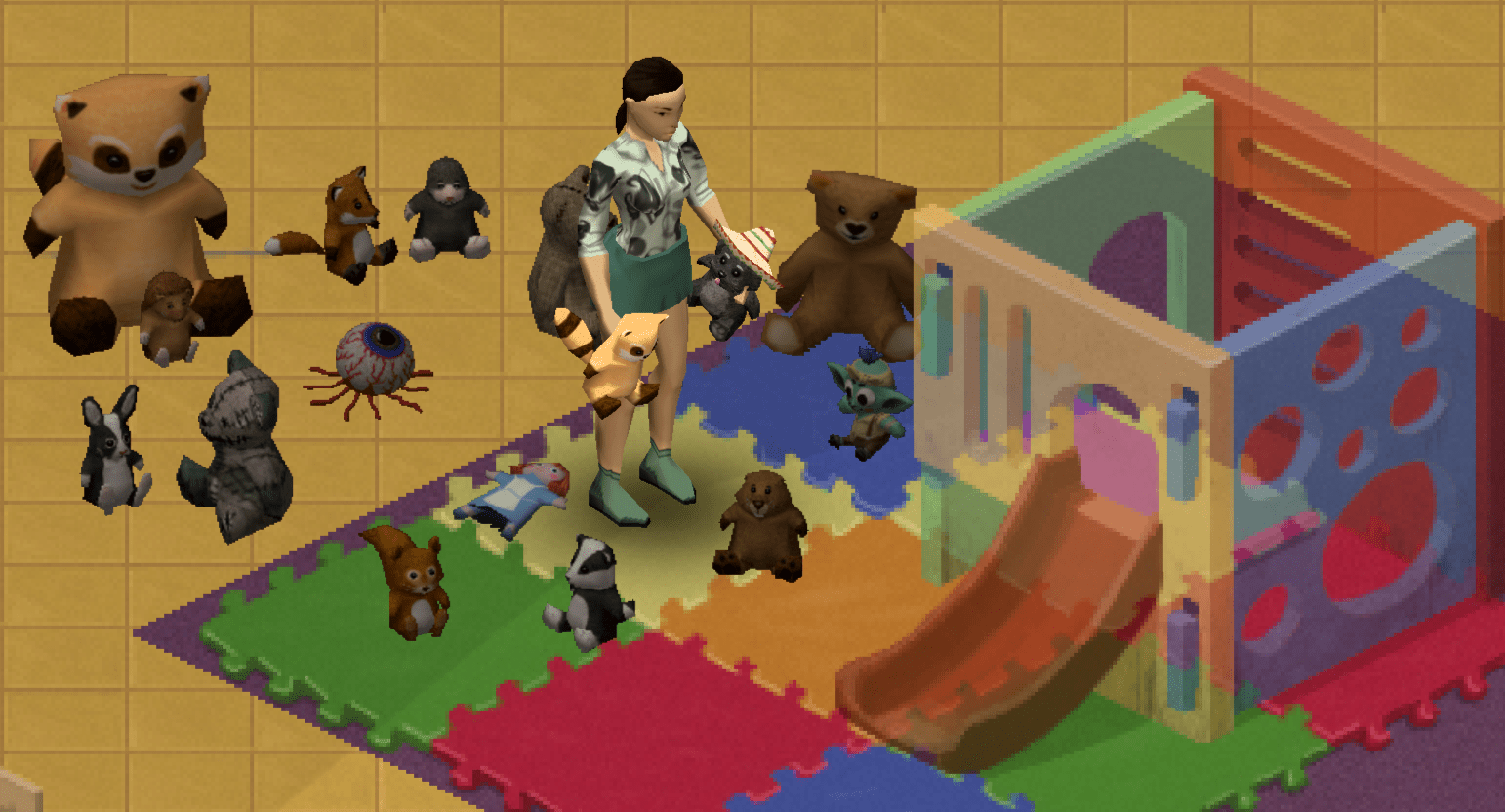
Result Example
More Project Zomboid guides
- Modding Policy★ 5 (397)133k views208 ♥9 minUpdated Nov 8, 2022
- 80 tips and tricks for Project Zomboid (If you have over 100 hours in this game some of these will probably be new to you too)★ 5 (1.6k)82k views3.1k ♥28 minUpdated Aug 29, 2021
- Топ 100 лучших модов на "project zomboid"★ 5 (415)68k views1.1k ♥10 minRussianUpdated Jul 28, 2024
- [B41] Лучшие места для базы★ 5 (477)61k views1.3k ♥6 minRussianUpdated Nov 30, 2025
- Первая помощь ❤★ 5 (628)49k views1.4k ♥5 minRussianUpdated Jan 20, 2025
- The Basics of Base Building★ 5 (704)48k views1.5k ♥17 minUpdated Dec 24, 2021





🔥 Popular guides
- Upgrading to PremiumTeam Fortress 2★ 5 (20k)1441k views11k ♥6 minUpdated May 11, 2022
- No More Room in Hell Official ManualNo More Room in Hell★ 5 (2.8k)569k views2.1k ♥29 minUpdated Apr 22, 2019
- NMRiH Community Hosting GuidesNo More Room in Hell★ 5 (526)351k views653 ♥1 minUpdated Aug 10, 2022
- ULTIMATE GUIDE FOR GAME DEV TYCOONGame Dev Tycoon★ 5 (5.8k)326k views10k ♥4 minUpdated 23 Jan, 2014
- How to 'Git Gud' Soon™MORDHAU★ 5 (2k)318k views3k ♥68 minUpdated Nov 16, 2024
- Лучшие кооперативные игры SteamPAYDAY 2★ 5 (1.5k)315k views2.1k ♥56 minRussianUpdated Apr 27, 2025






This guide was created by its original author on the Steam Community. Are you the author and want it removed? Request removal.