[Modding] How to add an exit
Result
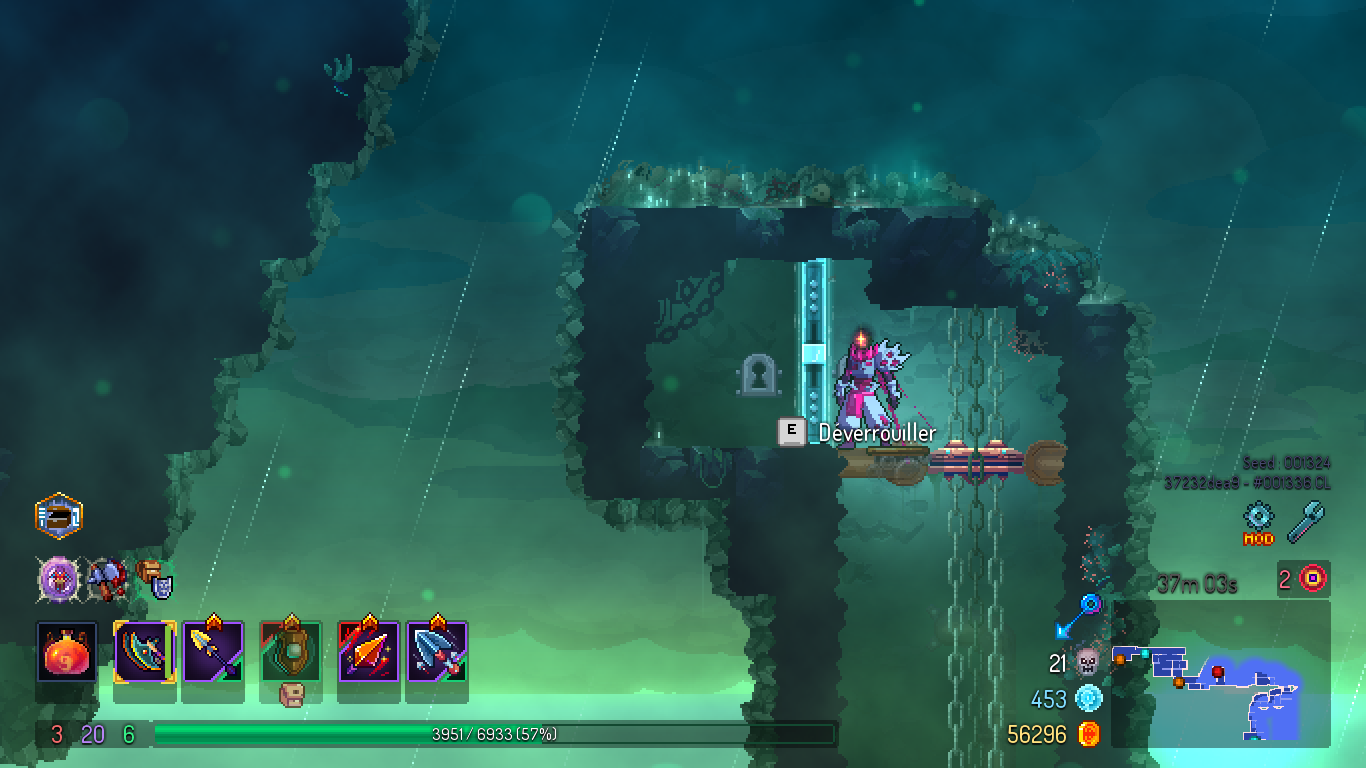
This is what it looks like ingame. Entering this zone will instantly yeet you to the level transition you chose.
0/ Fixing the skin duplicates bug
Needed only once per version.
:: Change the value of DCPATH for your system
SET DCPATH=C:\Program Files (x86)\Steam\steamapps\common\Dead Cells
CD "%DCPATH%\ModTools"
:: Unpack res.pak and data.cdb
PAKTool.exe -Expand -refpak "%DCPATH%\res.pak" -outdir "%DCPATH%\ModTools\skins_fixed"
CDBTool.exe -Expand -outdir "%DCPATH%\ModTools\skins_fixed\00-CDB_EXPANDED" -refcdb "%DCPATH%\ModTools\skins_fixed\data.cdb"
:: Delete duplicate skins
SET SKINPATH=%DCPATH%\ModTools\skins_fixed\00-CDB_EXPANDED\skin\PlayableCharacters
del "%SKINPATH%\092---FlawlessBehemoth.json"
del "%SKINPATH%\093---FlawlessBeholder.json"
del "%SKINPATH%\094---FlawlessHotk.json"
del "%SKINPATH%\095---FlawlessGiant.json"
del "%SKINPATH%\096---FlawlessAssassin.json"
del "%SKINPATH%\097---FlawlessGardener.json"
del "%SKINPATH%\098---FlawlessTick.json"
:: Collapse data.cdb and clean up
CDBTool.exe -Collapse -indir "%DCPATH%\ModTools\skins_fixed\00-CDB_EXPANDED" -outcdb "%DCPATH%\ModTools\skins_fixed\data.cdb"
rmdir /s /q "%DCPATH%\ModTools\skins_fixed\00-CDB_EXPANDED"
:: Collapse res.pak and clean up
PAKTool.exe -Collapse -inDir "%DCPATH%\ModTools\skins_fixed" -outPak "%DCPATH%\res.pak"
rmdir /s /q "%DCPATH%\ModTools\skins_fixed"
1/ Extract rooms from res.pak
Let's prepare the playground
:: Change these variables as you wish
SET MODNAME=boss_exits-v29
SET DCPATH=C:\Program Files (x86)\Steam\steamapps\common\Dead Cells
CD "%DCPATH%\ModTools"
Extract res.pak
PAKTool.exe -Expand -refpak ..\res.pak -outdir "%MODNAME%\res"
Extract rooms with TmxTool
:: Beware of spaces in folder names
TmxTool\TmxTool.exe -Expand -TmxBin "%MODNAME%\res\tiled" -TmxXml "%MODNAME%\tmxxml"
2/ Work in Tiled
Create project: see ModsDoc.
- Save project in folder "tmxxml"
- Add subfolder "tmx" to project
- Set folder "tmxxml" and file "objecttypes.json" in Project Properties.
Find a unique room to edit
- used only once in the whole game
- doesn’t already have a SpecialEquipment
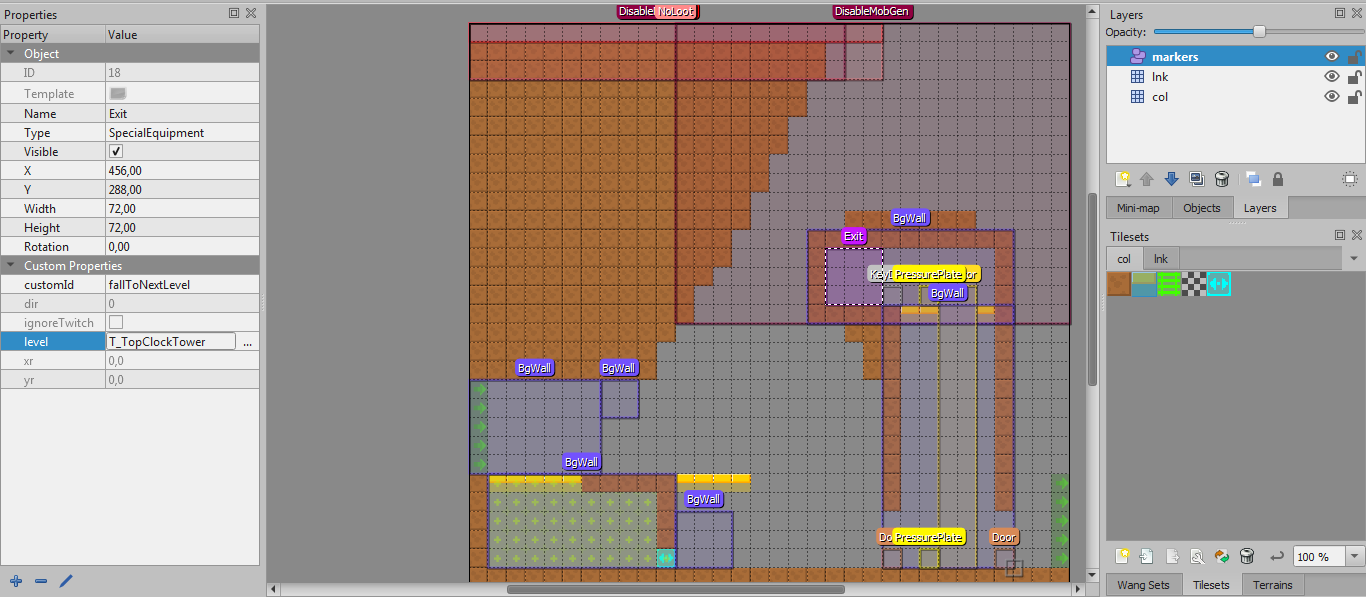 Change the room type in CDB to Exit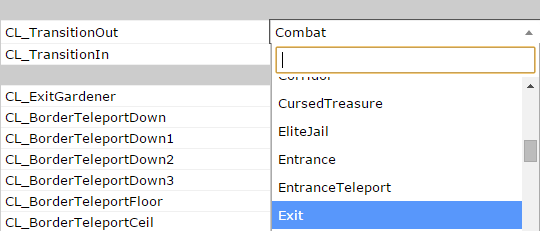
3/ Repack the whole thing
Repack rooms with TmxTool
Create diffpak
Let's clean up the rooms we don't need
:: Still beware of spaces in folder names
TmxTool\TmxTool.exe -Collapse -TmxBin "%MODNAME%\res\tiled" -TmxXml "%MODNAME%\tmxxml"
Create diffpak
:: Needs absolute paths
PAKTool.exe -CreateDiffPak -refpak "%DCPATH%\res.pak" -indir "%DCPATH%\ModTools\%MODNAME%\res" -outPak "%DCPATH%\ModTools\%MODNAME%\res.pak"
Let's clean up the rooms we don't need
PAKTool.exe -Expand -refpak "%MODNAME%\res.pak" -outdir "%MODNAME%\cleanup"
:: Delete by hand all the rooms you didn't edit
PAKTool.exe -Collapse -inDir "%MODNAME%\cleanup" -outPak "%MODNAME%\res.pak"
More Dead Cells guides
- [How to] Dead Cells★ 5 (1.1k)50k views1.1k ♥19 minUpdated 3 Jan, 2019
- Секретные чертежи и их местонахождение★ 5 (1.1k)44k views2.2k ♥9 minRussianUpdated 23 Oct, 2023
- Complete Achievements Guide★ 5 (674)35k views1.3k ♥18 minUpdated 21 Jul, 2020
- [EN/FR]Dead Cells Biome Map - V3.5★ 5 (436)25k views961 ♥1 minUpdated 20 Aug, 2024
- [Beginner Guide] New Game Routing (a.k.a.: Going to the correct maps)★ 5 (394)22k views1k ♥3 minUpdated 24 Jul, 2024
- Ultimate Guide - Everything you need!★ 5 (389)17k views578 ♥1 minUpdated 27 May





🔥 Popular guides
- Upgrading to PremiumTeam Fortress 2★ 5 (20k)1441k views11k ♥6 minUpdated May 11, 2022
- No More Room in Hell Official ManualNo More Room in Hell★ 5 (2.8k)569k views2.1k ♥29 minUpdated Apr 22, 2019
- NMRiH Community Hosting GuidesNo More Room in Hell★ 5 (526)351k views653 ♥1 minUpdated Aug 10, 2022
- ULTIMATE GUIDE FOR GAME DEV TYCOONGame Dev Tycoon★ 5 (5.8k)326k views10k ♥4 minUpdated 23 Jan, 2014
- How to 'Git Gud' Soon™MORDHAU★ 5 (2k)318k views3k ♥68 minUpdated Nov 16, 2024
- Лучшие кооперативные игры SteamPAYDAY 2★ 5 (1.5k)315k views2.1k ♥56 minRussianUpdated Apr 27, 2025






This guide was created by its original author on the Steam Community. Are you the author and want it removed? Request removal.