Reconfiguring your controls.sii file for a keyed ignition switch
Introduction
Most folks using a button box (be it a diy or purchased one) have configured their ignition switch in the game's Keys & Buttons settings so that the keyed ignition's 'on' (or 'run') position is assigned to the "Start/Stop Engine Electricity" option. This is fine in and of itself, as it technically works, but it makes the position act as a toggle that needs to be deactivated then reactivated to turn the engine off. This is usually accomplished by turning the key back past the 'off' position and into accessory temporarily, or in the case of an ignition that doesn't have an accessory position, the key needs to be turned to 'off', then back to 'on' to send the game the signal to turn the engine off. We just need to make a couple of small, manual changes to our controls.sii file in order to make our key work like a real ignition, so that our engine shuts off whenever our key is returned to the 'off' position.
Edits to the controls.sii file
These steps are based on already having configured the on position of the ignition to "Start/Stop Engine Electricity" from within the game's Keys & Buttons settings as a starting point, since most folks are likely already configured this way. REMEMBER TO MAKE A BACKUP COPY OF YOUR controls.sii FILE BEFORE EDITING!! (Although, if you mess up the file too badly, the worst that could happen is you have to reconfigure all your controls in game. So if you don't want that to potentially happen, just back up the file before editing it. Seriously.) So let's open our controls.sii file in a text editor and get started. Note that the line numbers in the instructions may be different than the line numbers in your file, but the entries (mix engineelect, mix ignitionoff, mix ignitionon) are the important part.
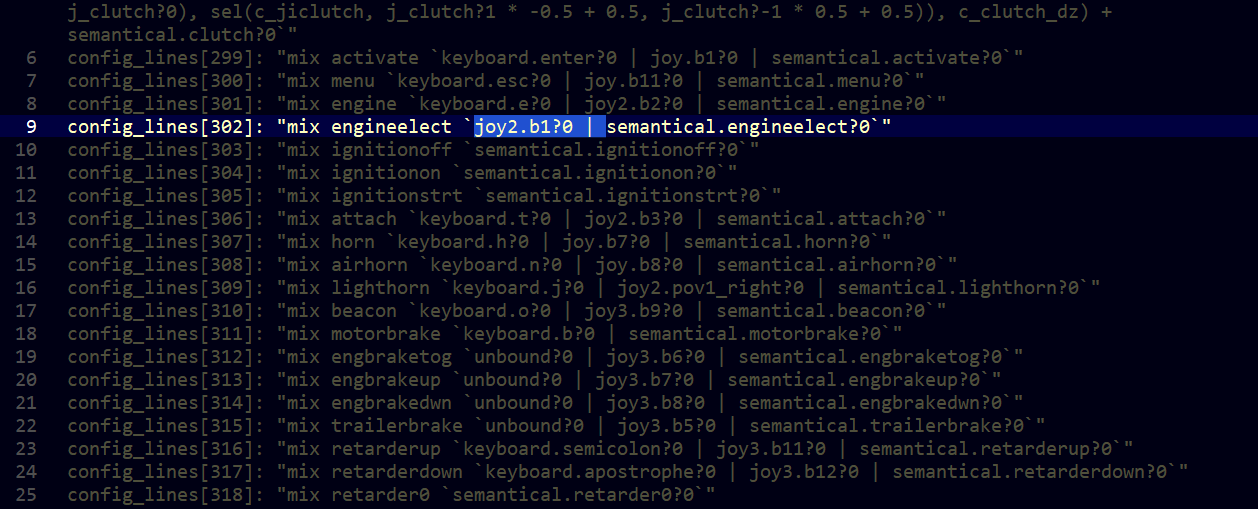
- Scroll down to the "mix engineelect" entry (somewhere in the config_lines[300]+ range.)
- Highlight the "joy..." definition segment from the "j" in "joy" up to the "s" in "semantical.engineelect?0", including the pipe (line) and the space (See figure_1), then cut the highlighted text.
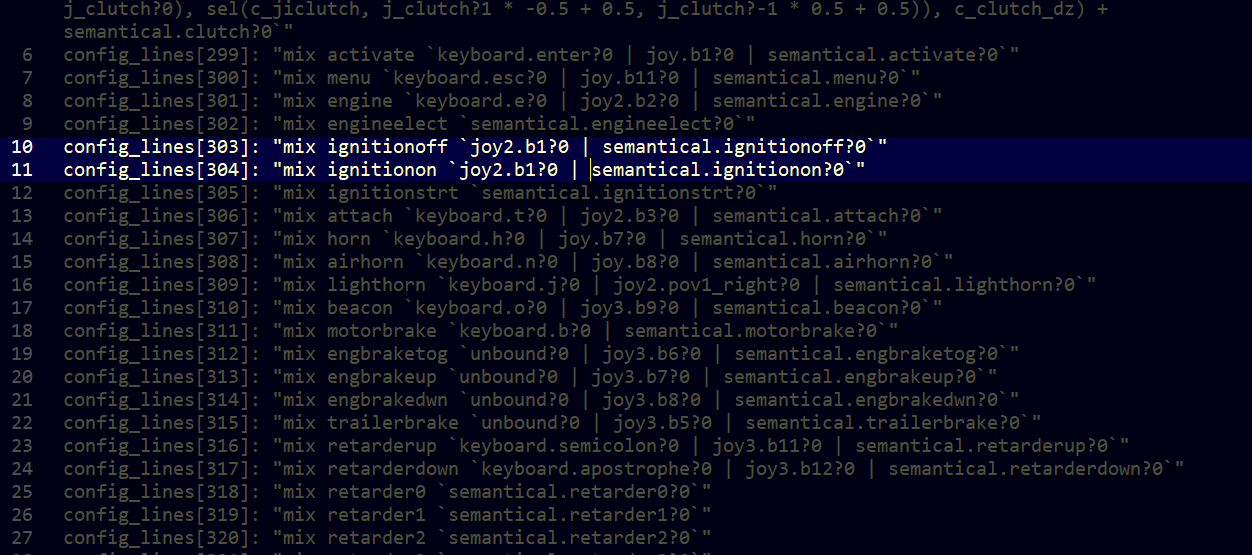
- On the next two lines ("mix ignitionoff" and "mix ignitionon", paste the "joy" definition we just cut in front of the "semantical.xxx" definitions (semantical.ignitionoff?0 and semantical.ignitionon?0). See figure_2.
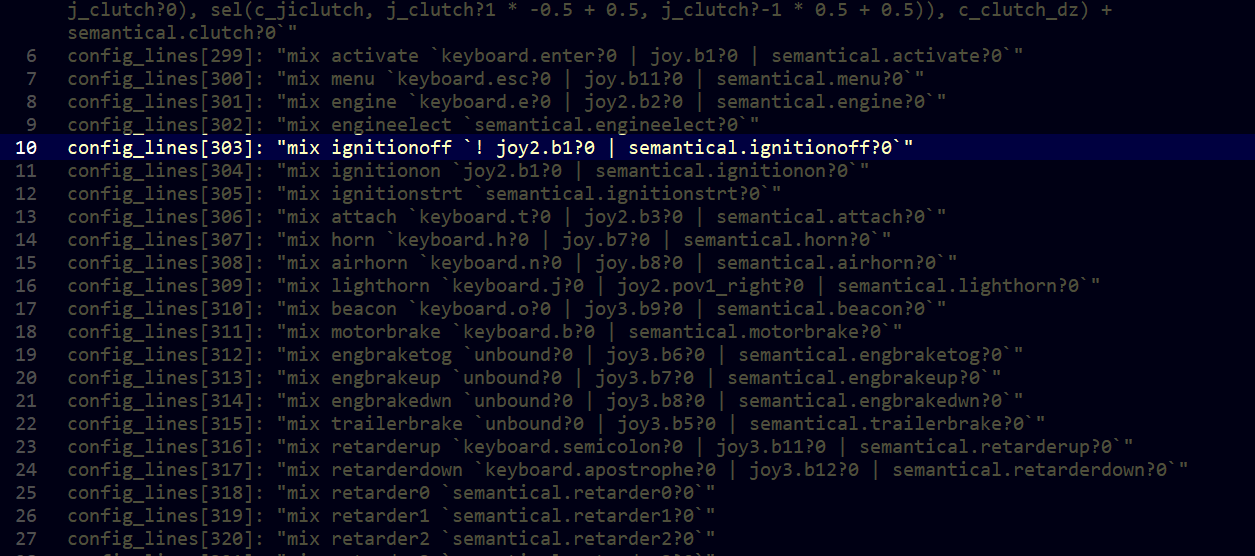
- Back on the "mix ignitionoff" definition, we need to add an exclaimation point and a space in front of the "j" in the "joy" segment so that it looks like figure_3.
Now save the file, exit your text editor and start your game. Your ignition *should* now properly work like a real ignition.
NOTES: If things still aren't working, in Gameplay Settings, make sure "Automatic engine and electricity start" is unchecked.
Summing Up
- Hidden and unmarked roads - USA - WEST - updated 2026/02/20★ 5 (1.3k)38k views1.9k ♥73 minUpdated Feb 19
- The American Truckers Guide to everything!★ 5 (960)34k views1.5k ♥53 minUpdated Aug 16, 2020
- American Truck Simulator 100% Achievement-Guide [ENG]★ 5 (704)15k views1.3k ♥8 minUpdated May 16
- Все достижения American Truck Simulator + все DLC [100% Achievement-Guide] [upd: 15.05.26]★ 5 (1.2k)14k views1.7k ♥42 minRussianUpdated Jul 12
- ATS | Cheat-codes | ENG★ 4 (106)13k views183 ♥3 minUpdated 2 Jan, 2025
- Texas 100% Achievement-Guide [ENG]★ 5 (443)12k views595 ♥7 minUpdated May 16



- Upgrading to PremiumTeam Fortress 2★ 5 (20k)1441k views11k ♥6 minUpdated May 11, 2022
- No More Room in Hell Official ManualNo More Room in Hell★ 5 (2.8k)569k views2.1k ♥29 minUpdated Apr 22, 2019
- NMRiH Community Hosting GuidesNo More Room in Hell★ 5 (526)351k views653 ♥1 minUpdated Aug 10, 2022
- ULTIMATE GUIDE FOR GAME DEV TYCOONGame Dev Tycoon★ 5 (5.8k)326k views10k ♥4 minUpdated 23 Jan, 2014
- How to 'Git Gud' Soon™MORDHAU★ 5 (2k)318k views3k ♥68 minUpdated Nov 16, 2024
- Лучшие кооперативные игры SteamPAYDAY 2★ 5 (1.5k)315k views2.1k ♥56 minRussianUpdated Apr 27, 2025






This guide was created by its original author on the Steam Community. Are you the author and want it removed? Request removal.