Running Project Zomboid on Linux
It's not as simple as pressing "Play"
Yes, you can just run the game out of the box. From my experimenting this game needs a bit of tweaking to be on par with Windows.
The issues I've seen on the Linux build:
- Performance is worse compared to Windows
- Some (only a couple I've used) mods don't work
The fix for these problems? Proton.
Proton
The way to fix Linux is to use Windows*
Blasphemy.
However, this is easy and benefits you massively.
You should already have Proton enabled in Steam. IF YOU DON'T, it's in Steam > Settings > Compatibility
To enable Proton for PZ:- Right click PZ in your library and open Properties
- Navigate to Compatibility, enabling "Force the use of a specific Steam Play compatibility tool"
- Select a version of Proton. It should be up to date, but I specifically recommend GE-Proton if you have it installed for the improvements over vanilla Proton
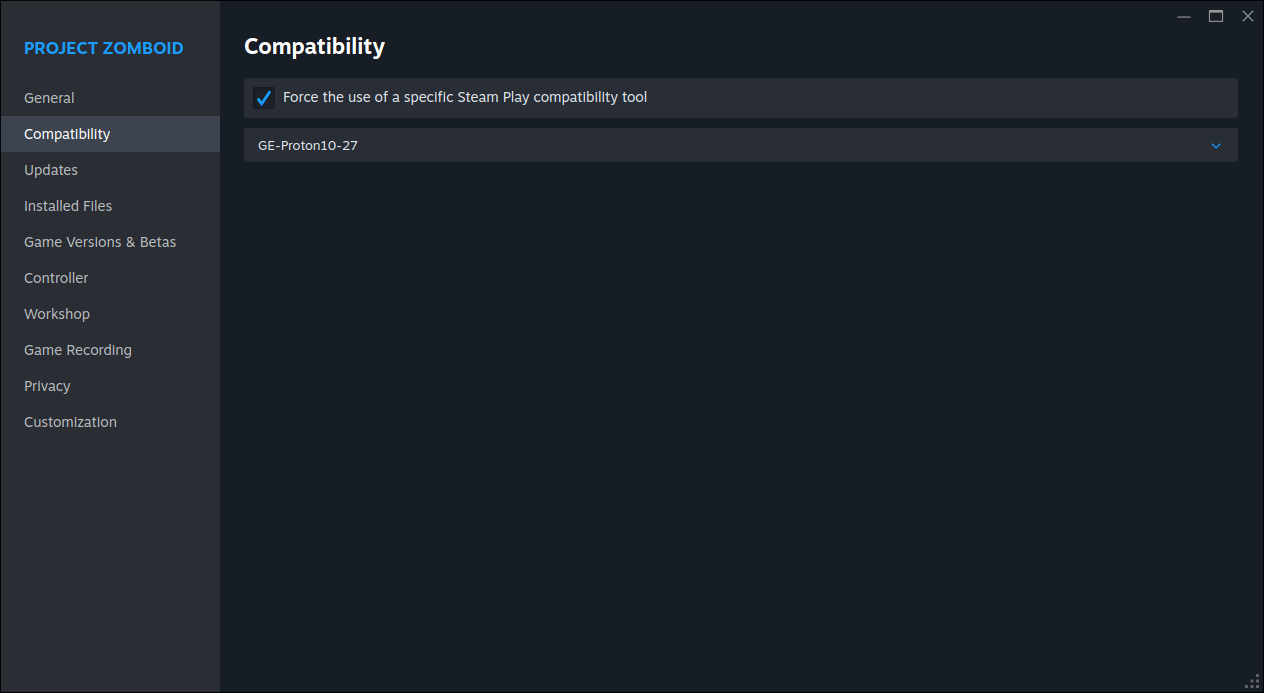
From there, a download should start in Steam (this is it downloading the Windows build) and you should be able to just press Play.
Allocating more memory
Some mods may ask that you increase the memory allocated to your game. This is because the default maximum is 2 GB
Increasing it requires editing files in your game directory. I'll simplify though.
- Right click PZ in your library
- Manage, Browse local files
- I'm assuming you're using the 64 bit version, so open ProjectZomboid64.json
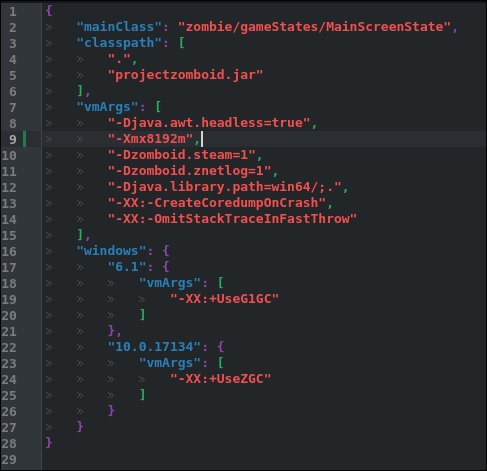
This is my config. Your config will likely have -Xms as well
Very simply: -Xmx is the MAXIMUM amount of memory the game can have, -Xms is the MINIMUM (memory usage can't go below)
Take the memory you want to allocate and supply it in MB. You can quickly find this by doing (memory in GB*1024)
For example, I have -Xmx8192m for 8GB maximum.
You don't need to add -Xms as I haven't seen any differences
Increasing it requires editing files in your game directory. I'll simplify though.
- Right click PZ in your library
- Manage, Browse local files
- I'm assuming you're using the 64 bit version, so open ProjectZomboid64.json
This is my config. Your config will likely have -Xms as well
Very simply: -Xmx is the MAXIMUM amount of memory the game can have, -Xms is the MINIMUM (memory usage can't go below)
Take the memory you want to allocate and supply it in MB. You can quickly find this by doing (memory in GB*1024)
For example, I have -Xmx8192m for 8GB maximum.
You don't need to add -Xms as I haven't seen any differences
YOU'RE WINNER!
You should notice the improvements over native.
If you have any issues idk not my problem
* Depending on who you ask it's not Windows. There's 100% stolen Windows code in WINE and no contributors have noticed
If you have any issues idk not my problem
* Depending on who you ask it's not Windows. There's 100% stolen Windows code in WINE and no contributors have noticed
More Project Zomboid guides
- Modding Policy★ 5 (397)133k views208 ♥9 minUpdated Nov 8, 2022
- 80 tips and tricks for Project Zomboid (If you have over 100 hours in this game some of these will probably be new to you too)★ 5 (1.6k)82k views3.1k ♥28 minUpdated Aug 29, 2021
- Топ 100 лучших модов на "project zomboid"★ 5 (415)68k views1.1k ♥10 minRussianUpdated Jul 28, 2024
- [B41] Лучшие места для базы★ 5 (477)61k views1.3k ♥6 minRussianUpdated Nov 30, 2025
- Первая помощь ❤★ 5 (628)49k views1.4k ♥5 minRussianUpdated Jan 20, 2025
- The Basics of Base Building★ 5 (704)48k views1.5k ♥17 minUpdated Dec 24, 2021





🔥 Popular guides
- Upgrading to PremiumTeam Fortress 2★ 5 (20k)1441k views11k ♥6 minUpdated May 11, 2022
- No More Room in Hell Official ManualNo More Room in Hell★ 5 (2.8k)569k views2.1k ♥29 minUpdated Apr 22, 2019
- NMRiH Community Hosting GuidesNo More Room in Hell★ 5 (526)351k views653 ♥1 minUpdated Aug 10, 2022
- ULTIMATE GUIDE FOR GAME DEV TYCOONGame Dev Tycoon★ 5 (5.8k)326k views10k ♥4 minUpdated 23 Jan, 2014
- How to 'Git Gud' Soon™MORDHAU★ 5 (2k)318k views3k ♥68 minUpdated Nov 16, 2024
- Лучшие кооперативные игры SteamPAYDAY 2★ 5 (1.5k)315k views2.1k ♥56 minRussianUpdated Apr 27, 2025






This guide was created by its original author on the Steam Community. Are you the author and want it removed? Request removal.