Using "incompatible" mods on Beta versions of ATS
Introduction & Disclaimers
In this guide, you'll learn on how to use "incompatible" mods on beta versions of the game, please keep in mind that this is my first guide and decided to create this out of pure rage (mixture between developers and modders not updating assets when it is quite as simple as what I'm about to explain), be ready to pay attention and follow along as I give you step by step instructions on how to override, and load mods that are apparently "out of date" even though it is just a beta and nothing changed! I'll be using ramcharger04's mod as a demonstration, although this will be incredibly easy regardless of what the mod is, but the process may be different. I've not forcefully loaded any other mods ever since I made this, and did this originally out of lack of patience. It should be noted to PLEASE be patient and wait for a official update from the mod author your overriding! Sometimes a update quite literally could be around the block. Only do this if your 100% sure that it'll take a significant time for them to update their mod, also please respect mod authors regardless, if they request you not todo this procedure please don't. Thanks!
Please understand that I will assist, but keep in mind that I can NOT give support for every mod, that is why the example of this guide is a engine mod as it is basic, and is something that doesn't have a model. Thanks!With that out of the way, I'll now begin explaining on how to override versions for your favorite mods that you just cant wait to support beta versions!
Process 1: Locating Files
Now I'll begin explaining on how to find, and locate where the workshop mods folder is at for American Truck Simulator. Courtesy of this post from March 2016, the workshop folder is located @ where steam is installed, (which in this case) we're gonna assume your steam library is installed on your D:\ (as mine is), so it'll be located at D:\Steam\steamapps\workshop\content\270880. After you migrate to that, stuff does get a bit tricky as this will vary significantly depending on what workshop content you are trying to mod to support the future version, but this should be the 2nd most difficult part of this process. After you migrate to 270880 (which is ATS' workshop mod folder), you'll then migrate to the steam workshop file your trying to modify via steam workshop. Once your on the steam workshop page for the mod you want to override, you'll go to the top bar of the webpage, and right after "?id=", there'll be the workshop file ID, you'll need this for Process 2 which is finding the version file, and overriding the version.
 Next, you'll return back to D:\Steam\steamapps\workshop\content\270880, paste in that id into the search bar OR you can manually find the workshop ID number, so for an example lets say that our ID is 1594049032 (which for me, it would be), I'd now go back to the ATS Mod folder (which is D:\Steam\steamapps\workshop\content\270880), and find the numbers "1594049032" WORKSHOP ID IS UNIQUE, THE ONLY NON-UNIQUE LOCATION WILL BE THE AMERICAN TRUCK SIMULATOR WORKSHOP FOLDER ID WHICH WILL ALWAYS BE 270880. Once you find the mod/workshop ID (which was 1594049032) for me, move onto Process 2 which is modifying the file.
Next, you'll return back to D:\Steam\steamapps\workshop\content\270880, paste in that id into the search bar OR you can manually find the workshop ID number, so for an example lets say that our ID is 1594049032 (which for me, it would be), I'd now go back to the ATS Mod folder (which is D:\Steam\steamapps\workshop\content\270880), and find the numbers "1594049032" WORKSHOP ID IS UNIQUE, THE ONLY NON-UNIQUE LOCATION WILL BE THE AMERICAN TRUCK SIMULATOR WORKSHOP FOLDER ID WHICH WILL ALWAYS BE 270880. Once you find the mod/workshop ID (which was 1594049032) for me, move onto Process 2 which is modifying the file.
Process 2: Modifying Files
Congratulations, you've located the files for your mod in question. This is where the process gets VERY tricky, please stay along with me and if you've any questions please, feel free to reach out via the guide comments and I'll assist you with the process as each mod is very different from one other from what I've seen already. If your mod is like mine and you got lucky, your file will look like this:
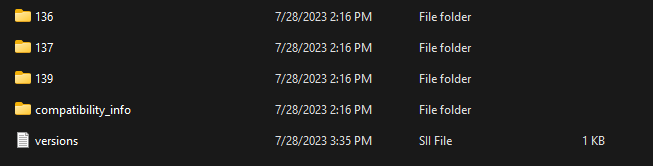 Otherwise, keep reading as I'll explain how to find the version or manifest file (if the mod doesn't have a version file), you'll want to look for a file that looks something like this inside of the mod your trying to edit (in this case for this mod, it would be the "versions.SII" file for me):
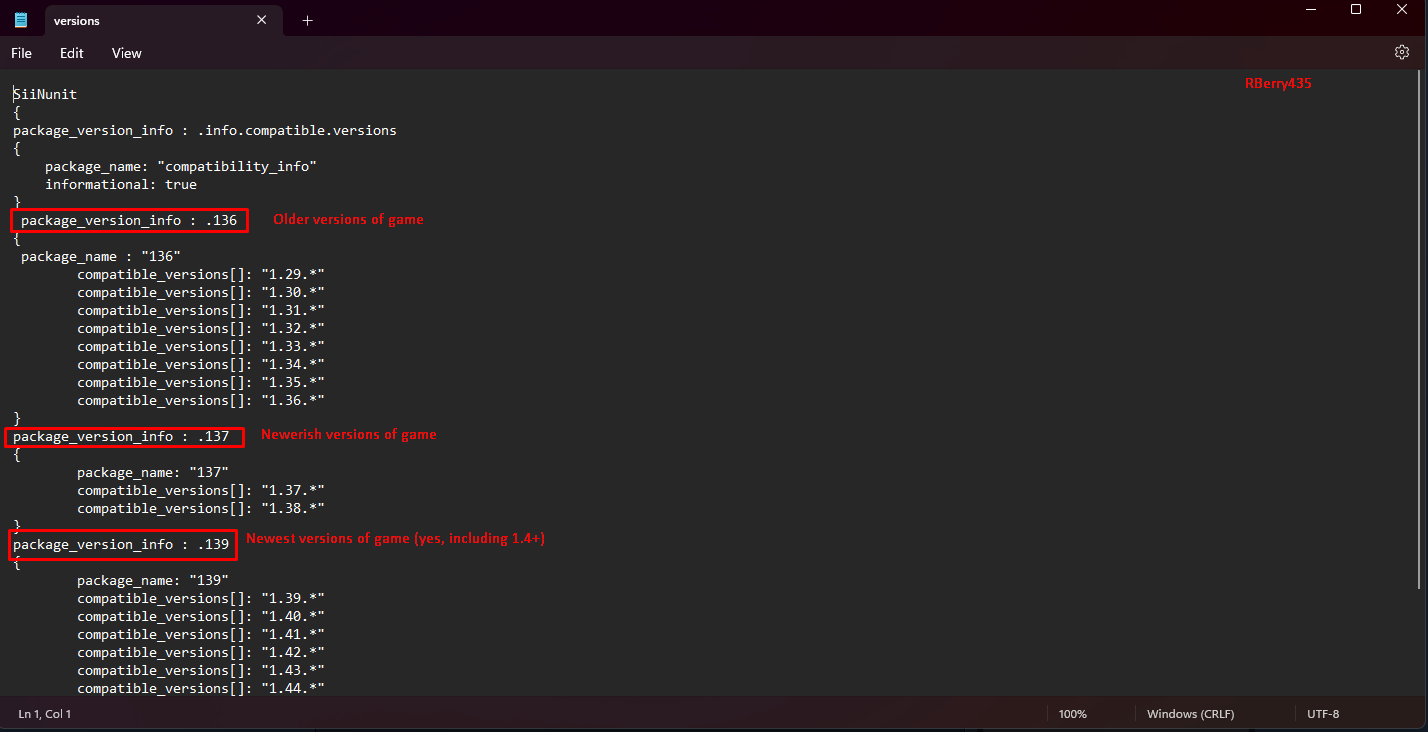 It is 100% safe to just open these files up with notepad, they're like normal txt files except the game knows to read them and not ignore them. Next what you'll do, is you'll scroll down to the very bottom of the version.SSI file (depending on what version you are trying to use the mods on, if that consists of 1.4, 1.3, 1.2, etc. etc. the mod author might've already had back version support, but this thread doesn't cover that. It covers future versions, you may reshape this information and try it but I've not tried it personally myself so I can't tell you if it will work or not, although it might as it makes sense.) and paste in the version you want, for an example if I want the latest beta (at the time of making this review) to be supported, I'll scroll down to "package_version_info : .139 ", then to the table below where all the "compatible_versions[]: x" are, all the way to the bottom, and then paste in the respected version depending on what version of the game you want to support via beta version.
Otherwise, keep reading as I'll explain how to find the version or manifest file (if the mod doesn't have a version file), you'll want to look for a file that looks something like this inside of the mod your trying to edit (in this case for this mod, it would be the "versions.SII" file for me):
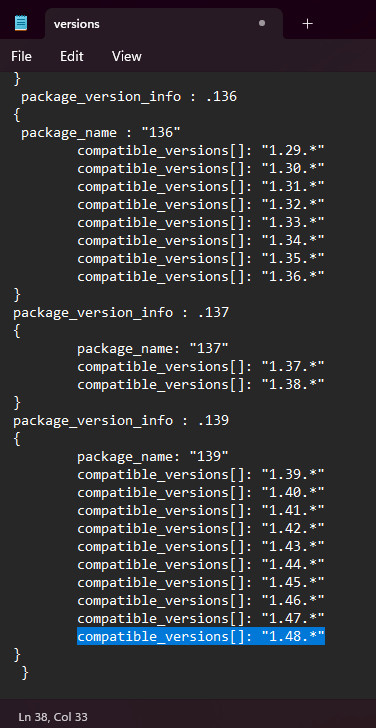
It is 100% safe to just open these files up with notepad, they're like normal txt files except the game knows to read them and not ignore them. Next what you'll do, is you'll scroll down to the very bottom of the version.SSI file (depending on what version you are trying to use the mods on, if that consists of 1.4, 1.3, 1.2, etc. etc. the mod author might've already had back version support, but this thread doesn't cover that. It covers future versions, you may reshape this information and try it but I've not tried it personally myself so I can't tell you if it will work or not, although it might as it makes sense.) and paste in the version you want, for an example if I want the latest beta (at the time of making this review) to be supported, I'll scroll down to "package_version_info : .139 ", then to the table below where all the "compatible_versions[]: x" are, all the way to the bottom, and then paste in the respected version depending on what version of the game you want to support via beta version. compatible_versions[]: "1.48.*"(above will be updated when new beta versions release for convenience). Afterwards, save that file, it'll look something like this if done correctly:
Process 3: Wrapping up
Congratulations, the difficult part is now over. It is as simple as now loading up ATS after hitting Ctrl + S on the version.SSI (or whatever it is called by your mod), and going to your mod manager. If it worked correctly, the mod should allow you to use it even though your game is more indate then the mod itself!
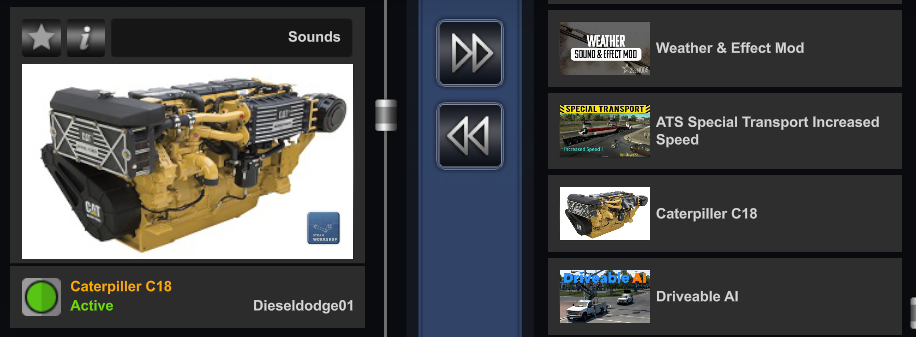
I'd heavily suggest that you test the mod ingame, and make sure that it works as intended, as sometimes the mod developer does have to add up to date assets, but for the most part if it is something as simple as just new features and no new trucks, the mod should still work like butter especially if it is as simple as a engine mod where it is just all sound and no added assets.
I've no clue what else to put here I could've probably squeezed this into "Conclusion".
I'd heavily suggest that you test the mod ingame, and make sure that it works as intended, as sometimes the mod developer does have to add up to date assets, but for the most part if it is something as simple as just new features and no new trucks, the mod should still work like butter especially if it is as simple as a engine mod where it is just all sound and no added assets.
I've no clue what else to put here I could've probably squeezed this into "Conclusion".
Conclusion
I hope this worked for you, as it worked perfectly fine for me, and hope you the best with this guide! Again please don't feel afraid to reach out via the comments if you've any questions or have any issues, I should be able to answer a bit better compared to a entire cluttered article that took me 40 minutes to make as I kept trying to make absolutely sure it wasn't cluttered whilst also trying not to make it sound difficult. It's sad its difficult but you've got todo what you've got todo.
I do seriously suggest you check out ramcharger04's Caterpiller C18 mod, it is a incredible mod but isn't updated frequently enough for me and clearly a lot of people also in the workshop comment section for the same exact mod lol.
If you appreciated the tutorial/mod walkthrough, please give me a favorite, award, idk something lol.
Thanks and happy trucking + modding! 👍
I do seriously suggest you check out ramcharger04's Caterpiller C18 mod, it is a incredible mod but isn't updated frequently enough for me and clearly a lot of people also in the workshop comment section for the same exact mod lol.
If you appreciated the tutorial/mod walkthrough, please give me a favorite, award, idk something lol.
Thanks and happy trucking + modding! 👍
More American Truck Simulator guides
- Hidden and unmarked roads - USA - WEST - updated 2026/02/20★ 5 (1.3k)38k views1.9k ♥73 minUpdated Feb 19
- The American Truckers Guide to everything!★ 5 (960)34k views1.5k ♥53 minUpdated Aug 16, 2020
- American Truck Simulator 100% Achievement-Guide [ENG]★ 5 (704)15k views1.3k ♥8 minUpdated May 16
- Все достижения American Truck Simulator + все DLC [100% Achievement-Guide] [upd: 15.05.26]★ 5 (1.2k)14k views1.7k ♥42 minRussianUpdated Jul 12
- ATS | Cheat-codes | ENG★ 4 (106)13k views183 ♥3 minUpdated 2 Jan, 2025
- Texas 100% Achievement-Guide [ENG]★ 5 (443)12k views595 ♥7 minUpdated May 16


🔥 Popular guides
- Upgrading to PremiumTeam Fortress 2★ 5 (20k)1441k views11k ♥6 minUpdated May 11, 2022
- No More Room in Hell Official ManualNo More Room in Hell★ 5 (2.8k)569k views2.1k ♥29 minUpdated Apr 22, 2019
- NMRiH Community Hosting GuidesNo More Room in Hell★ 5 (526)351k views653 ♥1 minUpdated Aug 10, 2022
- ULTIMATE GUIDE FOR GAME DEV TYCOONGame Dev Tycoon★ 5 (5.8k)326k views10k ♥4 minUpdated 23 Jan, 2014
- How to 'Git Gud' Soon™MORDHAU★ 5 (2k)318k views3k ♥68 minUpdated Nov 16, 2024
- Лучшие кооперативные игры SteamPAYDAY 2★ 5 (1.5k)315k views2.1k ♥56 minRussianUpdated Apr 27, 2025






This guide was created by its original author on the Steam Community. Are you the author and want it removed? Request removal.