LASO Save/Quit Method Fix
Introduction
If you are like me and many others who want to go through the hell that is the MCC LASO playlists without spending years perfecting every run, you are probably going to use the Save/Quit method while playing solo. As many of you already know, when you die, quickly saving and quitting the game allows you to resume from your last checkpoint the next time you resume the game. That method works perfectly fine for a lot of people, but not for me. After the first death, or maybe after two or three, even though I did everything correctly, the game would throw me back to the beginning of the level instead of the last checkpoint. While searching online, I found many other people with the exact same issue, but no real solution. So, I decided to try everything that came to mind, and eventually I found two solutions that actually worked. Using these methods, I have completed all 6 LASO playlists solo. Keep in mind that these fixes worked for me and for a few other Steam players who had the same issue. They may or may not work for you, but I hope this guide can help anyone struggling with the Save/Quit method.
Method 01
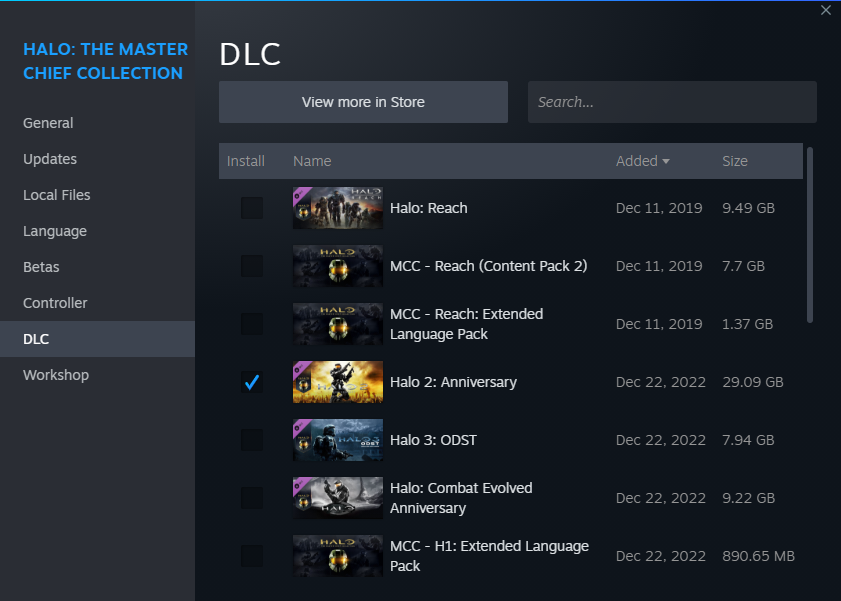
The first method I tried was installing only the game you are currently playing LASO on. For example, if you are doing Halo 2A LASO, only have the Halo 2A campaign DLC installed. While I was playing through Reach, I had no problems at all with the Save/Quit method, mainly because Reach was the only Halo game I owned at the time. The issues only started after I bought and installed all the other Halo games included in MCC. After trying this method, I managed to complete Truth and Reconciliation while dying more than 30 times without being restarted even once. Before that, just two or three deaths were enough to send me all the way back to the beginning of the level.
Method 02
Even though the first method worked wonders, there were still some occasions where it failed and restarted me back at the beginning of the level. One time, after getting restarted, I got frustrated and force-quit the game. Since the level was one of the easier ones, I decided to launch the game again and continue anyway. To my surprise, even though I had already seen the opening cutscene after the restart, the game put me right back at my last checkpoint. The next time it happened, I repeated the same process: I force-quit the game, launched it again, continued the playlist, and once again I was back at my last checkpoint. One very important thing to note is that you need to pause the game during the opening cutscene. Do not let the cutscene fully play out or skip it. If you do, the game will update your checkpoint to the one after the cutscene instead of restoring the checkpoint you had before the Save/Quit method failed.
The video below demonstrates what happens when the Save/Quit method fails and sends you back to the beginning of the level. By using the second method, I was able to restore my run and respawn at my last checkpoint. I managed to capture this during my Gravemind playthrough of all levels. I only got restarted once, but as you can see, the run was saved, and with that I was finally able to complete Gravemind once and for all.
The video below demonstrates what happens when the Save/Quit method fails and sends you back to the beginning of the level. By using the second method, I was able to restore my run and respawn at my last checkpoint. I managed to capture this during my Gravemind playthrough of all levels. I only got restarted once, but as you can see, the run was saved, and with that I was finally able to complete Gravemind once and for all.
Conclusion
You can try using just the first method, just the second method, or both together. Hopefully, one of them works for you and saves you from having your LASO runs constantly reset. I hope this guide helps somebody out there.
Cheers!
Cheers!
More Halo: The Master Chief Collection guides
- Halo Reach: Collectibles★ 5 (1.2k)33k views2.3k ♥9 minUpdated Jul 4, 2021
- Halo: Reach - Full Achievement Guide★ 5 (823)28k views1.7k ♥12 minUpdated May 9, 2025
- MCC - Master Achievement Guide (Complete)★ 5 (479)19k views1.2k ♥5 minUpdated Aug 8, 2020
- Halo Combat Evolved: Collectibles★ 5 (1k)17k views2k ♥8 minUpdated Nov 20, 2020
- Halo: Combat Evolved - Full Achievement Guide★ 5 (504)16k views1.1k ♥7 minUpdated Jun 2, 2022
- Golden Moa Location Guide★ 5 (476)13k views878 ♥13 minUpdated 28 Nov, 2021






🔥 Popular guides
- Upgrading to PremiumTeam Fortress 2★ 5 (20k)1441k views11k ♥6 minUpdated May 11, 2022
- No More Room in Hell Official ManualNo More Room in Hell★ 5 (2.8k)569k views2.1k ♥29 minUpdated Apr 22, 2019
- NMRiH Community Hosting GuidesNo More Room in Hell★ 5 (526)351k views653 ♥1 minUpdated Aug 10, 2022
- ULTIMATE GUIDE FOR GAME DEV TYCOONGame Dev Tycoon★ 5 (5.8k)326k views10k ♥4 minUpdated 23 Jan, 2014
- How to 'Git Gud' Soon™MORDHAU★ 5 (2k)318k views3k ♥68 minUpdated Nov 16, 2024
- Лучшие кооперативные игры SteamPAYDAY 2★ 5 (1.5k)315k views2.1k ♥56 minRussianUpdated Apr 27, 2025






This guide was created by its original author on the Steam Community. Are you the author and want it removed? Request removal.