Fix of DOOM / Исправление DOOM
Fix of Freezes / Фикс фризов
[ENG]
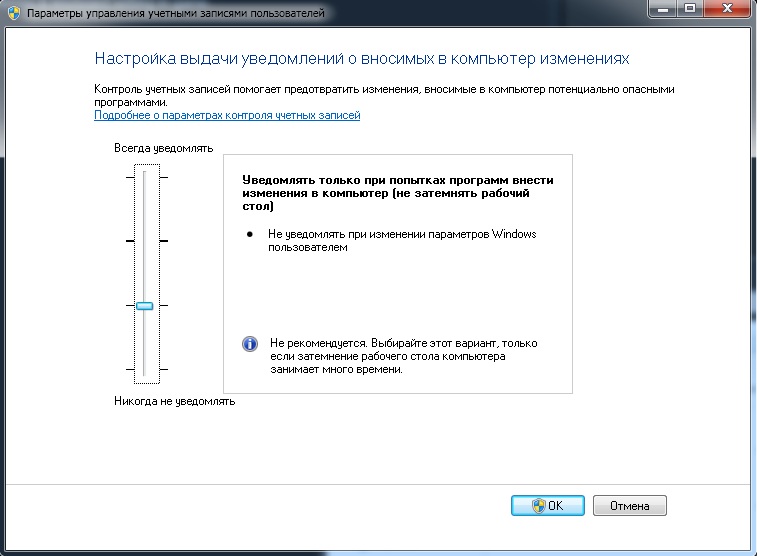
Enable UAC first level and then run DOOM as an administrator. It'll fix freezes after which sound keep going but image not.
[RUS]
Включи UAC на первый уровень, а после запусти DOOM от имени администратора. Это исправит фризы после, которых звук идет, а картинка нет.Fix of Stuttering / Фикс статтеров
[ENG]
If your framerate is drops you need to disable Razer chroma integration in mouse & keyboard setting in game or install that fix.[RUS]
Если твой fps просидает тебе нужно отключить Razer Chroma в настройках мыши & клавиатуры или установить этот фикс.
Freeze at profile loading / Зависание на загрузке профиля
[ENG]
Download and install this driver[www.nvidia.com].Thx TurtlePower for finding solution.
[RUS]
Скачайте и установите этот драйвер[www.nvidia.com].Спасибо TurtlePower за нахождение решения.
Texture fix / Исправление текстур
[ENG]
If you have that texture glitch, then you need to delete all old files (older than 2019 year) in this folder "DOOM\virtualtextures"
[RUS]
Если у тебя имеется такая проблема с текстурами, то тебе нужно удалить все старые файлы (старее 2019 года) в этой папке "DOOM\virtualtextures"
Launch options / Параметры запуска
[ENG]
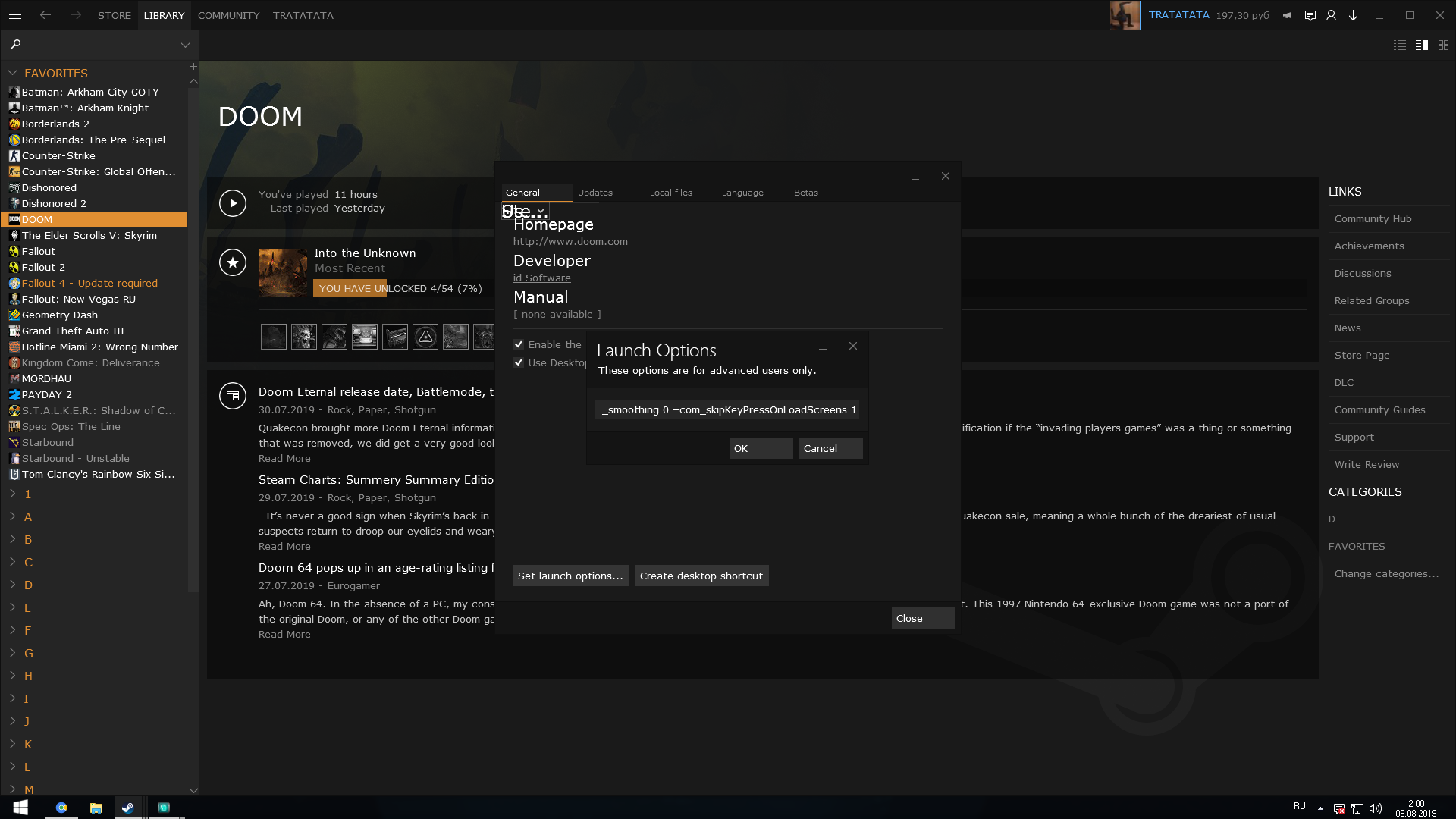
This launch options necessary to provide better experience. Just copy and put it here+com_skipIntroVideo 1 +menu_advanced_AllowAllSettings 1 +set m_smoothing 0 +com_skipKeyPressOnLoadScreens 1(Disables intro, give access to nigthmare settings, remove need to press space after every loading, mouse acceleration disabled)
[RUS]
Эти параметры запуска необходимы для комфортной игры. Просто скопируй и вставь их сюда+com_skipIntroVideo 1 +menu_advanced_AllowAllSettings 1 +set m_smoothing 0 +com_skipKeyPressOnLoadScreens 1(Нет интро, доступны все настройки графики, не надо жать пробел после каждой загрузки, отключено ускорение мыши)
Rate if it help you / Оцени если тебе это помогло

More DOOM guides
- DOOM Written Guide/Walkthrough for all secrets on each mission including Doomguy locations.★ 5 (4.8k)101k views9.3k ♥45 minUpdated 22 May, 2025
- DOOM 100% Achievement Guide★ 5 (1.5k)65k views2.8k ♥19 minUpdated 30 Nov, 2023
- Все секреты★ 5 (2.8k)54k views4.8k ♥14 minRussianUpdated 6 Jan, 2022
- DOOM Secrets & Collectibles★ 5 (1.2k)49k views2.1k ♥4 minUpdated 4 Dec, 2022
- Secret Doom Classic Level Locations + Easter Eggs★ 5 (1.5k)47k views2.1k ♥13 minUpdated 29 Jan, 2021
- Как уменьшит объем игры(лайфхак)?★ 5 (729)44k views343 ♥1 minRussianUpdated 25 May, 2017



🔥 Popular guides
- Upgrading to PremiumTeam Fortress 2★ 5 (20k)1441k views11k ♥6 minUpdated May 11, 2022
- No More Room in Hell Official ManualNo More Room in Hell★ 5 (2.8k)569k views2.1k ♥29 minUpdated Apr 22, 2019
- NMRiH Community Hosting GuidesNo More Room in Hell★ 5 (526)351k views653 ♥1 minUpdated Aug 10, 2022
- ULTIMATE GUIDE FOR GAME DEV TYCOONGame Dev Tycoon★ 5 (5.8k)326k views10k ♥4 minUpdated 23 Jan, 2014
- How to 'Git Gud' Soon™MORDHAU★ 5 (2k)318k views3k ♥68 minUpdated Nov 16, 2024
- Лучшие кооперативные игры SteamPAYDAY 2★ 5 (1.5k)315k views2.1k ♥56 minRussianUpdated Apr 27, 2025






This guide was created by its original author on the Steam Community. Are you the author and want it removed? Request removal.