Fix Project Zomboid “Out of Memory” / Low RAM Crash (2025 Ultimate Guide – 300+ Mods & Max Zombies)
🧩 1. Find your Project Zomboid folder
C:\Program Files (x86)\Steam\steamapps\common\Project Zomboid\
🧾 2. Open ProjectZomboid64.json
Right-click → Edit with Notepad.
🧠 3. Locate the section called "vmArgs": [ … ]
It should look like this by default:
"vmArgs": [
"-Djava.awt.headless=true",
"-Xmx3072m",
"-Dzomboid.steam=1"
],
"vmArgs": [
"-Djava.awt.headless=true",
"-Xmx3072m",
"-Dzomboid.steam=1"
],
⚙️ 4. Replace it with the optimized version:
"vmArgs": [
"-Djava.awt.headless=true",
"-Xms16g",
"-Xmx32g",
"-XX:+UseZGC",
"-XX:+AlwaysPreTouch",
"-XX:+UseStringDeduplication",
"-Dzomboid.steam=1",
"-Dzomboid.znetlog=1",
"-Djava.library.path=win64/;.",
"-XX:-CreateCoredumpOnCrash",
"-XX:-OmitStackTraceInFastThrow"
],
"-Djava.awt.headless=true",
"-Xms16g",
"-Xmx32g",
"-XX:+UseZGC",
"-XX:+AlwaysPreTouch",
"-XX:+UseStringDeduplication",
"-Dzomboid.steam=1",
"-Dzomboid.znetlog=1",
"-Djava.library.path=win64/;.",
"-XX:-CreateCoredumpOnCrash",
"-XX:-OmitStackTraceInFastThrow"
],
💡 If you have lots of mods or 128 GB RAM, you can also use:
-Xms32g
-Xmx64g
-Xmx64g
💾 5. Save the file → Restart Steam → Launch the game
At startup you should see in console.txt:
Memory max: 32768.0 MB
or higher – that means it worked! ✅
Memory max: 32768.0 MB
or higher – that means it worked! ✅
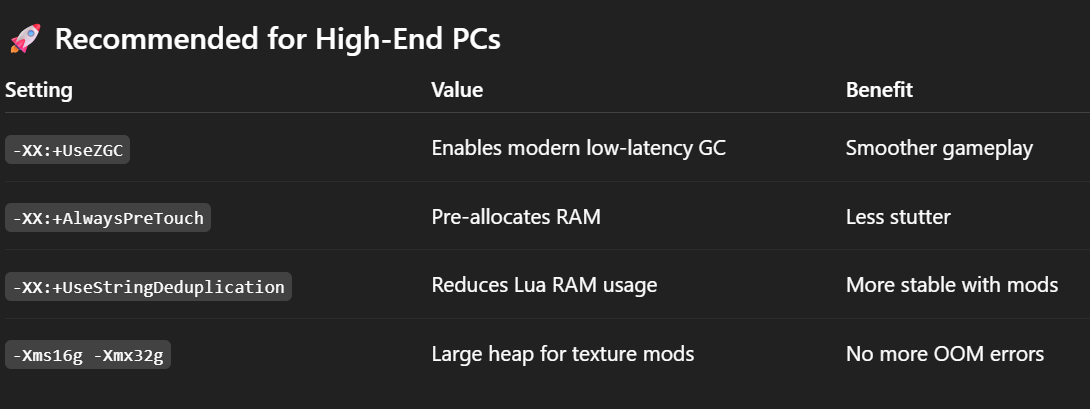
🚀 Recommended for High-End PCs
More Project Zomboid guides
- Modding Policy★ 5 (397)133k views208 ♥9 minUpdated Nov 8, 2022
- 80 tips and tricks for Project Zomboid (If you have over 100 hours in this game some of these will probably be new to you too)★ 5 (1.6k)82k views3.1k ♥28 minUpdated Aug 29, 2021
- Топ 100 лучших модов на "project zomboid"★ 5 (415)68k views1.1k ♥10 minRussianUpdated Jul 28, 2024
- [B41] Лучшие места для базы★ 5 (477)61k views1.3k ♥6 minRussianUpdated Nov 30, 2025
- Первая помощь ❤★ 5 (628)49k views1.4k ♥5 minRussianUpdated Jan 20, 2025
- The Basics of Base Building★ 5 (704)48k views1.5k ♥17 minUpdated Dec 24, 2021





🔥 Popular guides
- Upgrading to PremiumTeam Fortress 2★ 5 (20k)1441k views11k ♥6 minUpdated May 11, 2022
- No More Room in Hell Official ManualNo More Room in Hell★ 5 (2.8k)569k views2.1k ♥29 minUpdated Apr 22, 2019
- NMRiH Community Hosting GuidesNo More Room in Hell★ 5 (526)351k views653 ♥1 minUpdated Aug 10, 2022
- ULTIMATE GUIDE FOR GAME DEV TYCOONGame Dev Tycoon★ 5 (5.8k)326k views10k ♥4 minUpdated 23 Jan, 2014
- How to 'Git Gud' Soon™MORDHAU★ 5 (2k)318k views3k ♥68 minUpdated Nov 16, 2024
- Лучшие кооперативные игры SteamPAYDAY 2★ 5 (1.5k)315k views2.1k ♥56 minRussianUpdated Apr 27, 2025






This guide was created by its original author on the Steam Community. Are you the author and want it removed? Request removal.