How to Fix Performance Issues / FPS Drops After a Patch
Introduction
No Man's sky has a tendency of breaking for some people after patches. Without even touching at the graphics settings :
One cause is that the game launches on the wrong GPU : the integrated GPU (iGPU) from the CPU, instead of the dedicated graphics card.
This guide will contain 2 ways to check if you suffer from this specific issue and how to fix it.
- FPS are stuck very low, no matter the graphics settings.
- The game used to run smoothly before the patch.
- GPU usage is close to 0% in Task Manager while playing.
One cause is that the game launches on the wrong GPU : the integrated GPU (iGPU) from the CPU, instead of the dedicated graphics card.
This guide will contain 2 ways to check if you suffer from this specific issue and how to fix it.
First Method (In Game)
Check the graphics settings:
Open up the game and go into Display & Graphics.In the Display section, look for the GPU setting and change it to your graphics card.
(e.g. Here my integrated GPU is named AMD Radeon(TM) Graphics and my correct GPU is named AMD Radeon RX 7800 XT)
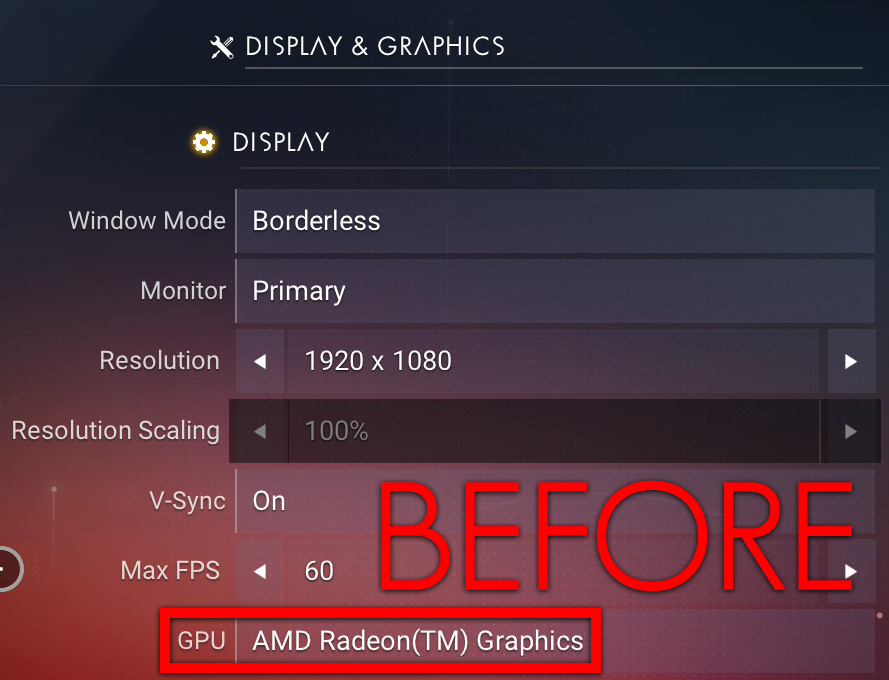
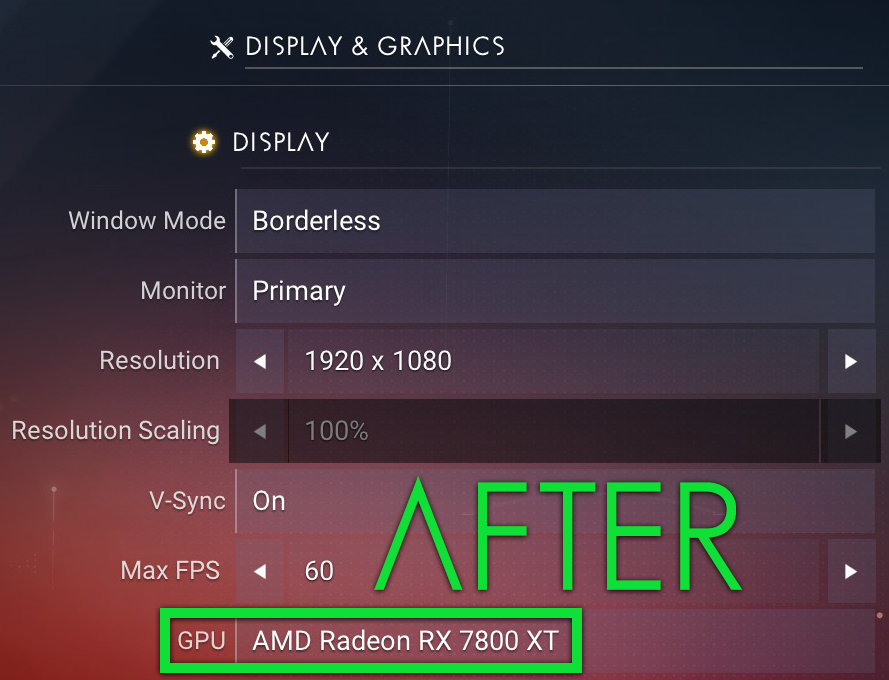
- If your game crashes on startup or won't open, try the second method.
Second Method
Check TKGRAPHICSSETTINGS.mxml
The graphics configuration is stored in:C:\Program Files (x86)\Steam\steamapps\common\No Man's Sky\Binaries\SETTINGS
- Look for the file named TKGRAPHICSSETTINGS.MXML
- Open the file with a text editor and look for these lines at the bottom of the document:<Property name="AdapterName" value="AMD Radeon(TM) Graphics" /> <Property name="AdapterIndex" value="1" />(e.g. Here my integrated GPU is named AMD Radeon(TM) Graphics)
- Edit the file by replacing the lines above with the correct GPU name and index:<Property name="AdapterName" value="AMD Radeon RX 7800 XT" /> <Property name="AdapterIndex" value="0" />(e.g. Here my correct GPU is named AMD Radeon RX 7800 XT)!!! Make sure you type the exact name of your GPU !!!
- Save your changes.
- Relaunch No Man’s Sky.
The game should now run on your dedicated GPU, and FPS should return to normal.
Hope that helped you!
More No Man's Sky guides
- No Man's Sky Access Codes★ 5 (880)43k views2.1k ♥1 minUpdated 14 Apr
- Refining – The Magic Of Alchemy★ 5 (1.2k)41k views3.6k ♥5 minUpdated 24 Mar, 2022
- How to get RICH in NMS SUPER FAST★ 5 (501)32k views1k ♥2 minUpdated 7 Sep, 2022
- Multi-Tools: Types, Statistics, Weapons, Layouts★ 5 (550)27k views1.3k ♥7 minBulgarianUpdated 3 Jul, 2025
- Starship Guide: Types, Statistics & Roles★ 5 (461)25k views924 ♥8 minBulgarianUpdated 30 May
- Звездолеты СТРАЖЕЙ★ 5 (220)24k views519 ♥7 minRussianUpdated 9 Feb, 2025




🔥 Popular guides
- Upgrading to PremiumTeam Fortress 2★ 5 (20k)1441k views11k ♥6 minUpdated May 11, 2022
- No More Room in Hell Official ManualNo More Room in Hell★ 5 (2.8k)569k views2.1k ♥29 minUpdated Apr 22, 2019
- NMRiH Community Hosting GuidesNo More Room in Hell★ 5 (526)351k views653 ♥1 minUpdated Aug 10, 2022
- ULTIMATE GUIDE FOR GAME DEV TYCOONGame Dev Tycoon★ 5 (5.8k)326k views10k ♥4 minUpdated 23 Jan, 2014
- How to 'Git Gud' Soon™MORDHAU★ 5 (2k)318k views3k ♥68 minUpdated Nov 16, 2024
- Лучшие кооперативные игры SteamPAYDAY 2★ 5 (1.5k)315k views2.1k ♥56 minRussianUpdated Apr 27, 2025






This guide was created by its original author on the Steam Community. Are you the author and want it removed? Request removal.