A Introduction to Fallout New Vegas Multiplayer (NVMP) [Updated 2025]
Notices
READ THIS iF YOU ARE A LINUX USER
The Mod Works with Linux But requires additional set-up, But you're unable to join the Public Server due to the method of setting it up (There's a pinned post in the #NVMP-Support channel you can check out or this video) Compatible Game Versions
NVMP works only with these platforms
* GOG
* Steam
(Yes it is cross-platform)
Introduction
Hello! If you're reading this, you're most likely interested in New Vegas Multiplayer (NVMP) or are browsing the mod and would like to know a little more about it. To start there are different ways to enjoy NVMP They have
- Public Server/ATK (Formerly known as RADD)
- Co-op (New Vegas in a local server with up to 10 Friends)
This is what you can do with NVMP I will also have a FAQ section if you have some questions and if you have one that's not up there feel free to leave one.
If you're wondering what's possible with Co-op I'll leave a playlist that has NVMP Co-op
It'll be Here
Otherwise I hope this guide helps explain somethings and introduce you into NVMP and possibly trying it for yourself
If you're seeking NVMP support, feel free to Ping me in the NVMP Support Channel
and I'll try to help the best I can
- Public Server/ATK (Formerly known as RADD)
- Co-op (New Vegas in a local server with up to 10 Friends)
This is what you can do with NVMP I will also have a FAQ section if you have some questions and if you have one that's not up there feel free to leave one.
If you're wondering what's possible with Co-op I'll leave a playlist that has NVMP Co-op
It'll be Here
Otherwise I hope this guide helps explain somethings and introduce you into NVMP and possibly trying it for yourself
Regarding NVMP Support
If you're seeking NVMP support, feel free to Ping me in the NVMP Support Channel
and I'll try to help the best I can
NVMP Discord
https://nv-mp.com/discord
Installation
How to Install
There are multiple ways of setting up NVMP these are:
Manual
Mod Organizer 2
Wabbajack
Manually Installing
Recommended to be using a Clean Install
Installing Manually is recommended for experienced/stubborn modders
NVMP Manual Guide Wiki[nuwiki.nv-mp.com]
(Official guide)
Using Mod Organizer 2
When using Mod Organizer you need to install NVMP into your game files so they can properly work
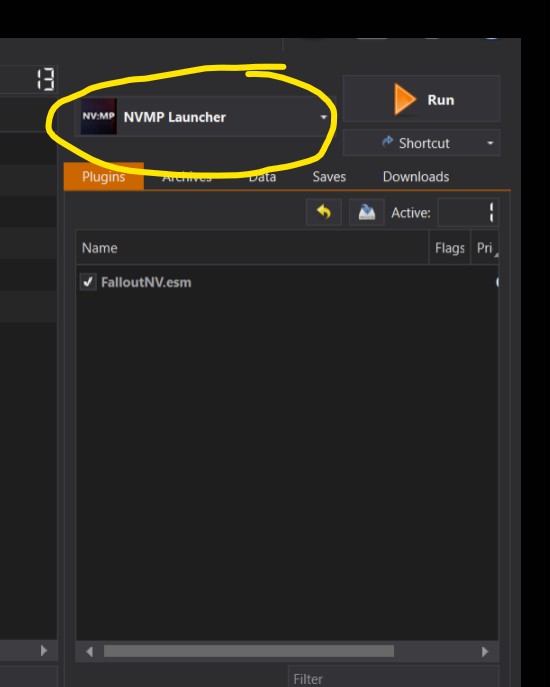
This is what it should look like in Mo2
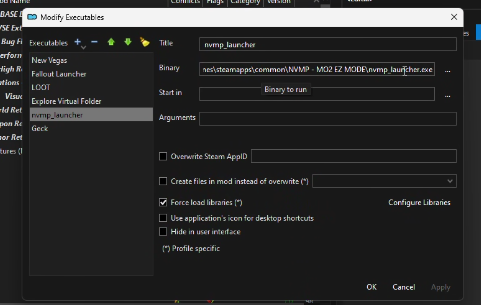
this is what it should be setup as in your executables
Wabbajack
[Official Guide]
Public Server (ATK)
What Is ATK?
ATK(Ain't that a Kick in the Head?) Is the official public server for NV:MP
it's New Vegas but with a MMO Spin!
Anything new?
* Player Currency (Sparks)
* Player Housing
* Re-balanced for PVP
* Factions and Land Fighting
* All Player led factions & are entirely ran by the Players.
* Free Faction Creation (You can make any faction you want!)
* Drivable Vertibirds
* Party System
* San Fran Map (Accessible at Lvl 30)
Sparks
Sparks are the player currency of NVMP. They can be traded with other players and gathered in multiple different ways.
- PVE Grinding
Animals, Humans, Robots, any kind of NPC's can be killed to gain sparks.
- Jobs
- Radio Host: 100 Sparks every 30 minutes
- Entertainer: Get Tips for playing Music
- Courier: Deliver Mail to Players & Houses for 250 Sparks per Mail
- Drug Dealer: Make Tobacco & Moonshine
- Raider: Get Sparks for killing players and steal resources from locations!
- Bounty Hunter: Join a Staff-Led merc faction to gain sparks for collecting bounties and doing contracts
What can I use them for?
- You can Purchase houses from Players
- Pay other players with them!
- Buy from Lawson(Black-Market Trader)
- Paying for Services
PVP
PVP can be the most fun, exhilarating combat you can have as the open world of New Vegas mixed with PVP is amazing.
The Game has been entirely re-balanced and setup to make builds using Legendary perks to boost your favorite weapons. Some weapons will be good and some will be awful but finding things to use in a fight can be amazing.
if you wanted to see what PVP looks like in NVMP this Video has it all
Introduction to Co-op!
Co-op can be setup with multiple methods and have different ways
I'll be showcasing all of them here but first
DLC's can be disabled though so if someone doesn't have DLCs have everyone disable the dlcs or what they don't have
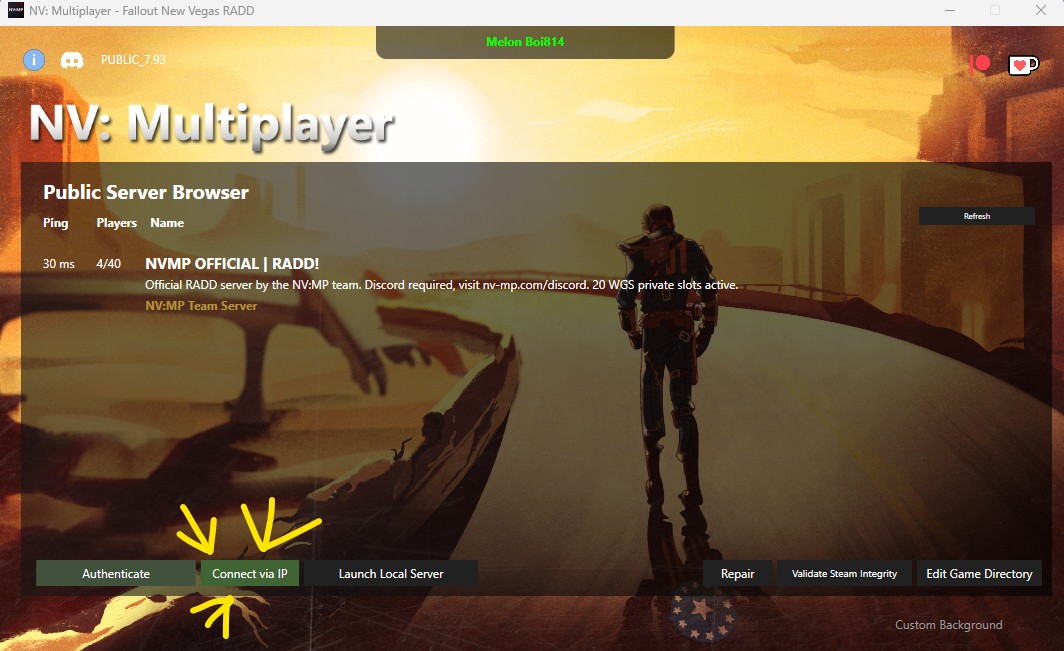
Opening a Server is easy, head to your launcher hit the "Launch Local Server" Button
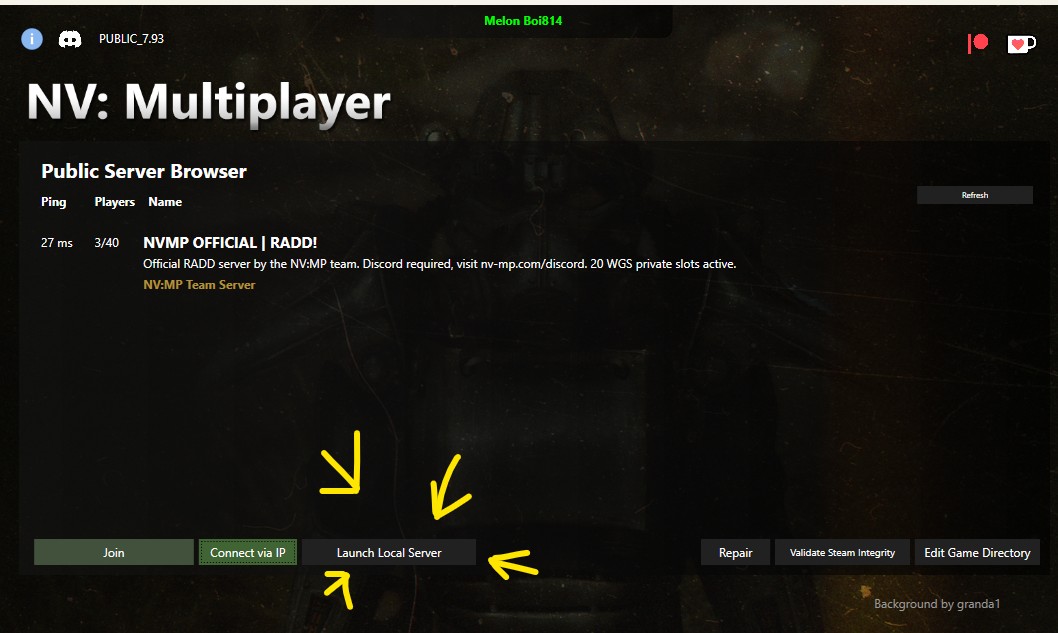
Once open you'll see a bunch of things appear and it should look like this
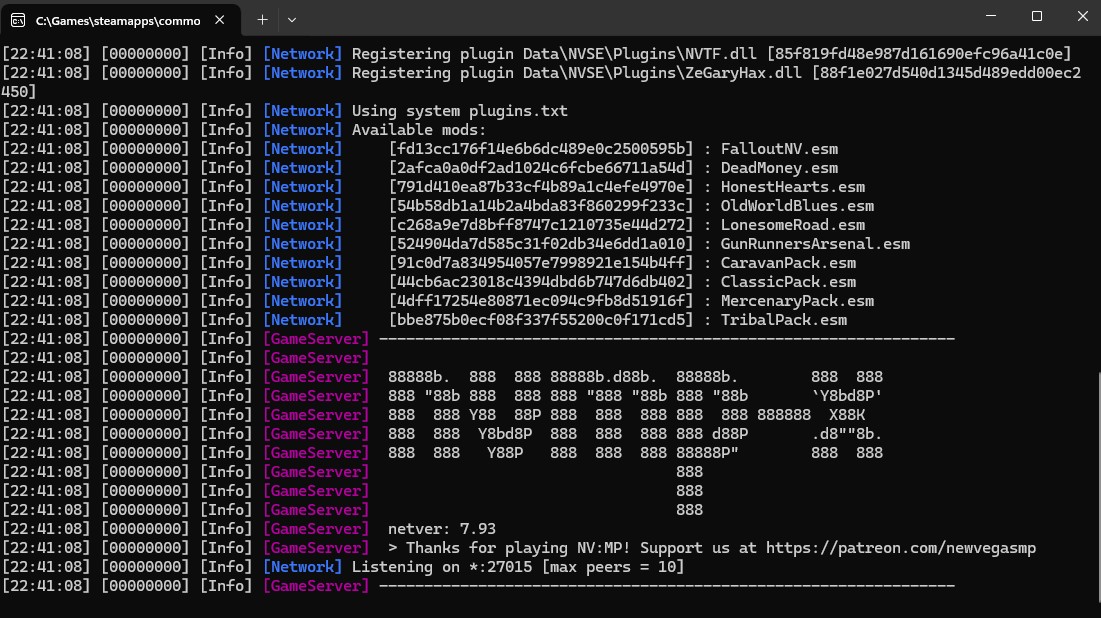
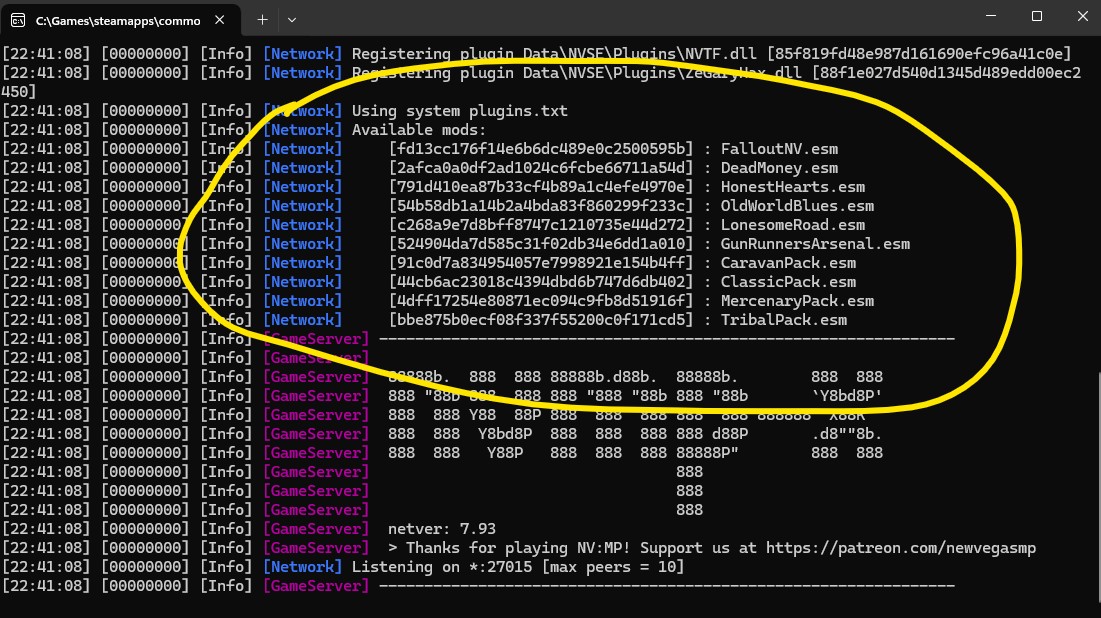
Now the most important thing here is the "Available Mods" as this is what mods/ esps the server is registering for the server and means every player has to have those mods
Simple. If you're the one hosting you can head to "Connect Via IP" and input Localhost:27015
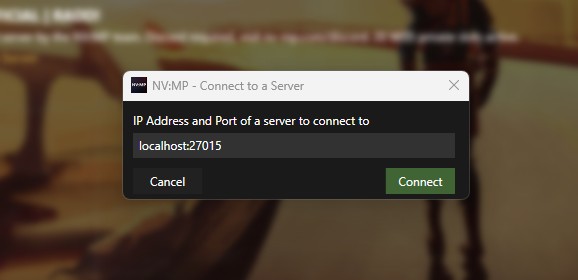
it should launch the game up!
I'll be showcasing all of them here but first
ALL PLAYERS MUST HAVE THE SAME MODS/DLCS WHEN CONNECTING
DLC's can be disabled though so if someone doesn't have DLCs have everyone disable the dlcs or what they don't have
Port Fowarding/Local
RadminVPN/Hamachi
Patreon Only Server
RadminVPN/Hamachi
Patreon Only Server
Opening a Co-op Server
Opening a Server is easy, head to your launcher hit the "Launch Local Server" Button
Once open you'll see a bunch of things appear and it should look like this
Now the most important thing here is the "Available Mods" as this is what mods/ esps the server is registering for the server and means every player has to have those mods
How do I join my server?
Simple. If you're the one hosting you can head to "Connect Via IP" and input Localhost:27015
it should launch the game up!
Co-op (RadminVPN/Hamachi)
Using Radmin/Hamachi to Connect is the simplest way to connect (In my opinion)
Step 1. Setting up a Network!
Setting up a network is the way you have each other be connected
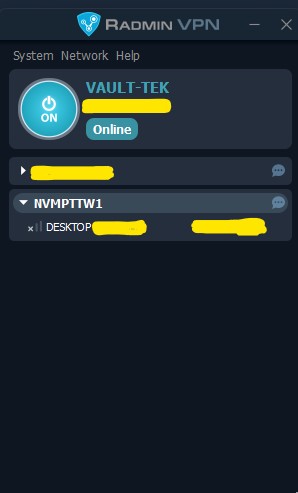
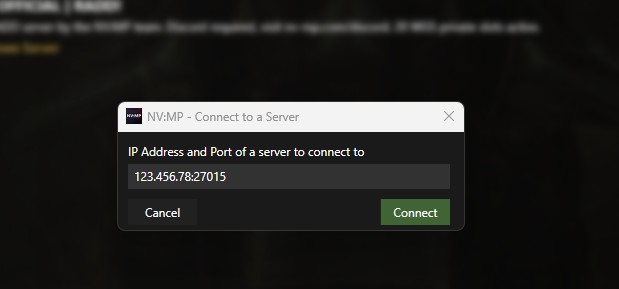
2. Joining!
Whoever is hosting use their "Radmin IP" and insert it into "Connect Via IP" and also add the port :27015 at the end!
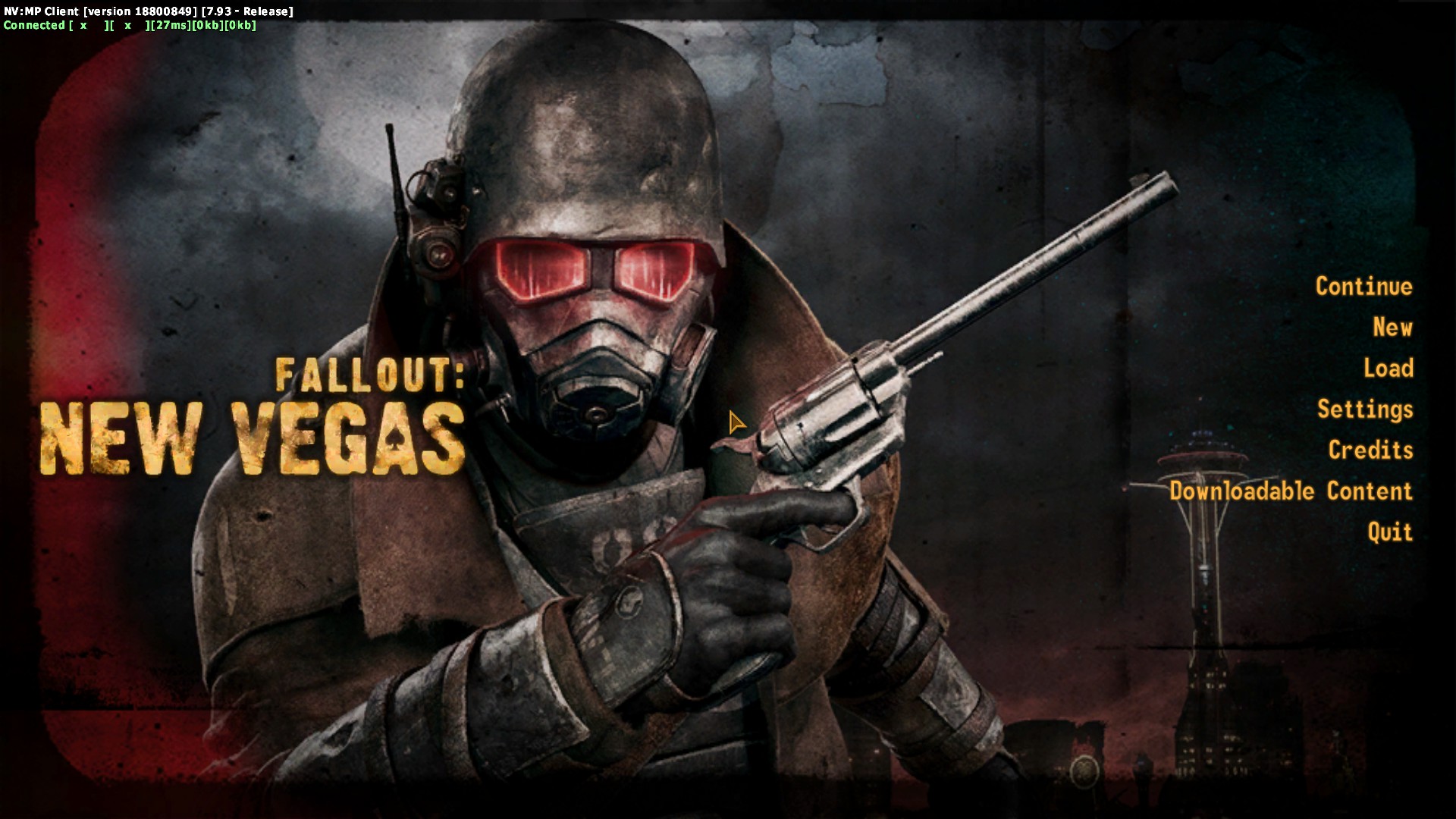
Step 3. Success!
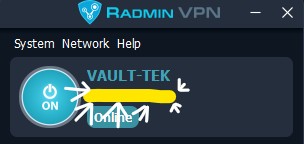
[Small FAQ]
Q: What is Radmin IP?
A: The Numbers under your PC name!
Step 1. Setting up a Network!
Setting up a network is the way you have each other be connected
2. Joining!
Whoever is hosting use their "Radmin IP" and insert it into "Connect Via IP" and also add the port :27015 at the end!
Step 3. Success!
[Small FAQ]
Q: What is Radmin IP?
A: The Numbers under your PC name!
Co-op (Port Fowarding/Local)
Port Fowarding/Local
Port Fowarding is recommended for those who have expertise or are accustomed to using it.
Simply join the Host using their public Ivp4 Connection using "connect via ip" with the :27015 at the end
Co-op (Patreon Server)
Patreon Only Servers
The Patreon only servers are people who directly support the mod via their Patreon[www.patreon.com] these servers are not hosted on a PC but are ran on a server.
Remember this is only for people who pay for the Patreon!!
You just need to input selected commands like these into the bots messages
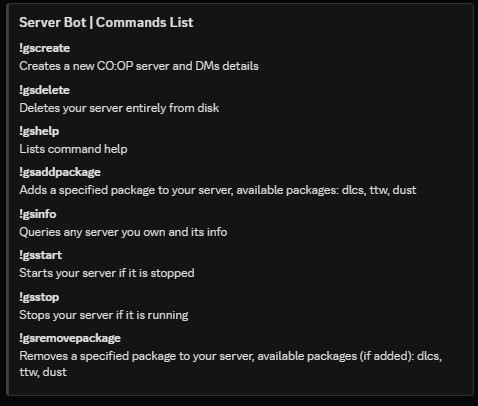
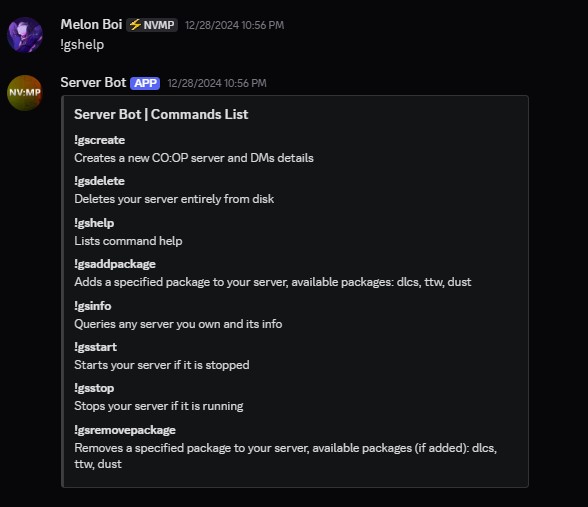
Creating a server to play on is easy! just input the !gscreate command and it'll start a server
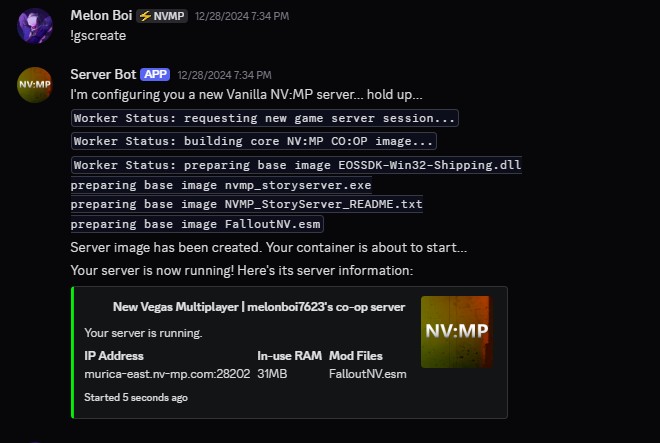
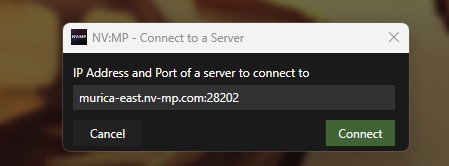
To Join
Simply enter in the server IP in the info you were given for your server
The customization on the Patreon server is limited as you only have access to a select few of presets!

Dust 1.6 (not 2.0 sadly), Tales of Two Wastelands, DLC's (All DLC's)
FAQ
I'll be answering some questions that I see that are commonly asked.
Q: Can you play Co-op and not have to play the Public Server
A: Yes you can play Co-op with up to 10 friends
Q:Do I have to pay to play Co-op?
A: No.
Q: Can I use mods with Co-op?
A: Yep, But all players have to be using the same mods and same versions though.
Q: Can I play locally with someone on the same network?
A: Yes.
Q: Is there Quest sync?
A: No
Q: Is Progress Shared?
A: No, all progress is tied to your save.
Q: What Happens if I die? does my friend die too?
A: You will go back to your most recent save. Your friends progress will remain untouched.
Q: Why is there NPC's that are transparent
A: The Ghosts are someone else NPC's
Q: Can I Turn off the Ghosts?
A: No.
|
Q: Am I able interact with the other persons NPC?
A: You're still able to harm the NPC but you're unable to talk to them.
Q: Can I use mods on the server?
A:No, Only Retextures, Replacers, etc. Anything with .Esp/.Esm & .dll Will not work. This is because of the server whitelist which will block anything non-whitelisted by the server, I.e Johnny Guitar & scripting mods will not work and other mods
Q:Do I need to be in VC?
A:No, It hasn't been the case in ages.
Q: Can I Play the story on the Public server?
A: Yes.
Q: Am I able to access the DLCs?
A: All DLCs except for Courier's Stash is available
Q:Do I need the DLC's?
A: Yes you need All DLC's except Courier's stash
Q: Can I Turn off PVP?
A: No.
Q: Where is Safe to be?
A: Goodsprings is the natural Player hub and has a safezone so you're unable to be harmed.
Q:Will this affect my game when I'm not playing NVMP?
A:No, NVMP should never affect your game.
Q: Why isn't there quest sync?
A: The Mod itself is a framework, not meant to be a Skyrim Together sort of mod,
Q: Do we need to be in the NVMP Discord to play the mod?
A: No, But to join the public server you need to be in the discord
Q: Is there a way to not have to sign-in to Epic Games?
A:Yes. there is a offline Mode that allows for Co-op but all Players must be in Offline and you can't access the Public Server.
Q: Why Do we need to sign into Epic Games?
(Answer from Developer)
* Epic Games gives us considerably great Anti-Cheat
* Epic Games gives us an SDK that allows for better networking in the future
* Discord linkage means we can hold everyone accountable within the Discord, and our bans in Discord mirror directly to the RADD server
* The linkage only ever has to be done once, so it's just a small hurdle one time
As of version 9.0, Epic games is no longer used
If there are more questions I will add them.
Co-op
Q: Can you play Co-op and not have to play the Public Server
A: Yes you can play Co-op with up to 10 friends
Q:Do I have to pay to play Co-op?
A: No.
Q: Can I use mods with Co-op?
A: Yep, But all players have to be using the same mods and same versions though.
Q: Can I play locally with someone on the same network?
A: Yes.
Q: Is there Quest sync?
A: No
Q: Is Progress Shared?
A: No, all progress is tied to your save.
Q: What Happens if I die? does my friend die too?
A: You will go back to your most recent save. Your friends progress will remain untouched.
Q: Why is there NPC's that are transparent
A: The Ghosts are someone else NPC's
Q: Can I Turn off the Ghosts?
A: No.
|
Q: Am I able interact with the other persons NPC?
A: You're still able to harm the NPC but you're unable to talk to them.
Public Server
Q: Can I use mods on the server?
A:No, Only Retextures, Replacers, etc. Anything with .Esp/.Esm & .dll Will not work. This is because of the server whitelist which will block anything non-whitelisted by the server, I.e Johnny Guitar & scripting mods will not work and other mods
Q:Do I need to be in VC?
A:No, It hasn't been the case in ages.
Q: Can I Play the story on the Public server?
A: Yes.
Q: Am I able to access the DLCs?
A: All DLCs except for Courier's Stash is available
Q:Do I need the DLC's?
A: Yes you need All DLC's except Courier's stash
Q: Can I Turn off PVP?
A: No.
Q: Where is Safe to be?
A: Goodsprings is the natural Player hub and has a safezone so you're unable to be harmed.
NVMP
Q:Will this affect my game when I'm not playing NVMP?
A:No, NVMP should never affect your game.
Q: Why isn't there quest sync?
A: The Mod itself is a framework, not meant to be a Skyrim Together sort of mod,
Q: Do we need to be in the NVMP Discord to play the mod?
A: No, But to join the public server you need to be in the discord
Q: Is there a way to not have to sign-in to Epic Games?
A:Yes. there is a offline Mode that allows for Co-op but all Players must be in Offline and you can't access the Public Server.
Q: Why Do we need to sign into Epic Games?
(Answer from Developer)
* Epic Games gives us considerably great Anti-Cheat
* Epic Games gives us an SDK that allows for better networking in the future
* Discord linkage means we can hold everyone accountable within the Discord, and our bans in Discord mirror directly to the RADD server
* The linkage only ever has to be done once, so it's just a small hurdle one time
As of version 9.0, Epic games is no longer used
If there are more questions I will add them.
Incompatible Mods/Software
What do you mean Incompatible software?
NVMP uses its own custom UI and some software's have a direct conflict with the GUI
These are the ones I know that cause conflict:
- Overwolf
- Msi Afterburner
- RivaTuner
Incompatible Mods
Some mods do cause conflict due to editing game files or overwriting the NVMP UI
These are:
- Reshade
- Enb's
- Heap Replacer
- Simple Death
DXVK & D3d9 are compatible now
More Fallout: New Vegas guides
- Simple Guide to Setting up New Vegas in 2026★ 5 (2.9k)122k views8k ♥9 minUpdated May 6
- New Vegas 2024 Essential Modding Guide★ 5 (1.4k)112k views3.9k ♥37 minUpdated Jan 19
- Fallout:NV Console Command List / Weapons / Armor / NPC's and World Objects★ 5 (948)67k views2.4k ♥33 minUpdated Aug 6, 2025
- 100% Achievement Guide: Fallout - New Vegas★ 5 (1.5k)37k views4.6k ♥98 minUpdated May 9
- Interactive Map★ 5 (614)27k views957 ♥1 minBulgarianUpdated Jan 30
- Complete Achievement Guide (Includes DLC)★ 5 (808)23k views2.1k ♥26 minUpdated Aug 5, 2025


This guide was created by its original author on the Steam Community. Are you the author and want it removed? Request removal.