Black Ops 3 Security Concerns
Short guide; something not clear?
This guide is meant to be as short and straightforward as possible. If anything is unclear or if you run into any issues, let me know. I'll update the guide with more detailed steps or better explanations if needed. And of course, if you need help with anything just leave a comment or add me on steam.
Correct me if I'm wrong
pls do
t7 patch
I believe it is not clear if this patch still prevents the security risks. MRTlexify stated in his video regarding this risk that Shiversoft will for now not be working on this project anymore.
MRTlexify on this security risk
shiversoft responded, t7 should be safe so you could use this as well, be sure to use a network password within the patch.
Shiversoft responds on security risks
MRTlexify on this security risk
shiversoft responded, t7 should be safe so you could use this as well, be sure to use a network password within the patch.
Shiversoft responds on security risks
Workshop mods
Download whatever stuff you like on the workshop page. These mods are downloaded from steam and have nothing to do with black ops 3 servers.
Simply playing offline?
I'm not too sure what the best solution to this is. I think there could easily be written a script for windows firewall to disable or enable communication for black ops 3. What I would do for now is just start steam offline by going to steam in the top left and pressing play offline
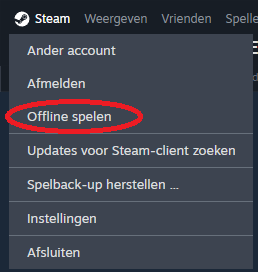
Downside Playing Offline
While testing I noticed that playing offline also means I cant find or joing other devices via LAN. This would mean this for me atleast is not a solution I like. (Correct me if I am wrong but LAN just did not work for me in offline mode)
Server emulator
Because playing offline seems to also disable possibilty for LAN (again correct me if I'm wrong) we need a server emulator like project bo4 has with demonware. For this you can use the very well known boiii client. I just started using this so I may not know as much as I should other than that there are different running projects with different github repositorys. What I do know is that it worked for me to connect via LAN.
I tested both projects and they both work for me. The ezz one shares the source code so you maybe want to consider that. The other github link is one that I saw in a different black ops 3 guide for QOL changes.
ezz boiii client[github.com]
boiii ps2classicsvault[github.com]
Switching to a client like this enables many nice features like unlock all.
You can boot the game up with no connection to the outside world whatsoever and the client will emulate that you are online, so we can join via lan.
Only downside is the watermark you see, for boiii in the top left corner.
I heard from a friend of mine this is a file branding.cpp ? This could be removed.
I tested both projects and they both work for me. The ezz one shares the source code so you maybe want to consider that. The other github link is one that I saw in a different black ops 3 guide for QOL changes.
ezz boiii client[github.com]
boiii ps2classicsvault[github.com]
Switching to a client like this enables many nice features like unlock all.
You can boot the game up with no connection to the outside world whatsoever and the client will emulate that you are online, so we can join via lan.
Only downside is the watermark you see, for boiii in the top left corner.
I heard from a friend of mine this is a file branding.cpp ? This could be removed.
Zerotier - Tailscale
Maybe you have never heard of these services before. Basically what they do is make sure that two devices are able to connect with each other as they will be in the same virtual LAN. LAN stands for local area network. All your devices connected home are probably in the same LAN. So if you have two devices already in the same LAN you don't need this, or if you have any other solution like vpn.
I have been using zerotier for a lot of things and never experienced issues with that. I have also been using it for project shield for bo4 so here is a unnecessary Shout out to check this project out as well:
Project bo4[shield-bo4.gitbook.io]
I have been using zerotier for a lot of things and never experienced issues with that. I have also been using it for project shield for bo4 so here is a unnecessary Shout out to check this project out as well:
Project bo4[shield-bo4.gitbook.io]
Option 1: ZeroTier
This is the first option to play with your friends.
- Create a network
- Install zerotier on devices
- Let devices join via network ID
- Via zerotier you can hand out a IP-address to the joined device
- Can the devices ping each other (cmd)?
- Play together via LAN (See connecting to a device)
Option 2: Tailscale
Almost the same as zerotier. If steps are needed let me know.
Connecting to a device
Whilst there is probably a way to create a server like with the demonware server emulator for bo4, it is not necessary to do so. When a friend boots up a game of zombies, the other device in the virtual LAN can connect via the ip of the device that booted up a zombies game.
open up console with the ` /~ key which is under esc.
type in connect 'ip of friend (zerotier or tailscale)'
you can press tab to make sure it enters it as a command, tab will add the needed slash.
This means the player only misses the first round.
I tested joining the lobby but this gives a .gsc error. Probably fixable by installing something like a server emulator that works with the boiii client.
open up console with the ` /~ key which is under esc.
type in connect 'ip of friend (zerotier or tailscale)'
you can press tab to make sure it enters it as a command, tab will add the needed slash.
This means the player only misses the first round.
I tested joining the lobby but this gives a .gsc error. Probably fixable by installing something like a server emulator that works with the boiii client.
More Call of Duty: Black Ops III guides
- All Around Enhancement Mod Description And Info★ 5 (597)211k views1.2k ♥34 minUpdated Aug 10, 2023
- Black Ops 3: Console Commands★ 5 (1.1k)123k views2.4k ♥7 minUpdated Feb 13, 2020
- Origins Ultimate Guide★ 5 (562)72k views1.7k ♥17 minUpdated Jun 24, 2017
- Guide for Shadows of Evil [2020 updated]★ 5 (1.4k)67k views4.5k ♥24 minUpdated Mar 22, 2024
- Guide for Der Eisendrache [2020 updated]★ 5 (1.3k)65k views4.6k ♥30 minUpdated Feb 22, 2024
- How to download the community T7patch by Serious and play online zombies safely (also FPS Fix)★ 5 (491)62k views1.2k ♥4 minUpdated Apr 30






🔥 Popular guides
- Upgrading to PremiumTeam Fortress 2★ 5 (20k)1441k views11k ♥6 minUpdated May 11, 2022
- No More Room in Hell Official ManualNo More Room in Hell★ 5 (2.8k)569k views2.1k ♥29 minUpdated Apr 22, 2019
- NMRiH Community Hosting GuidesNo More Room in Hell★ 5 (526)351k views653 ♥1 minUpdated Aug 10, 2022
- Лучшие кооперативные игры SteamPAYDAY 2★ 5 (1.5k)315k views2.1k ♥56 minRussianUpdated Apr 27, 2025
- Desert Eagle Heat Treated | Blue GemCounter-Strike 2★ 5 (1.6k)292k views1.5k ♥2 minUpdated Jan 16
- Treasure Hunt Puzzle SolutionsTotal War: WARHAMMER II★ 5 (6.9k)281k views15k ♥3 minUpdated Aug 19, 2021






This guide was created by its original author on the Steam Community. Are you the author and want it removed? Request removal.