How to Fix BO3 Frame Drops (EASY)
Download the Patch
First you need to download the T7 Patch, it is completely Safe, and even protects you from remote crashes and exploits (IT DOES NOT MASK YOUR IP).
To download T7Patch, download T7.community.patch.2.02.zip from this github link. If by the time you are reading this, it isn't on version 2.02, don't worry because the link sends you to the latest updated version.
T7Patch Download[github.com]
To download T7Patch, download T7.community.patch.2.02.zip from this github link. If by the time you are reading this, it isn't on version 2.02, don't worry because the link sends you to the latest updated version.
T7Patch Download[github.com]
Installation
Extract the following files into your BO3 game directory
aka (C:\Program Files (x86)\Steam\steamapps\common\Call of Duty Black Ops III)

Settings.json contains data like your Displayname and if you want your lobby to be friends only.
aka (C:\Program Files (x86)\Steam\steamapps\common\Call of Duty Black Ops III)
Settings.json contains data like your Displayname and if you want your lobby to be friends only.
How to use T7Patch (Which fixes the Frame Drops)
To use the Patch (which will fix your frame drops and keep you safe from exploits)
>Launch T7patch.exe before you launch Black ops 3
>Done
>Launch T7patch.exe before you launch Black ops 3
>Done
Additional info
WHAT DO THE NUMBERS COLOURS MEAN MASON?
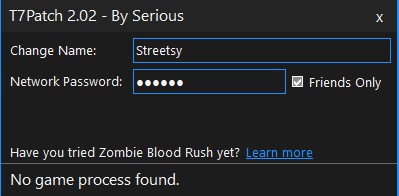
BLUE means T7Patch can't identify BO3 running (check you started bo3)
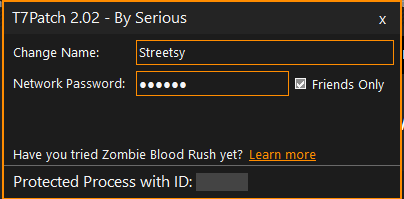
ORANGE means it's injected and working 👍
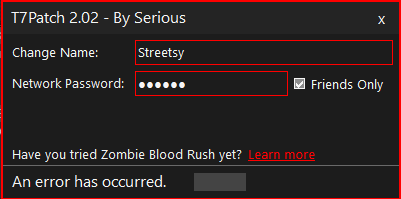
RED means there is an Error usually caused by the Safe Mode pop up, just select yes or no and it should go away.
OTHER
-T7Patch cannot mask your IP-T7Patch Does NOT Support Campaign as of version 2.0.3
-T7Patch can't get you banned as of 2024
-T7Patch doesn't fix Matchmaking in Multiplayer
-LEAVE NETWORK PASSWORD EMPTY IF YOU WANT TO GET INTO LOBBIES!
Thanks for reading and leave a like and award if this was helpful
More Call of Duty: Black Ops III guides
- All Around Enhancement Mod Description And Info★ 5 (597)211k views1.2k ♥34 minUpdated Aug 10, 2023
- Black Ops 3: Console Commands★ 5 (1.1k)123k views2.4k ♥7 minUpdated Feb 13, 2020
- Origins Ultimate Guide★ 5 (562)72k views1.7k ♥17 minUpdated Jun 24, 2017
- Guide for Shadows of Evil [2020 updated]★ 5 (1.4k)67k views4.5k ♥24 minUpdated Mar 22, 2024
- Guide for Der Eisendrache [2020 updated]★ 5 (1.3k)65k views4.6k ♥30 minUpdated Feb 22, 2024
- How to download the community T7patch by Serious and play online zombies safely (also FPS Fix)★ 5 (491)62k views1.2k ♥4 minUpdated Apr 30






🔥 Popular guides
- Upgrading to PremiumTeam Fortress 2★ 5 (20k)1441k views11k ♥6 minUpdated May 11, 2022
- No More Room in Hell Official ManualNo More Room in Hell★ 5 (2.8k)569k views2.1k ♥29 minUpdated Apr 22, 2019
- NMRiH Community Hosting GuidesNo More Room in Hell★ 5 (526)351k views653 ♥1 minUpdated Aug 10, 2022
- Лучшие кооперативные игры SteamPAYDAY 2★ 5 (1.5k)315k views2.1k ♥56 minRussianUpdated Apr 27, 2025
- Desert Eagle Heat Treated | Blue GemCounter-Strike 2★ 5 (1.6k)292k views1.5k ♥2 minUpdated Jan 16
- Treasure Hunt Puzzle SolutionsTotal War: WARHAMMER II★ 5 (6.9k)281k views15k ♥3 minUpdated Aug 19, 2021






This guide was created by its original author on the Steam Community. Are you the author and want it removed? Request removal.