Game doesn't launch/crashing at startup possible fix
0. What causes the issue
- 1. Game has basic antitampering protection, supposedly it blocks game startup if suspicious programs and services running in background are detected. You can see if it's the issue by starting windows without third party services and apps. Common offenders would be Nefarious service from DSX and WinDivert service from winws. Steps will be discussed below.
- 2. Game has various reasons to crash with startup, friend list being too much or hackers abusing game vulnerabilities to stop you from playing the game. I recommend running black ops 3 patch such as t7patch from https://github.com/shiversoftdev/t7patch to avoid possible game issues. Download latest version archive, unpack it in separate folder and run patch executable before the game, keep patch running during gameplay. You can follow video guides on how to run it with the game
1. How to determine if it's service or app in background causing issues with startup
Fastest way to determine if it's third party app is by booting without any apps and services using diagnostic startup option
Beware that this is an Advanced troubleshooting method and, although there's nothing dangerous with doing this, anything you do after this is UP TO YOU to figure out.
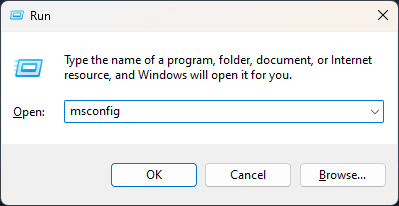
In order to get diagnostic startup, hold Windowsbutton+R to get Run window and type msconfig there, press OK
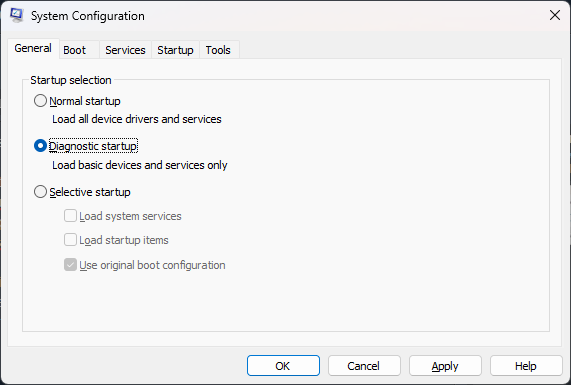
then choose diagnostic startup, ok and reboot as it asks to save changes.
This will be a one time thing, you will be able to boot normally after you check the game by choosing msconfig normal startup.
Beware that this is an Advanced troubleshooting method and, although there's nothing dangerous with doing this, anything you do after this is UP TO YOU to figure out.
In order to get diagnostic startup, hold Windowsbutton+R to get Run window and type msconfig there, press OK
then choose diagnostic startup, ok and reboot as it asks to save changes.
This will be a one time thing, you will be able to boot normally after you check the game by choosing msconfig normal startup.
- Start Steam in Diagnostic Startup. If steam asks about installing service, then ignore it and don't install it, continue without installing its service, it won't be needed to launch the game.
- Launch the game from steam, patch is not required to check so you can do without it. If the game loads normally, then some app or service is interfering with game boot. You will have to find it by yourself by launching apps one by one with the game afterwards. In my case I found out that WinDivert was causing the issue, stopping the service itself with the app was enough to get game running.
Guide will be updated as soon as I get new information about other fixes or find time to add details to steps
More Call of Duty: Black Ops III guides
- All Around Enhancement Mod Description And Info★ 5 (597)211k views1.2k ♥34 minUpdated Aug 10, 2023
- Black Ops 3: Console Commands★ 5 (1.1k)123k views2.4k ♥7 minUpdated Feb 13, 2020
- Origins Ultimate Guide★ 5 (562)72k views1.7k ♥17 minUpdated Jun 24, 2017
- Guide for Shadows of Evil [2020 updated]★ 5 (1.4k)67k views4.5k ♥24 minUpdated Mar 22, 2024
- Guide for Der Eisendrache [2020 updated]★ 5 (1.3k)65k views4.6k ♥30 minUpdated Feb 22, 2024
- How to download the community T7patch by Serious and play online zombies safely (also FPS Fix)★ 5 (491)62k views1.2k ♥4 minUpdated Apr 30






🔥 Popular guides
- Upgrading to PremiumTeam Fortress 2★ 5 (20k)1441k views11k ♥6 minUpdated May 11, 2022
- No More Room in Hell Official ManualNo More Room in Hell★ 5 (2.8k)569k views2.1k ♥29 minUpdated Apr 22, 2019
- NMRiH Community Hosting GuidesNo More Room in Hell★ 5 (526)351k views653 ♥1 minUpdated Aug 10, 2022
- Лучшие кооперативные игры SteamPAYDAY 2★ 5 (1.5k)315k views2.1k ♥56 minRussianUpdated Apr 27, 2025
- Desert Eagle Heat Treated | Blue GemCounter-Strike 2★ 5 (1.6k)292k views1.5k ♥2 minUpdated Jan 16
- Treasure Hunt Puzzle SolutionsTotal War: WARHAMMER II★ 5 (6.9k)281k views15k ♥3 minUpdated Aug 19, 2021






This guide was created by its original author on the Steam Community. Are you the author and want it removed? Request removal.