HOW TO NOT GET HACKED
Introduction
Black Ops 3 has significant hacking issues and vulnerabilities. Hackers can disrupt online matches and potentially run malicious code on your machine. This problem affects every old Call of Duty game.
Thankfully, Serious developed a community patch that is the best and easiest way to protect yourself when playing Origins with friends. Additionally, the T7 patch fixes the FPS stutter in the menus and addresses multiple issues across different versions, including performance improvements, Linux/Steamdeck support, and resolving the 100 friend limit issue.
Here are some highlights of the patch updates:- 2.03: Fixes small performance issues, resolves the 100 friend limit issue, and provides Linux/Steamdeck support (thanks to @InvoxiPlayGames).
- 2.02: Additional performance fixes related to Steam.
- 2.01: Fixes multiple issues, adds new vulnerability protection, restores matchmaking, and resolves loading issues. Note: Campaign is still not working.
- 1.12 and earlier: Fixes various exploits, introduces private network password feature, and improves performance.
INSTALLATION
The T7 patch is a community-developed solution to improve security and performance for Black Ops 3. It has been vetted by many in the community and is safe to use. You can verify its safety by reading user feedback on various forums.
Here's how to use it:
Windows Instructions:- Download the Patch: Here[github.com]
- Watch the Tutorial: Follow the step-by-step video guide provided on the GitHub page.
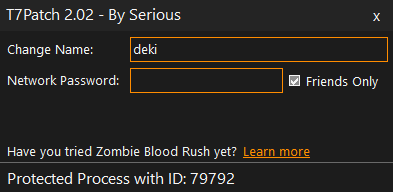
- Set Up: Set a username and launch BO3.
- Password Protection: If you are avoiding matchmaking, set a network password. Otherwise, feel free to leave it blank or tick 'Friends only'.
Linux/Steamdeck Instructions:
- Download the Patch: Download the Linux zip from the same GitHub page.
- Extract Files: Extract the files into your Black Ops 3 installation folder.
- Open Steam Properties: Adjust the launch options as shown in the provided tutorial image.
- Enable Compatibility: Change your Proton version and enable Steam Play compatibility.
- Edit Settings: Modify your settings in the `t7patch.conf` file provided (name, friends only, etc.). You can edit these while the game is running too.
IMPORTANT: You need to run this patch every time you launch the game. It’s recommended to pin it somewhere easily accessible, like your desktop or taskbar.
Congratulations!
FREQUENTLY ASKED QUESTIONS (FAQ)
Q: Does this patch fix matchmaking issues or the game's anti-cheat?
ANo, this patch only addresses a few RCE exploits and other miscellaneous issues. It won't fix matchmaking issues or improve the game's anti-cheat system. If you're encountering cheaters using aimbots or spinbots, this patch will not help with that.
Q: Does this patch fix the FPS stutter in the menus?
AYes, the patch includes a fix for the FPS stutter in the menus.
Q: Do I need to run the patch if I am playing solo offline?
ANo, unless you are a high-profile player. Steam networking is complicated, so it might still be advisable.
Q: Does this patch work on Steam Deck or Linux?
AAs of version 2.03, yes. Please use the Linux installation instructions. Thanks again to @InvoxiPlayGames for making this possible.
Q: Does this patch disable achievements?
ANo, using the patch will not disable your achievements.
Q: Is there a ban risk when using this patch?
ANo, the patch is safe to use and does not risk a ban.
Q: Why does my anti-virus say this is malware?
ASome of the techniques used to patch the game are similar to those used by malware, which can cause antivirus to flag it.
Q: Does this patch work with custom maps?
AYes, the patch works with custom maps.
Q: What should I do if the patch doesn't work?
AMake sure you follow the installation instructions carefully. If issues persist, refer to the GitHub page or contact the community maintainers.
Q: Who should I send crash reports to?
ASend crash reports to serious#9999 on Discord. You must be in the server and allow DMs from server members.
Q: Is this tool still updated?
AYes, the patch is still being updated to address new vulnerabilities and improve performance.
Q: Can this patch affect multiplayer matchmaking?
AYes, some users have reported issues joining multiplayer matches even with the patch installed. This patch is primarily designed for Zombies mode and may not fully support multiplayer matchmaking.
Q: Does this patch work for high-profile players or streamers?
AYes, it provides protection against RCE vulnerabilities, but high-profile players or streamers should consider using additional protections like VPNs and alternate Steam profiles.
- All Around Enhancement Mod Description And Info★ 5 (597)211k views1.2k ♥34 minUpdated Aug 10, 2023
- Black Ops 3: Console Commands★ 5 (1.1k)123k views2.4k ♥7 minUpdated Feb 13, 2020
- Origins Ultimate Guide★ 5 (562)72k views1.7k ♥17 minUpdated Jun 24, 2017
- [2.0]All Around Enhancement Mod Description And Info★ 5 (186)71k views600 ♥38 minUpdated 16 May
- Guide for Shadows of Evil [2020 updated]★ 5 (1.4k)67k views4.5k ♥24 minUpdated Mar 22, 2024
- Guide for Der Eisendrache [2020 updated]★ 5 (1.3k)65k views4.6k ♥30 minUpdated Feb 22, 2024






- Upgrading to PremiumTeam Fortress 2★ 5 (20k)1441k views11k ♥6 minUpdated May 11, 2022
- No More Room in Hell Official ManualNo More Room in Hell★ 5 (2.8k)569k views2.1k ♥29 minUpdated Apr 22, 2019
- NMRiH Community Hosting GuidesNo More Room in Hell★ 5 (526)351k views653 ♥1 minUpdated Aug 10, 2022
- ULTIMATE GUIDE FOR GAME DEV TYCOONGame Dev Tycoon★ 5 (5.8k)326k views10k ♥4 minUpdated 23 Jan, 2014
- How to 'Git Gud' Soon™MORDHAU★ 5 (2k)318k views3k ♥68 minUpdated Nov 16, 2024
- Лучшие кооперативные игры SteamPAYDAY 2★ 5 (1.5k)315k views2.1k ♥56 minRussianUpdated Apr 27, 2025






This guide was created by its original author on the Steam Community. Are you the author and want it removed? Request removal.