How to never lose a hero or have to retreat
How to set it up
Before you embark on a mission, go to: Program files (x86) > Steam > userdata > 879448002 > 262060 > remote. There you should find your saves labed as profile_X (as seen below)
Copy all these 'profile' files and paste them in a folder to use as a backup, Mine was on my Desktop.
Do this before you go on any mission.
Copy all these 'profile' files and paste them in a folder to use as a backup, Mine was on my Desktop.
Do this before you go on any mission.
Now it's time to go back in time.
Let's say you got bad RNG or just made a mistake and you wish to go back in time before you went to that dungeon. To do this, Go to the folder where you backed up your save, Copy those files and head back to where you found them in the first place and paste them there. When you open the game again and open your savefile you'll be back in the hamlet before you embarked.
Achievements
Here are a few achievements that are made easier or less detrimental by this method:
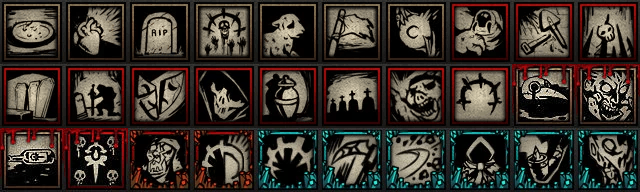 You can also do this in the middle of dungeons and during a battle, In case you wanna go for a Shambler trinket or something.
You can also do this in the middle of dungeons and during a battle, In case you wanna go for a Shambler trinket or something.
More Darkest Dungeon® guides
- Curio Guide★ 5 (5.1k)96k views13k ♥10 minUpdated Feb 2, 2022
- Party Building/Composition★ 5 (2.2k)60k views5.8k ♥27 minUpdated Jun 28, 2018
- Know Your Dungeon: 15 Adventuring Tips★ 5 (2.6k)58k views4.3k ♥52 minUpdated May 31, 2020
- The Darkest Dungeon 101 - All You Need to Know★ 5 (2.1k)56k views6.1k ♥21 minUpdated Jun 20, 2022
- The Complete Guide to Provisions★ 5 (2.2k)50k views6.1k ♥20 minUpdated Jun 24, 2020
- Darkest Dungeon без боли: 100 страниц боевого опыта★ 5 (2.6k)48k views4.7k ♥179 minRussianUpdated Aug 30, 2020





🔥 Popular guides
- Upgrading to PremiumTeam Fortress 2★ 5 (20k)1441k views11k ♥6 minUpdated May 11, 2022
- No More Room in Hell Official ManualNo More Room in Hell★ 5 (2.8k)569k views2.1k ♥29 minUpdated Apr 22, 2019
- NMRiH Community Hosting GuidesNo More Room in Hell★ 5 (526)351k views653 ♥1 minUpdated Aug 10, 2022
- ULTIMATE GUIDE FOR GAME DEV TYCOONGame Dev Tycoon★ 5 (5.8k)326k views10k ♥4 minUpdated 23 Jan, 2014
- How to 'Git Gud' Soon™MORDHAU★ 5 (2k)318k views3k ♥68 minUpdated Nov 16, 2024
- Лучшие кооперативные игры SteamPAYDAY 2★ 5 (1.5k)315k views2.1k ♥56 minRussianUpdated Apr 27, 2025






This guide was created by its original author on the Steam Community. Are you the author and want it removed? Request removal.