How to test your mod
Introduction
This method needs a bit of preparation to be done before you can start testing. Be careful and keep track of what you do with your files, otherwise it might get messy. We don't want that, do we?
Setting up your own Test Directory
-
Steam
-
-
-
Copy the folder to any space on your hard drive.
DarkestDungeon <- You may rename your copy to anything you'd like
For example:
Darkest Dungeon Test Directory
Skip to Using the Test Script, if you don't want to have DLC content available for testing.
WARNING: Non-Steam users beware!
If you use the GoG or Epic game version read this carefully please!
Due to the workings of the scripts you will need to backup your save files located in:
profile_0 might get overwritten by some testing scripts (I could confirm for those that load into town). profile_0 is the first save ingame.
Steam users don't have to worry, since their save game location is in the steam folders.
Optional: Adding Class DLC content
Installing Musketeer, Flagellant and/or Shieldbreaker
Locate and copy/move the following folders into your Darkest Dungeon Test Directory:
For Musketeer-
-
-
Copy this ->
Copy this ->
Copy this ->
Copy this ->
Copy this ->
Copy this ->
For Flagellant
-
-
-
Copy this ->
Copy this ->And
-
-
-
-
-
ㅤㅤㅤㅤCopy this ->
ㅤㅤㅤㅤCopy this ->
ㅤㅤㅤㅤCopy this ->
ㅤㅤㅤㅤCopy this ->
ㅤㅤㅤㅤCopy this ->
ㅤㅤㅤㅤCopy this ->
ㅤㅤㅤㅤCopy this ->
ㅤㅤㅤㅤCopy this ->
For Shieldbreaker
-
-
-
Copy this ->
Copy this ->
Copy this ->
Copy this ->
Copy this ->
Copy this ->
Copy this ->
Copy this ->
Copy this ->
Copy this ->
Copy this ->
Copy this ->
Copy this ->
Copy this ->
You can copy this, BUT DO NOT OVERRIDE pre-existing raid_settings.json ->
Copy this ->
Copy this ->
Copy this ->
Optional: Adding Crimson Court DLC content
Installing Crimson Court content (Monsters, Trinkets, Quirks and etc)
This might increase loading times.
-
-
-
Copy this ->
Copy this ->
Copy this ->
Copy this ->
Copy this ->
Copy this ->
Copy this ->And
-
-
-
-
-
ㅤㅤㅤㅤCopy this ->
ㅤㅤㅤㅤCopy this ->
ㅤㅤㅤㅤCopy this ->
ㅤㅤㅤㅤCopy this ->
ㅤㅤㅤㅤCopy this ->
ㅤㅤㅤㅤCopy this ->
ㅤㅤㅤㅤCopy this ->
ㅤㅤㅤㅤCopy this ->
ㅤㅤㅤㅤCopy this ->
ㅤㅤㅤㅤCopy this ->
ㅤㅤㅤㅤCopy this ->
ㅤㅤㅤㅤCopy this ->
ㅤㅤㅤㅤCopy this ->
ㅤㅤㅤㅤCopy this ->
ㅤㅤㅤㅤCopy this ->
You can copy this, BUT DO NOT OVERRIDE pre-existing raid_settings.json ->
ㅤㅤㅤㅤCopy this ->
ㅤㅤㅤㅤCopy this ->
ㅤㅤㅤㅤCopy this ->
Optional: Adding Colour of Madness DLC content
Installing Colour of Madness content (Monsters, Trinkets, Quirks and etc)
This might increase loading times.
-
-
-
Copy this ->
Copy this ->
Copy this ->
Copy this ->
Copy this ->
Copy this ->
Copy this ->
Copy this ->
Copy this ->
Copy this ->
Copy this ->
Copy this ->
Copy this ->
Copy this ->
Copy this ->
Copy this ->
Copy this ->
Copy this ->
Copy this ->
You can copy this, BUT DO NOT OVERRIDE pre-existing raid_settings.json ->
Copy this ->
Copy this ->
Copy this ->
Important: Merged raid_settings.json
If you want to load DLC dungeons you will need this modified file. In the normal case the game would merge this file itself, but since we need to hard install the DLC it needed to be merged manually.
raid_settings json[drive.google.com]
To be put here:-
-
Using the Test Script
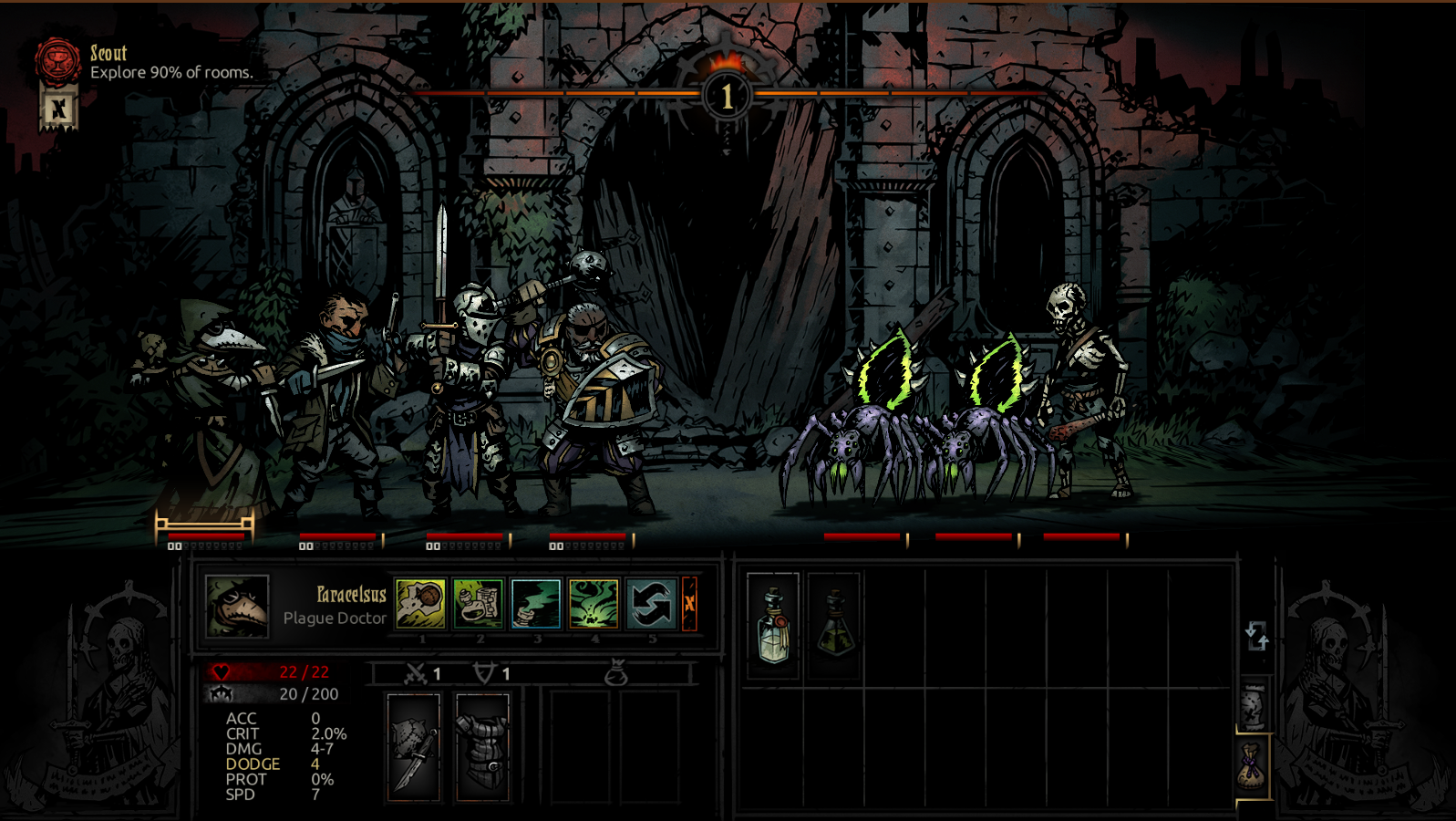
The Create Monster Script is what we will use for testing. You can find it here:
-
-
ㅤㅤDarkest_create_monster.vbs Doube-click
Input any monster IDs you want! Quick example:
Click OK and the game will load up!
Find more possible monster IDs by browsing through the files. Example on how to find them:
-
-
-
ㅤㅤㅤㅤㅤ
ㅤㅤㅤㅤㅤ
ㅤㅤㅤㅤㅤGreat, now we know how to spawn critters! But what about the heroes?
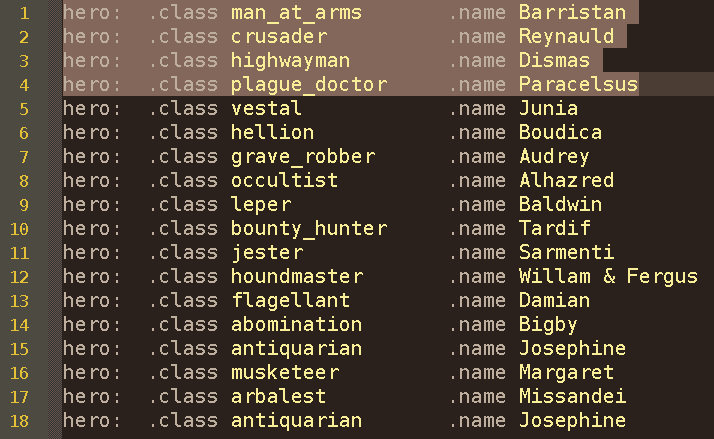
To setup your team you need to locate this file and open it: -
-
ㅤㅤㅤ
The first four entries are the heroes that will show up when using the script.
Configure them however you like!
Extra Scripts
- Spawing a curio in the first room. (Darkest_create_curio.vbs)
- Camping in the first room. (Darkest_camping.vbs)
- Directly loading into the hamlet/town. Dummy save. (Darkest_start_town.vbs)
- Directly load up a save from the Documents/Darkest folder. (Darkest_load_save.vbs)
- Starting nightmares/flashbacks. (Darkest_start_flashback.vbs)
- Starting quests. (Darkest_start_quest.vbs)
- Starting plot quests. (Darkest_start_plotquest.vbs)
- Starting town events. (Darkest_start_townevent.vbs)
- Testing effects. (Darkest_test_effects.vbs)
- Testing items. (Darkest_test_item.vbs)
- Testing quirks (by pressing F4). (Darkest_test_quirk.vbs)
- Testing virtues or afflictions. (Darkest_test_resolve.vbs)
- Testing trinkets. (Darkest_test_trinkets.vbs)
All you need to do is downloading the zip and extract it to:
-
-
Double click the script you need and follow the instruction of the prompts.
Additional parameters
-
-
ㅤㅤset wshs = WScript.CreateObject( "WScript.Shell" ) regentry = "HKCU\SOFTWARE\Red Hook Studios\Darkest Dungeon\firstroombattle" On Error Resume Next default = wshs.RegRead( regentry ) On Error Goto 0 monster = InputBox( "Enter name of monster to place in first room:", "Create Monster", default ) wshs.RegWrite regentry, monster, "REG_SZ" commandline = "Darkest -size 1600 900 -firstroombattle " + monster wshs.Run( commandline )
To add additional parameters we need go to this line:commandline = "Darkest -size 1600 900 -firstroombattle " + monster wshs.Run( commandline )
Below is a list of start parameters you can use with the script and descriptions of what they do.
This is currently a work-in-progress.ㅤㅤㅤㅤㅤㅤㅤㅤParameterㅤㅤㅤㅤㅤㅤㅤㅤㅤㅤㅤㅤㅤㅤㅤㅤㅤㅤㅤㅤArgumentsㅤㅤㅤㅤㅤㅤㅤㅤㅤㅤㅤㅤㅤㅤㅤㅤㅤㅤㅤㅤㅤㅤㅤㅤㅤㅤㅤㅤㅤㅤㅤㅤㅤㅤㅤㅤㅤㅤㅤㅤㅤㅤㅤㅤDescriptionㅤㅤㅤㅤㅤㅤ-skiptutorialDisables tutorial popups.-autolevelupheroes1-6Levels up your heroes and upgrades their equipment/skills to the given level.-start_languagefrench
german
spanish
italian
...Switches game language.-starttrinkettrinket_idGives a trinket to your hero in rank 1. Find Trinket IDs in the entry files contained in the trinkets folder.-startquirkquirk_idGives quirks to all of your heroes. Find Quirk IDs in the quirk library files contained in the shared\quirk folder.-stressedstalwart
courageous
focused
powerful
vigorous
custom_virtue
fearful
paranoid
selfish
masochistic
abusive
depressed
irrational
custom_afflictionStarts the battle with all of your heroes at stress level 99. Pass a turn to start a resolve check. You can force a virtue or affliction by using one of the listed arguments. If you don't use an argument the resolve check will be done normally.-startvirtuedstalwart
courageous
focused
powerful
vigorous
custom_virtueStarts the battle with all of your heroes virtued.-startafflictedfearful
paranoid
selfish
masochistic
abusive
depressed
irrational
custom_afflictionStarts the battle with all of your heroes afflicted.-startatbeforedeathsdoorStarts the battle with all of your heroes at 1 HP.-starteffectsStealth2
kill_self
Stress 1
Bleed 1
Blight 1
Stun 1
...Applies effects to your heroes. Examples:-starteffects Stealth2Will apply stealth to hero in rank 1.-starteffects Stealth2 Stealth2Will apply stealth to heroes in rank 1 and 2.-starteffects none Stealth2Will apply stealth to your hero in rank 2.-starteffects none none none Stealth2Will apply stealth to your hero in rank 4. You can use any effect you want - checkout the effects file.-startmoderadiant
bloodmoonStarts the battle with mode scaling.-startplotquestplot_kill_hag_1
plot_kill_swine_prince_1
plot_kill_drowned_crew_1
plot_town_invasion_0
plot_darkest_dungeon_1Calls a specified plot quest. You can use this to force a different dungeon entrance room for your test battle. It can be used to test plot quests aswell - just be sure to leave the create monster window empty or else every encounter will be replaced with whatever you typed in.-startsupplyStarts the battle with all possible supplies in your inventory.
This is how it might look like if you decide to turn off tooltips and add quirks to your heroes:commandline = "Darkest -size 1600 900 -skiptutorial -startquirk hard_skinned -firstroombattle " + monster wshs.Run( commandline )
Testing your own mod
If it's a class mod - replace one (or all?!) of the first four entries with your class ID and run the script!
-
-
ㅤㅤㅤ
Since you cannot choose your skills during the Test Battle I recommend subscribing to a mod like this: https://steamcommunity.com/sharedfiles/filedetails/?id=2188081793
Copy its contents from Steam\steamapps\workshop\content\262060\2188081793 into your Darkest Dungeon Test Directory After doing that - adjust these two parameter in your hero.info.darkest file:
If it's a monster mod - use the script to spawn your lovely critters (or baddies) by typing in their IDs.
If it's quirk or trinket - adjust the script with the parameters mentioned in the Additional Parameters guide section OR use my new extra scripts.
To test changes, locate your mod files in the Darkest Dungeon Test Directory and edit them. Test them until you see the results you wanted and then copy your edited files back to your original mod folder.
Closing Words
Happy modding and testing!
- Curio Guide★ 5 (5.1k)96k views13k ♥10 minUpdated Feb 2, 2022
- Party Building/Composition★ 5 (2.2k)60k views5.8k ♥27 minUpdated Jun 28, 2018
- Know Your Dungeon: 15 Adventuring Tips★ 5 (2.6k)58k views4.3k ♥52 minUpdated May 31, 2020
- The Darkest Dungeon 101 - All You Need to Know★ 5 (2.1k)56k views6.1k ♥21 minUpdated Jun 20, 2022
- The Complete Guide to Provisions★ 5 (2.2k)50k views6.1k ♥20 minUpdated Jun 24, 2020
- Darkest Dungeon без боли: 100 страниц боевого опыта★ 5 (2.6k)48k views4.7k ♥179 minRussianUpdated Aug 30, 2020





- Upgrading to PremiumTeam Fortress 2★ 5 (20k)1441k views11k ♥6 minUpdated May 11, 2022
- No More Room in Hell Official ManualNo More Room in Hell★ 5 (2.8k)569k views2.1k ♥29 minUpdated Apr 22, 2019
- NMRiH Community Hosting GuidesNo More Room in Hell★ 5 (526)351k views653 ♥1 minUpdated Aug 10, 2022
- ULTIMATE GUIDE FOR GAME DEV TYCOONGame Dev Tycoon★ 5 (5.8k)326k views10k ♥4 minUpdated 23 Jan, 2014
- How to 'Git Gud' Soon™MORDHAU★ 5 (2k)318k views3k ♥68 minUpdated Nov 16, 2024
- Лучшие кооперативные игры SteamPAYDAY 2★ 5 (1.5k)315k views2.1k ♥56 minRussianUpdated Apr 27, 2025






This guide was created by its original author on the Steam Community. Are you the author and want it removed? Request removal.