Let SFM multirun with other source games at the same time
Better way discovered by anonym00se, try this workshop addon first.
https://steamcommunity.com/sharedfiles/filedetails/?id=3481598701
Or,
Hex edit launcher.dll
00 00 83 CB FF E8 D6 D9 FF FF 84 C0 75 D3 FF D6
to
00 00 83 CB FF 90 90 90 90 90 84 C0 EB D3 FF D6
"This skips mutex from even being created, and skips the check for it, no need for -multirun or .bat launchers. So you can just run multiple SFMs without any extra steps."
Thanks to anonym00se for showing this in the sfm 'cord.
Just to make it run with TF2
The main reason you'd want to do this is if you were integrating your SFM workflow with TF2 and HLAE, and exporting between the two when you can only have one open at a time can be annoying.
anyways go to Sourcefilmmaker/game/bin and open launcher.dll in a text editor like notepad++.
Go to line 764 column 1421. SFM is never updating so we can pretty much garuntee it will be there.
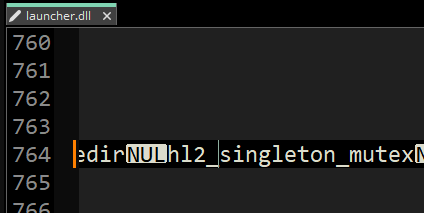
Change hl2_singleton_mutex to hl2_bingleton_mutex. Or something else that isn't hl2_singleton_mutex. But leave the characters to the sides of this string alone.
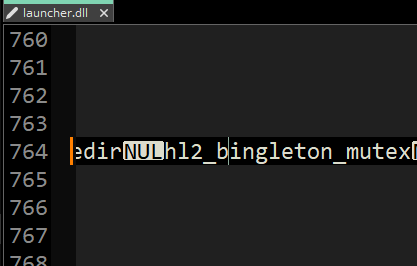
"And don't forget to hit CTRL+S to save your work."
About running multiple of SFM in particular
So this is more programming heavy which I don't understand well enough to meaningfully explain, but basically SFM creates this thing called a mutex which is I think a process handle that it tries to take when launcher.dll spawns SFM in. If it can't get hl2_singleton_mutex, it assumes there is another instance of source running and refuses to launch.[github.com]
There's a mutex-killing tool aptly named MutexKill[web.archive.org] by Robert Sacks.
The working download is here, [mojoware.org] or here, saved by the ever-holy internet archive.[web.archive.org](32-bit)[web.archive.org]
I'm not sure why his site was down but it seems up, for now...
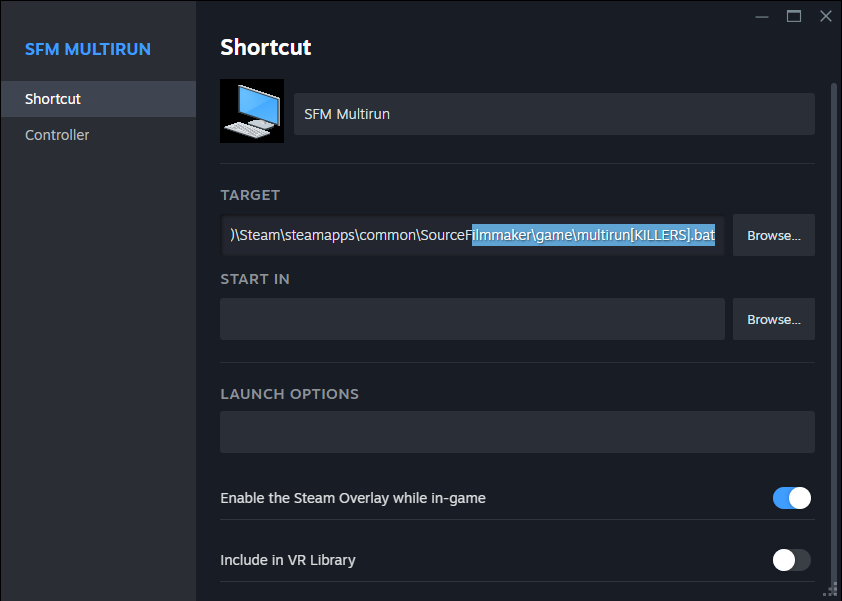
Write a bat file in sourcefilmmaker/game.
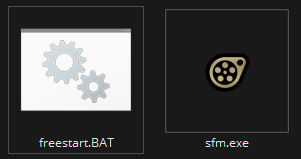
I think this is the best way if you want to multirun SFM, even though now you have to launch it from a bat file. If you want to get the convenience of library launching it, simply add a non steam game and choose the .bat file. It should turn into a monitor icon on Windows 10 if you did it right.
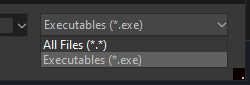
You'll need to allow any file type to show it.
- Changing Textures Using Material Overrides★ 5 (1.4k)41k views2.7k ♥5 minUpdated Jul 26, 2014
- Manually Updating TF2 Content★ 5 (1.3k)35k views1.9k ♥2 minUpdated Nov 26, 2025
- The Fundamentals of SFM: For Beginners★ 5 (1.3k)25k views3.3k ♥55 minUpdated Apr 29
- Ваш первый постер★ 5 (1.1k)22k views2k ♥5 minRussianUpdated Oct 22, 2024
- Getting Gmod Workshop stuff too SFM★ 5 (510)15k views1.3k ♥1 minBulgarianUpdated Aug 4, 2015
- Animation Guide★ 5 (704)14k views1.9k ♥6 minUpdated Apr 9, 2023





- Upgrading to PremiumTeam Fortress 2★ 5 (20k)1441k views11k ♥6 minUpdated May 11, 2022
- No More Room in Hell Official ManualNo More Room in Hell★ 5 (2.8k)569k views2.1k ♥29 minUpdated Apr 22, 2019
- NMRiH Community Hosting GuidesNo More Room in Hell★ 5 (526)351k views653 ♥1 minUpdated Aug 10, 2022
- ULTIMATE GUIDE FOR GAME DEV TYCOONGame Dev Tycoon★ 5 (5.8k)326k views10k ♥4 minUpdated 23 Jan, 2014
- How to 'Git Gud' Soon™MORDHAU★ 5 (2k)318k views3k ♥68 minUpdated Nov 16, 2024
- Лучшие кооперативные игры SteamPAYDAY 2★ 5 (1.5k)315k views2.1k ♥56 minRussianUpdated Apr 27, 2025






This guide was created by its original author on the Steam Community. Are you the author and want it removed? Request removal.