Using VRAM instead of Memory (RAM) To Avoid Memory Crashes (DXVK)
IMPORTANT NOTE
This guide is the same as DXVK. The DXVK also uses this d3d9.dll file
https://steamcommunity.com/sharedfiles/filedetails/?id=3441094380
This will is just like that guide but with more information and what it does
Also, You need vulkan 1.3 or higher for your GPU
https://vulkan.gpuinfo.org/
Why do I want VRAM to use Memory (RAM) instead?
 But, what if I want to use VRAM instead of Memory (RAM)?
Is there a limit for VRAM?

No, there is no limit for VRAM
I'm using a GTX 1060 6GB since its enough VRAM for SFM (You can have more VRAM if you want I just use GTX 1060 6GB because its enough in my opinion you can have more)
If you are using the -shadowmapres command, read this
-shadowmapres _____ changes (-shadowmapres "____" is any number like 6000 or 8192)
-shadowmapres uses a lot of VRAM
Shadowmapres is the value that puts it under the vram limit for graphics card that has lots of VRAM like a RTX 3060 This will change depending on your computers setup, so the number is different for everyone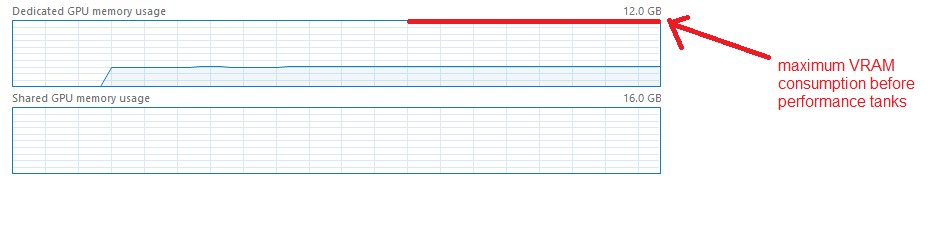
Users should open task manager, with their dedicated gpu memory open then test different shadowmap values until it’s below the ceiling, and not spilling over into shared memory.
What is this D3D9.dll thing?
This .dll script called D3D9.dll that helps to use VRAM instead of RAM (Memory)
This method helps prevent crashing issues in Source Filmmaker, especially when scenes get heavy with models, particles, or lighting. (Especially during rendering because the memory can change per frame it renders)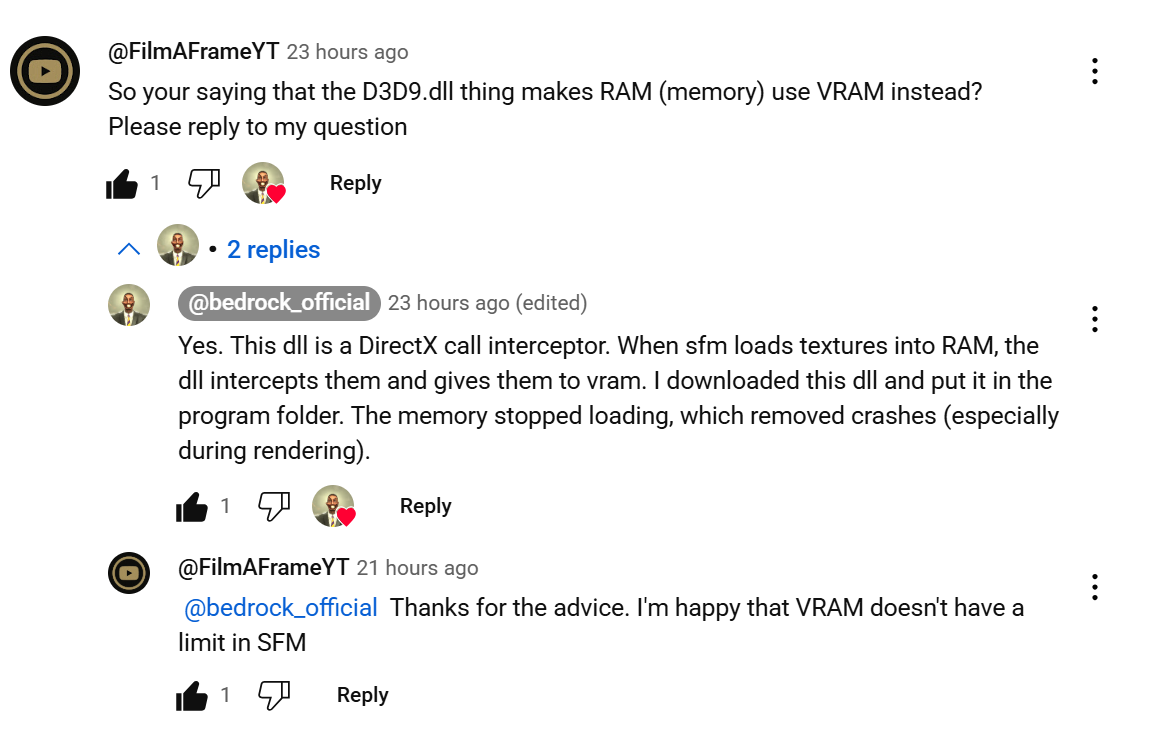
This is why in the DXVK guide the better GPU's like RTX 3060 Ti, RTX 3070M, RTX 4070 Ti, and RTX 4080 Super
The more VRAM you have, the less memory you get
Installation Guide

Here's a link for the D3D9.dll file that can help replacing the RAM (Memory) with VRAM instead. (It's called D3D9.dll)
https://drive.google.com/file/d/1Hp0Hgch5_PEDVMzY0Dd8nQofGtnEqgMd/view
Steps how to download it.Step 1: Move the D3D9.dll file into the bin folder in SourceFilmmaker\game\bin

Here's a video that can help by replacing the RAM (Memory) with VRAM instead
https://www.youtube.com/watch?v=XSJcAG8McNs
Your finished! Here are my other guides that are interesting
https://steamcommunity.com/sharedfiles/filedetails/?id=3521721691
https://steamcommunity.com/sharedfiles/filedetails/?id=3495204675&preview=true
- Changing Textures Using Material Overrides★ 5 (1.4k)41k views2.7k ♥5 minUpdated Jul 26, 2014
- Manually Updating TF2 Content★ 5 (1.3k)35k views1.9k ♥2 minUpdated Nov 26, 2025
- The Fundamentals of SFM: For Beginners★ 5 (1.3k)25k views3.3k ♥55 minUpdated Apr 29
- Ваш первый постер★ 5 (1.1k)22k views2k ♥5 minRussianUpdated Oct 22, 2024
- Getting Gmod Workshop stuff too SFM★ 5 (510)15k views1.3k ♥1 minBulgarianUpdated Aug 4, 2015
- Animation Guide★ 5 (704)14k views1.9k ♥6 minUpdated Apr 9, 2023





- Upgrading to PremiumTeam Fortress 2★ 5 (20k)1441k views11k ♥6 minUpdated May 11, 2022
- No More Room in Hell Official ManualNo More Room in Hell★ 5 (2.8k)569k views2.1k ♥29 minUpdated Apr 22, 2019
- NMRiH Community Hosting GuidesNo More Room in Hell★ 5 (526)351k views653 ♥1 minUpdated Aug 10, 2022
- ULTIMATE GUIDE FOR GAME DEV TYCOONGame Dev Tycoon★ 5 (5.8k)326k views10k ♥4 minUpdated 23 Jan, 2014
- How to 'Git Gud' Soon™MORDHAU★ 5 (2k)318k views3k ♥68 minUpdated Nov 16, 2024
- Лучшие кооперативные игры SteamPAYDAY 2★ 5 (1.5k)315k views2.1k ♥56 minRussianUpdated Apr 27, 2025






This guide was created by its original author on the Steam Community. Are you the author and want it removed? Request removal.