Basic Guide To SFM Cameras
Overview
It will show you things such as how to angle your camera correctly (composition) how to use the basic settings to make your shots look good and the basics of moving the camera to make a shot feel better and smoother
Composition
Composition is the most important thing about making a shot look good.
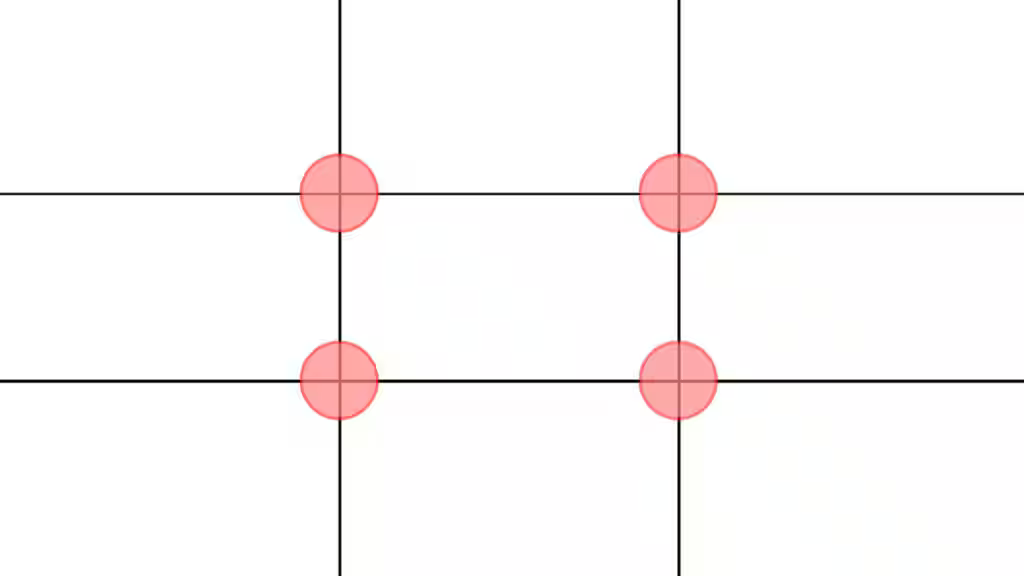
To make a good composition all you need to do is understand something called the rule of thirds which is where a grid is put on the screen and where ever the lines meet are where your key points want to me positioned at, it doesn't have to be exactly lined up but around that region are where key points are so just try remember not to put a main subject directly in the middle unless its for a reason
Settings
Settings are the thing that chooses how your scene feels
FOV:
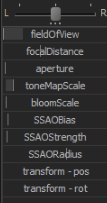
The FOV Slider is how much you zoom in and to make your scene more cinematic lower the FOV but for quick and prop filled scenes higher FOV is better. For Basic scene just put this around the middle
Blur:
To add Blur Behind Main Subjects you can simply just move your FocalDistance slider so its just behind your subject and then set the Aperture slider around half way to add a bit of blur (the more blur the more cinematic).
Camera Movement
To get a nice result in your scene you almost always need a little bit of camera movement. To get a nice result if your characters head moves a little into a different direction try move the camera a slight bit so it follows almost like head tracking so basically try always keep your main subject in the cross overs in the Rule Of Thirds and when you finish this you can select all key frames and click 3 to smooth it out.
Conclusion
Thanks For Following The Guide 🙏👍
- Changing Textures Using Material Overrides★ 5 (1.4k)41k views2.7k ♥5 minUpdated Jul 26, 2014
- Manually Updating TF2 Content★ 5 (1.3k)35k views1.9k ♥2 minUpdated Nov 26, 2025
- The Fundamentals of SFM: For Beginners★ 5 (1.3k)25k views3.3k ♥55 minUpdated Apr 29
- Ваш первый постер★ 5 (1.1k)22k views2k ♥5 minRussianUpdated Oct 22, 2024
- Getting Gmod Workshop stuff too SFM★ 5 (510)15k views1.3k ♥1 minBulgarianUpdated Aug 4, 2015
- Animation Guide★ 5 (704)14k views1.9k ♥6 minUpdated Apr 9, 2023





- Upgrading to PremiumTeam Fortress 2★ 5 (20k)1441k views11k ♥6 minUpdated May 11, 2022
- No More Room in Hell Official ManualNo More Room in Hell★ 5 (2.8k)569k views2.1k ♥29 minUpdated Apr 22, 2019
- NMRiH Community Hosting GuidesNo More Room in Hell★ 5 (526)351k views653 ♥1 minUpdated Aug 10, 2022
- ULTIMATE GUIDE FOR GAME DEV TYCOONGame Dev Tycoon★ 5 (5.8k)326k views10k ♥4 minUpdated 23 Jan, 2014
- How to 'Git Gud' Soon™MORDHAU★ 5 (2k)318k views3k ♥68 minUpdated Nov 16, 2024
- Лучшие кооперативные игры SteamPAYDAY 2★ 5 (1.5k)315k views2.1k ♥56 minRussianUpdated Apr 27, 2025






This guide was created by its original author on the Steam Community. Are you the author and want it removed? Request removal.