Project Winter Custom Games
Preferred Game Mode
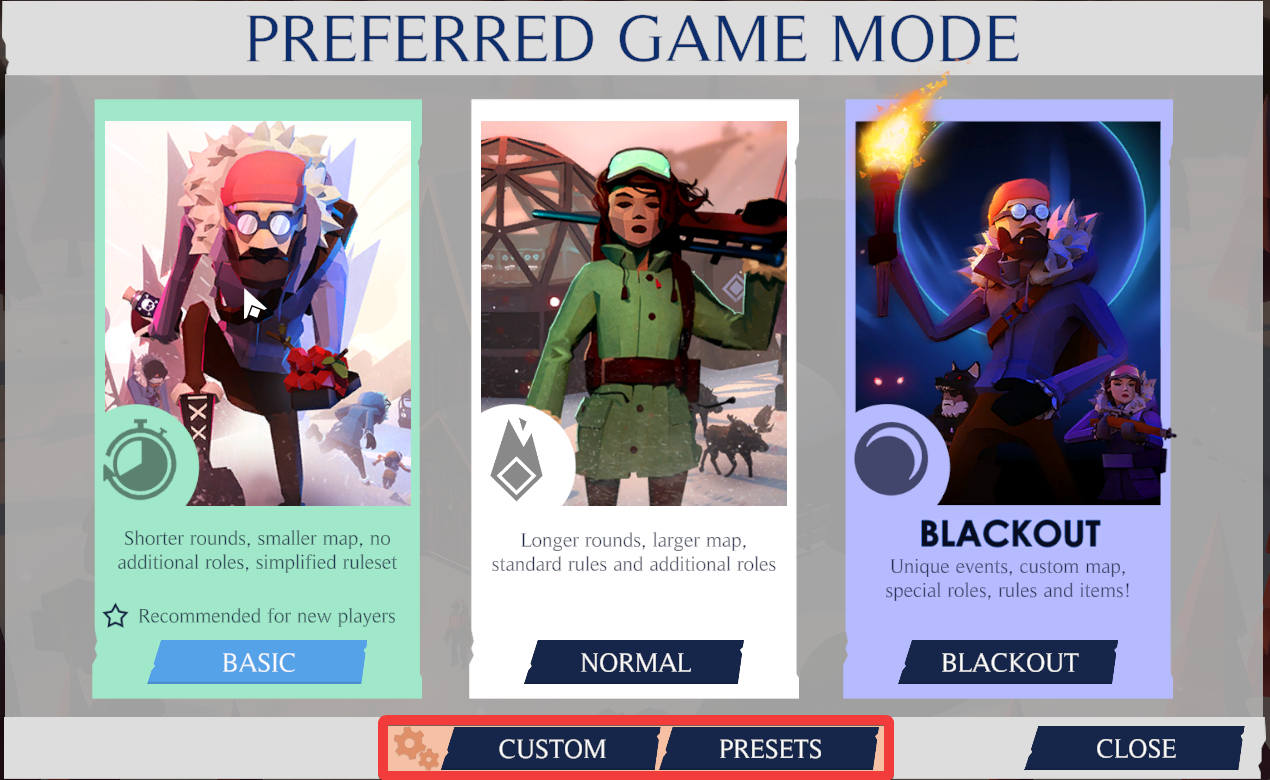
To host a custom game in Project Winter, you first need to
- Select "Host Game" from the main menu.
- On the "Preferred Game Mode" screen, select either the "Custom" or "Presets" button.
Custom
The "Custom" button will take you to a screen allowing you to create your own custom game preset. This screen contains multiple tabs, each with its own set of options for players to change.
See the "Making a Preset" section for more information on this screen.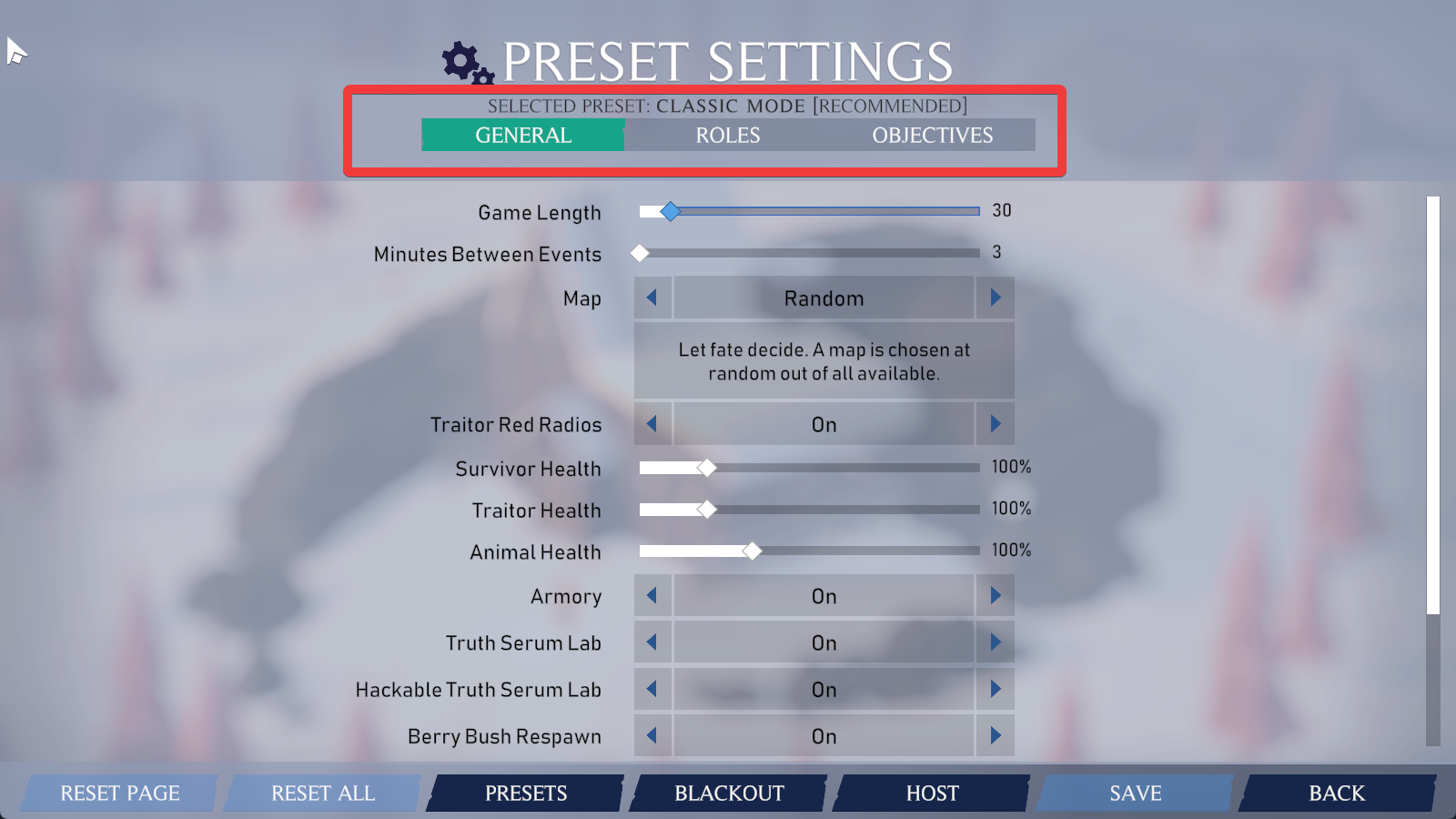
Presets
The "Presets" button will take you to a screen listing all of the developer recommended presets, and any presets you have already created or saved.
See the "Loading a Preset" section for more information on this screen.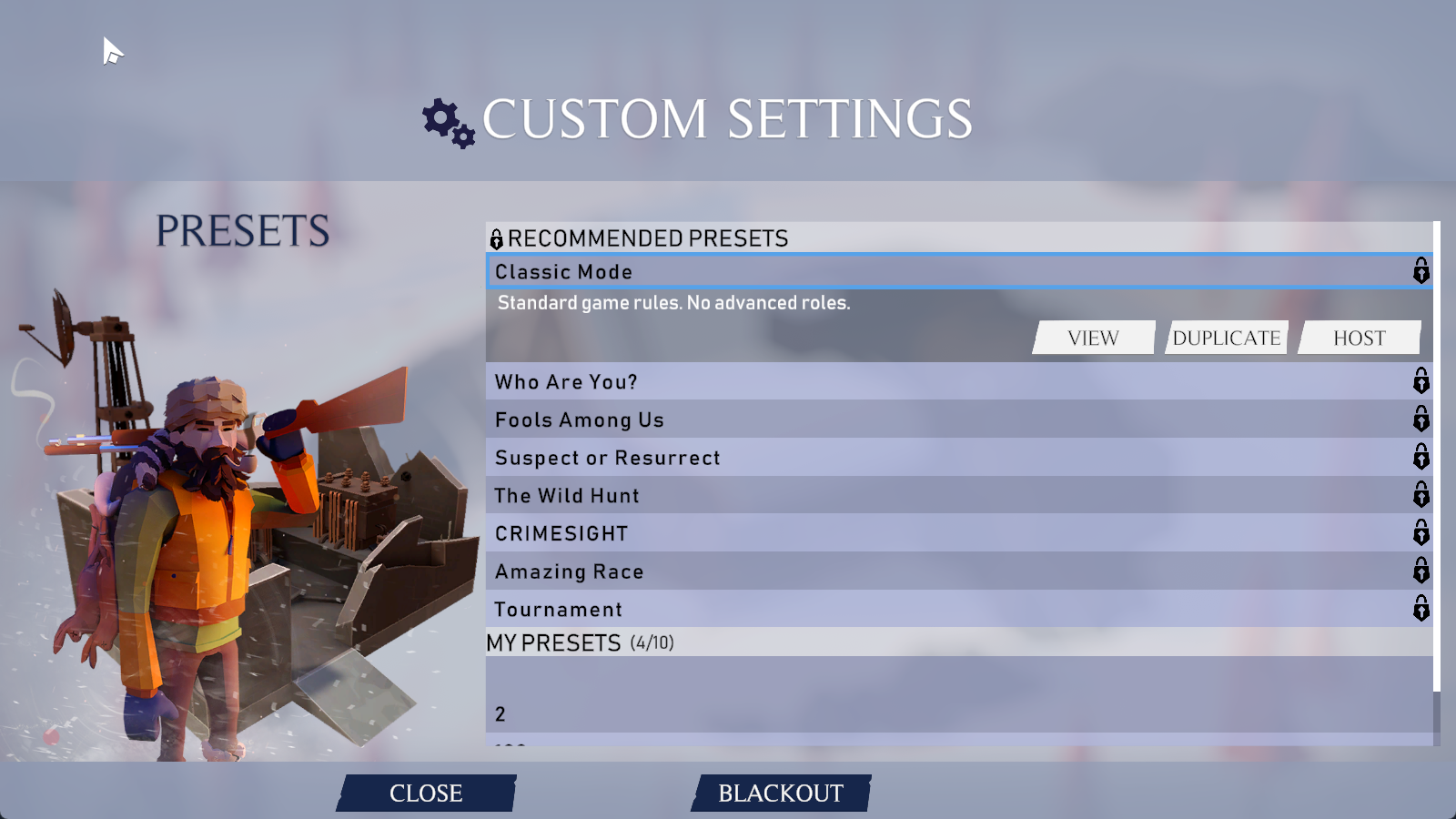
Making A Preset
Making a preset is fairly easy, but there a lot of options for you to change, and not all of them are explained clearly.
Once you're on the "Preset Settings" screen, you'll see an array of tabs, options and buttons.
Category Tabs
The category tabs break down options into categories and make them easier to understand.
The currently available tabs are:- General
- Roles
- Objectives
General
The general tab contains options that affect the general gameplay of a match. These settings are:Setting
Description
Game Length
This setting controls the time players have to complete the objectives before the Mega Blizzard arrives.
Minutes Between Events
This setting controls the minimum time between global events
Map
This setting controls which map will be selected
Traitor Red Radios
This setting controls whether Traitors will spawn with a red radio, or a random colored radio
Survivor, Traitor, Animal Health
These settings control the overall available health f
Armory
This setting controls whether an Armory will spawn on the map
Truth Serum Lab
This setting controls which whether the Truth Serum Lab will spawn on the map
Hackable Truth Serum Lab
This setting controls whether the Hacker Role can hack open the Truth Serum Lab
Berry Bush Respawn
This setting controls whether berry bushes replenish their berries after they've been harvested
Player Names Visible On Start
This setting controls whether player names are visible or hidden on match start
Ghost Abilities
This setting controls whether ghosts can use their abilities or not
Victory On Traitor Death
This setting controls whether the game will end or not when Traitors are killed
Traitor Proximity Credits Rate
This setting controls the rate at which Traitors earn traitor credits from being in close proximity to survivors.
Roles
The Roles tab contains all available options to curate which roles are possible to spawn in your preset. These roles are randomly selected based on the ranges provided in the preset.
The available options for this tab are:Setting
Description
Min Traitors
The minimum number of Traitors in a match
Max Traitors
The minimum number of Traitors in a match
Traitor Crate Shop
This setting controls whether items in Traitor crates cost credits or are free.
Advanced Roles
This setting controls whether the advanced roles are availbe or not. It left off, all players will be a "Survivor" or a "Traitor".
Advanced Roles
The advanced role section allows you to enable and disable roles and alter their minimum and maximum amounts. The available advanced roles are:- Defector
- Hacker
- Detective
- Scout
- Tracker
- Immune
- Traitor
- Identity Thief
Custom Roles
The custom role sections allows you to bring back roles that have previously been removed from the game. The roles include:
- Innocent
- Medic
- Soldier
- Scientist
- Saboteur
- Traitor Medic
- Traitor Hacker
- Traitor Scientist
Objectives
The objectives tab contains all available options to customize objective type and requirements for your preset.
Setting
Description
Possible Primary Objectives
This setting controls which Primary Objectives are possible to spawn
Possible Secondary Objectives
This setting controls which Secondary Objectives are possible to spawn
Repair Objective Difficulty
This setting scales the difficulty of the repair objectives.
Animal Wave Difficulty
This setting scales the difficulty of the wave objectives. .
Escape Capacity
This setting controls the number of seats available on each escape vehicle .
Power Lines
This setting controls whether second objectives have power lines leading to them .
Possible Second Objective Beacons
This setting controls whether beacons are displayed toward the possible second objective locations.
Button Bar
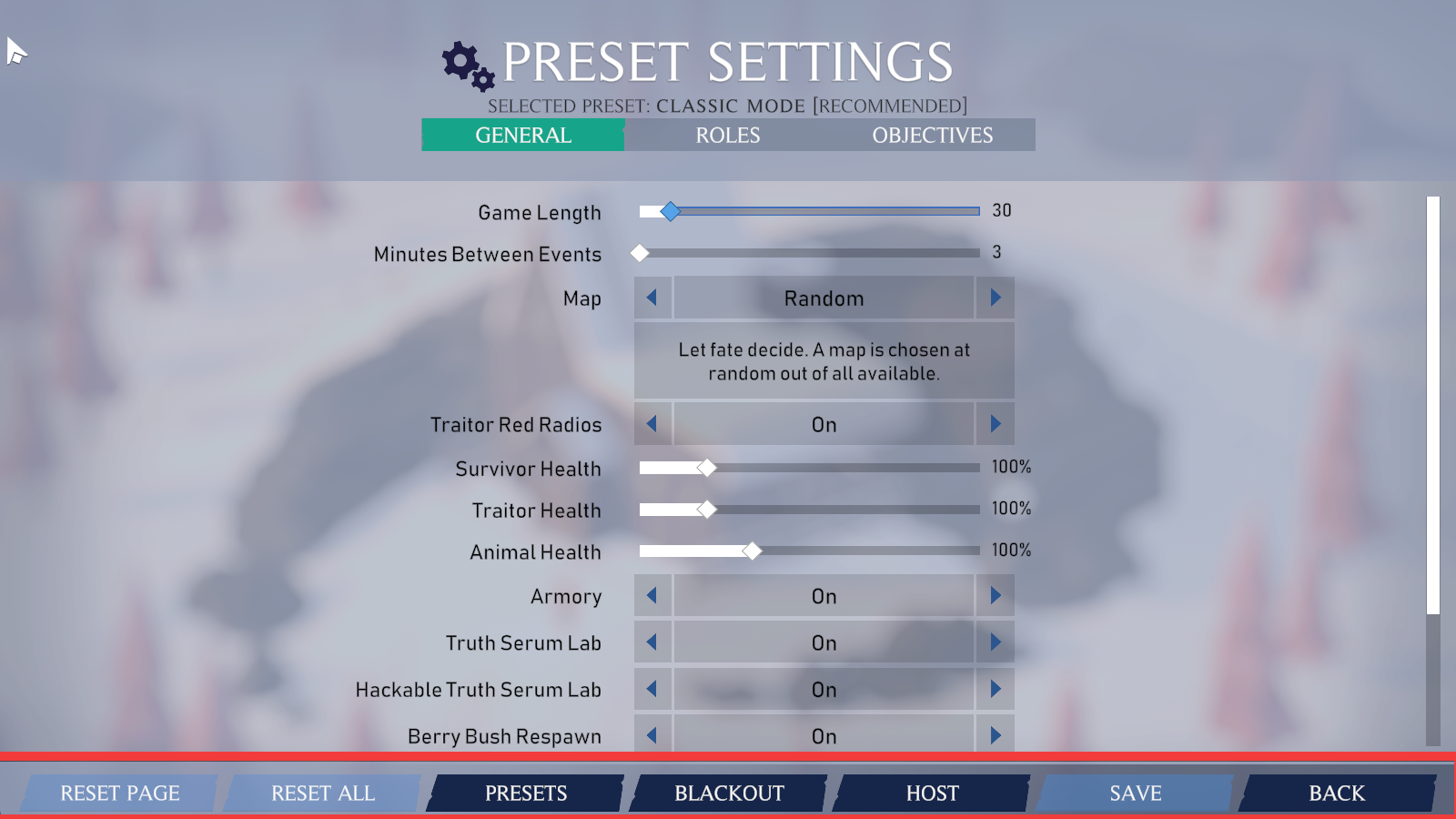
The Button Bar contains all the buttons you need to edit, save and host your custom game preset.
Button
Description
Reset Page
Resets all settings on the page back to the default value
Reset All
Resets all settings on all pages back to the default value
Presets
Displays the "Presets" page
Blackout
This button will change the settings to the "Blackout" DLC variants.
Host
This button will save the preset and host a lobby using this preset.
Save
]This button will save the preset
Back
]This button will bring you back to the main menu.
Possible Second Objective Beacons
This setting controls whether beacons are displayed toward the possible second objective locations.
Selecting A Preset
To select a preset, simply click on the preset you wish to select and choose one of the available options. The options for recommended presets are limited, and you will need to duplicate the recommended preset if you wish to customize it.
Option
Description
Delete
Deletes the selected preset
Rename
Renames the selected preset
Edit
Selects the preset, and moves you to the preset's options for customization
Duplicate
Duplicates the selected preset
Host
Hosts a lobby using the selected preset
More Source Filmmaker guides
- Changing Textures Using Material Overrides★ 5 (1.4k)41k views2.7k ♥5 minUpdated Jul 26, 2014
- Manually Updating TF2 Content★ 5 (1.3k)35k views1.9k ♥2 minUpdated Nov 26, 2025
- The Fundamentals of SFM: For Beginners★ 5 (1.3k)25k views3.3k ♥55 minUpdated Apr 29
- Ваш первый постер★ 5 (1.1k)22k views2k ♥5 minRussianUpdated Oct 22, 2024
- Getting Gmod Workshop stuff too SFM★ 5 (510)15k views1.3k ♥1 minBulgarianUpdated Aug 4, 2015
- Animation Guide★ 5 (704)14k views1.9k ♥6 minUpdated Apr 9, 2023





🔥 Popular guides
- Upgrading to PremiumTeam Fortress 2★ 5 (20k)1441k views11k ♥6 minUpdated May 11, 2022
- No More Room in Hell Official ManualNo More Room in Hell★ 5 (2.8k)569k views2.1k ♥29 minUpdated Apr 22, 2019
- NMRiH Community Hosting GuidesNo More Room in Hell★ 5 (526)351k views653 ♥1 minUpdated Aug 10, 2022
- ULTIMATE GUIDE FOR GAME DEV TYCOONGame Dev Tycoon★ 5 (5.8k)326k views10k ♥4 minUpdated 23 Jan, 2014
- How to 'Git Gud' Soon™MORDHAU★ 5 (2k)318k views3k ♥68 minUpdated Nov 16, 2024
- Лучшие кооперативные игры SteamPAYDAY 2★ 5 (1.5k)315k views2.1k ♥56 minRussianUpdated Apr 27, 2025






This guide was created by its original author on the Steam Community. Are you the author and want it removed? Request removal.